DrawSolidRectangleWithOutline
Draw a solid outlined rectangle in 3D space.
Read time 2 minutesLast updated 4 days ago
Definition
- Type: Method
- Namespace: UnityEditor
- Assembly: UnityEditor
DrawSolidRectangleWithOutline(Rect, Color, Color)
Draw a solid outlined rectangle in 3D space.
public static void DrawSolidRectangleWithOutline(Rect rectangle, Color faceColor, Color outlineColor)
Parameters
Remarks
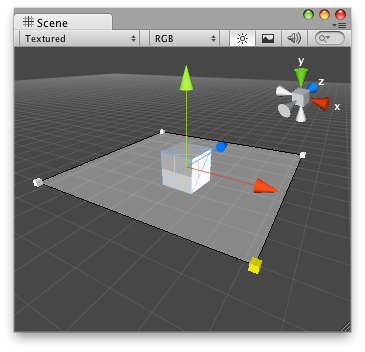
Solid rectangle with a black outline in the Scene View.
// Create a semi transparent rectangle that lets you modify// the "range" that resides in "SolidRectangleExample.cs"using UnityEngine;using UnityEditor;[CustomEditor(typeof(SolidRectangleExample))]public class DrawSolidRectangle : Editor{ void OnSceneGUI() { SolidRectangleExample t = target as SolidRectangleExample; Vector3 pos = t.transform.position; Vector3[] verts = new Vector3[] { new Vector3(pos.x - t.range, pos.y, pos.z - t.range), new Vector3(pos.x - t.range, pos.y, pos.z + t.range), new Vector3(pos.x + t.range, pos.y, pos.z + t.range), new Vector3(pos.x + t.range, pos.y, pos.z - t.range) }; Handles.DrawSolidRectangleWithOutline(verts, new Color(0.5f, 0.5f, 0.5f, 0.1f), new Color(0, 0, 0, 1)); foreach (Vector3 posCube in verts) { t.range = Handles.ScaleValueHandle(t.range, posCube, Quaternion.identity, 1.0f, Handles.CubeHandleCap, 1.0f); } }}
And the script attached to this Handle:
using UnityEngine;public class SolidRectangleExample : MonoBehaviour{ public float range = 5.0f;}
DrawSolidRectangleWithOutline(Vector3[], Color, Color)
Draw a solid outlined rectangle in 3D space.
public static void DrawSolidRectangleWithOutline(Vector3[] verts, Color faceColor, Color outlineColor)
Parameters
Remarks
Solid rectangle with a black outline in the Scene View.
// Create a semi transparent rectangle that lets you modify// the "range" that resides in "SolidRectangleExample.cs"using UnityEngine;using UnityEditor;[CustomEditor(typeof(SolidRectangleExample))]public class DrawSolidRectangle : Editor{ void OnSceneGUI() { SolidRectangleExample t = target as SolidRectangleExample; Vector3 pos = t.transform.position; Vector3[] verts = new Vector3[] { new Vector3(pos.x - t.range, pos.y, pos.z - t.range), new Vector3(pos.x - t.range, pos.y, pos.z + t.range), new Vector3(pos.x + t.range, pos.y, pos.z + t.range), new Vector3(pos.x + t.range, pos.y, pos.z - t.range) }; Handles.DrawSolidRectangleWithOutline(verts, new Color(0.5f, 0.5f, 0.5f, 0.1f), new Color(0, 0, 0, 1)); foreach (Vector3 posCube in verts) { t.range = Handles.ScaleValueHandle(t.range, posCube, Quaternion.identity, 1.0f, Handles.CubeHandleCap, 1.0f); } }}
And the script attached to this Handle:
using UnityEngine;public class SolidRectangleExample : MonoBehaviour{ public float range = 5.0f;}