Mediation Networks for Unity
Configure and integrate multiple ad networks into your project using the LevelPlay mediation platform by downloading and adding the necessary adapters.
阅读时间7 分钟最后更新于 6 小时前
The Unity LevelPlay mediation platform supports banner, interstitial, and video ads from multiple ad networks, equipped with smart loading, ad placement technology, and ad delivery optimization.
Prerequisites
Ensure that you have correctly integrated Rewarded Video, Interstitial or Banner Ads into your application. AndroidX: Starting with SDK 18.0.0, AdMob migrated from Android Support Libraries to Jetpack (AndroidX) Libraries. For more information, refer to the Google Play services release notes.LevelPlay Network Manager
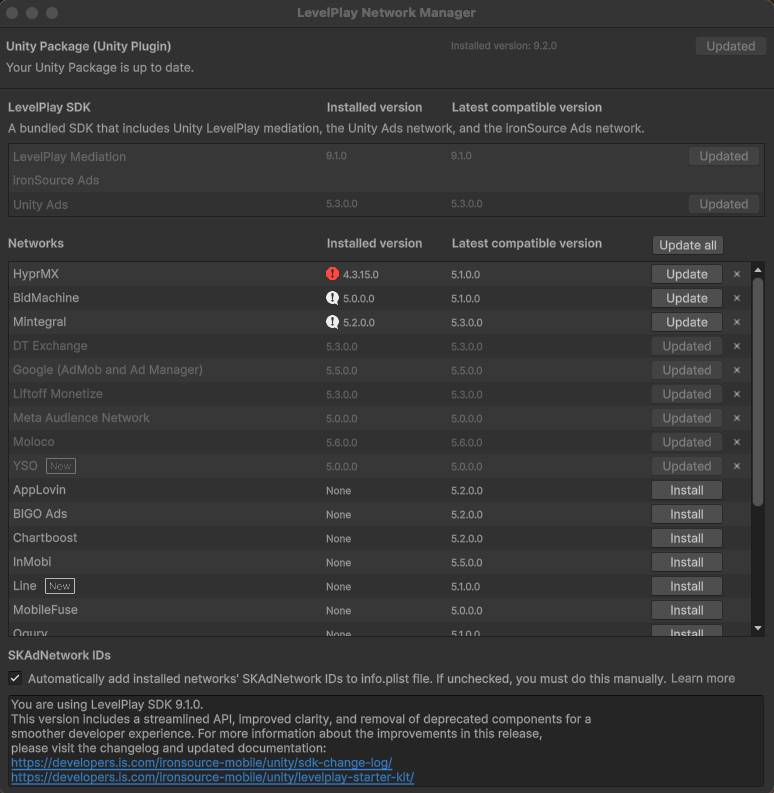
To add a new network or to upgrade to the latest adapter, complete the following steps:- Go to Ads Mediation > Network Manager.
- Select Install or Update.
Android (Manual Resolve)
To apply your changes, ensure that you use the "Resolve" process. This will download all relevant artifacts, according to your choices. For more information, refer to Unity Package integration.Unity Ads SDK
Starting with LevelPlay Unity package version 9.0.0, the Unity Ads network adapter will be automatically updated to the latest compatible version when the Unity package is updated. The recommended best practice is to always update to the latest adapter version to take advantage of new features, fixes, and improvements from the ad network. If necessary, you can manually specify a different compatible Unity Ads adapter version by completing the following steps:- After you install the LevelPlay package, locate the file under the folder LevelPlay > Editor.
ISUnityAdsAdapterDependencies.xml - Specify the version to install between the tag and
<unityversion>.</unityversion> - Verify that the Android () and iOS (
<androidPackage spec="…">) dependency versions in the XML match or are compatible with your specified adapter version.<iosPod version="…">
Integrate network adapters
Download a mediation adapter from the following table and refer to the corresponding ad network integration guide to access premium ad inventory through the LevelPlay mediation platform.Ad network | Adapter version | Supported SDK version | Supported Ad Units | Adapter | Changelog |
|---|---|---|---|---|---|
| AppLovin | 5.7.0.0 |
| Banner, interstitial, rewarded video | Adapter | |
| APS | 5.4.0.0 |
| Banner, interstitial, rewarded video | Adapter | |
| BidMachine | 5.5.0.0 |
| Banner, interstitial, rewarded video | Adapter | |
| BIGO Ads | 5.9.0.0 |
| Banner, interstitial, rewarded video | Adapter | |
| Chartboost | 5.4.0.0 |
| Banner, interstitial, rewarded video | Adapter | |
| DT Exchange | 5.10.0.0 |
| Banner, interstitial, rewarded video | Adapter | |
| 5.15.0.0 |
| Banner, interstitial, rewarded video | Adapter | ||
| HyprMX | 5.4.0.0 |
| Banner, interstitial, rewarded video | Adapter | |
| InMobi | 5.8.0.0 |
| Banner, interstitial, rewarded video | Adapter | |
| Liftoff Monetize | 5.12.0.0 |
| Banner, interstitial, rewarded video | Adapter | |
| LY Ads Network | 5.4.0.0 |
| Banner, interstitial, rewarded video | -- | |
| Meta Audience Network | 5.4.0.0 |
| Banner, interstitial, rewarded video | Adapter | |
| Mintegral | 5.18.0.0 |
| Banner, interstitial, rewarded video | Adapter | |
| MobileFuse | 5.3.0.0 |
| Banner, interstitial, rewarded video | Adapter | |
| Moloco | 5.13.0.0 |
| Banner, interstitial, rewarded video | Adapter | |
| Ogury | 5.6.0.0 |
| Banner, interstitial, rewarded video | Adapter | |
| Pangle | 5.22.0.0 |
| Banner, interstitial, rewarded video | Adapter | |
| PubMatic | 5.5.0.0 |
| Banner, interstitial, rewarded video | -- | |
| Smaato | 5.3.0.0 |
| Banner, interstitial, rewarded video | Adapter | |
| SuperAwesome | 5.2.0.0 |
| Interstitial, rewarded video | Adapter | |
| Tencent | 5.5.0.0 |
| Banner, interstitial, rewarded video | Adapter |
|
| Unity Ads | 5.6.0.0 |
| Banner, interstitial, rewarded video | Adapter | |
| Verve | 5.7.0.0 |
| Banner, interstitial, rewarded video | Adapter | |
| VK Ad Network | 5.9.0.0 |
| Banner, interstitial, rewarded video | Adapter | |
| Yandex Ads | 5.10.0.0 |
| Banner, interstitial, rewarded video | Adapter | |
| YSO Network | 5.3.0.0 |
| Banner, interstitial, rewarded video | Adapter |
Manual integration of adapters using XML
- Download the adapters XML file
- Add the files to Assets > LevelPlay > Editor.
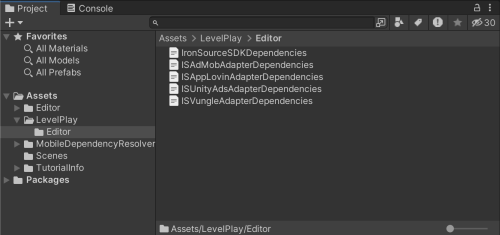
Manual integration of Android and iOS adapters
Android Manual Integration
- Download the relevant adapters.
- Copy the .aar or .jar files into in your Unity Project.
/Assets/Plugins/Android
iOS Manual Integration
- Download the relevant adapters using the relevant download links from here.
- Unzip the file and add IronSource.framework into in your Unity Project.
/Assets/Plugins/iOS