简单的服务器时间反作弊
Prevent timing-based exploits by using server time as the source of truth.
阅读时间9 分钟最后更新于 8 个月前
游戏通常会采用某种形式的计时元素。计时元素的一些示例包括:
- 只能在有明确有效期的拍卖中购买某个游戏内物品。
- 在达到冷却时间之前无法在 RTS 游戏世界中建造建筑物。
- 某个非玩家角色 (NPC) 仅在游戏开始的前几天过后出现。
构建此逻辑的最简单方法是使用设备时间。然而,使用设备的时间可能会带来一系列相关挑战。
在拍卖示例中,很难在多个时区的多个设备之间同步竞价结束状态。这种做法可能会导致一些玩家比其他玩家有更多时间出价或为该物品收集更多资源。此外,玩家可能会在游戏中作弊,通过更改设备上的时钟来增加拍卖的剩余时间。在世界建造游戏中,依赖设备时间的意外影响不仅限于恶意行为(例如在加速冷却时间的示例中)。玩家的设备上可能出现意外的时间错误,这可能会导致 NPC 在错误的时间出现,从而破坏用户体验。
以下示例并不能阻止所有恶意行为。Cloud Code 无法阻止玩家更改其游戏客户端的代码,因此他们能够直接与其他 Unity 服务进行交互。Cloud Code 已计划在未来支持编写完全合格的服务器授权代码。
基本示例
Cloud Code 提供一个中央“服务器时间”供您在游戏逻辑中使用。以下示例展示了一种使用 Cloud Code 中央服务器时间的简单方法:
JavaScript
/* * Return the current UNIX timestamp of the server and its UTC string representation */module.exports = async () => { // Get the current server timestamp const unixTimestamp = Date.now(); // Convert the timestamp to a JavaScript Date object const currentDate = new Date(unixTimestamp); // Create a Universal Coordinate Time (UTC) string const utcString = currentDate.toUTCString(); // Return both the timestamp and the formatted string back to the game client return { timestamp: unixTimestamp, formattedDate: utcString, };};
利用 Cloud Save
利用 Cloud Save,可以进一步处理世界建造示例。您可以在 Cloud Save 的键中以 UNIX 时间戳格式设置建筑物变为可用状态之前的冷却时间:
JavaScript
/* * Set the cooldown for a building with id "MUSEUM_BUILDING" in Cloud Save */const { DataApi } = require('@unity-services/cloud-save-1.4');// The Cloud Save key for the buildingconst MUSEUM_KEY = 'MUSEUM_BUILDING';// The cooldown before the "MUSEUM_BUILDING" is allowed to be built again.const MUSEUM_COOLDOWN = 30;module.exports = async ({ context, logger }) => { // Initialize a Cloud Save API client using the player credentials const { projectId, playerId } = context; const cloudSaveApi = new DataApi(context); // Get the current server timestamp and calculate when the cooldown is finished (in milliseconds) const currentTimestamp = Date.now(); const expiresAt = currentTimestamp + MUSEUM_COOLDOWN * 1000; // Save the data in Cloud Save try { await cloudSaveApi.setItem(projectId, playerId, { key: MUSEUM_KEY, value: expiresAt }); } catch (error) { let errorMessage; if (error.response) { // If the error is from the Cloud Save server errorMessage = JSON.stringify({ response: error.response.data, status: error.response.status, headers: error.response.headers, }); } else { // If the error is from the script errorMessage = JSON.stringify(error.message); } logger.error( `Could not save the key ${MUSEUM_KEY} in Cloud Save. Got error ${errorMessage}` ); // Return an error to the game client throw Error(`An error occurred when setting the cooldown of the ${MUSEUM_KEY}`); } // Return the current server time and when the cooldown expires return { serverTimestamp: currentTimestamp, cooldown: { durationSeconds: MUSEUM_COOLDOWN, expiresAt: expiresAt, }, };};
当用户尝试将建筑物放置在他们的世界中时,您可以使用一个 Cloud Code 脚本来验证冷却时间是否已结束:
JavaScript
/* * Validate that the cooldown for a building with id "MUSEUM_BUILDING" in Cloud Save has expired */const { DataApi } = require('@unity-services/cloud-save-1.4');// The Cloud Save key for the buildingconst MUSEUM_KEY = 'MUSEUM_BUILDING';module.exports = async ({ context, logger }) => { // Initialize a Cloud Save API client using the player credentials const { projectId, playerId } = context; const cloudSaveApi = new DataApi(context); const currentTimestamp = Date.now(); let cooldown; // Get the data from Cloud Save try { let { data: response } = await cloudSaveApi.getItems(projectId, playerId, [MUSEUM_KEY]); cooldown = response?.results?.[0]?.value ?? 0; } catch (error) { let errorMessage; if (error.response) { // If the error is from the Cloud Save server errorMessage = JSON.stringify({ response: error.response.data, status: error.response.status, headers: error.response.headers, }); } else { // If the error is from the script errorMessage = JSON.stringify(error.message); } logger.error( `Could not get the key ${MUSEUM_KEY} in Cloud Save. Got error ${errorMessage}` ); // Return an error to the game client throw Error(`An error occurred when getting the cooldown of the ${MUSEUM_KEY}`); } // Return a response to the client which indicates if the building can be built and if not, how long is left on the cooldown const timeRemaining = (cooldown - currentTimestamp) / 1000; const hasExpired = timeRemaining < 0 ? true : false; return { serverTimestamp: currentTimestamp, cooldown: { hasExpired: hasExpired, timeRemaining: hasExpired ? 0 : timeRemaining, }, };};
添加脚本参数并使用 Remote Config
脚本参数是 Cloud Code 的一项有用功能,可以使脚本更通用,并且可针对不同的建筑物类型重复使用。您还可以使用 Lodash 更轻松地迭代对象和数组。
利用 Remote Config 可以使脚本更具可配置性。您可以使用 键为游戏中的每个建筑物创建一个整数设置。然后,您可以设置每个冷却时间的值并保存配置。
${BUILDING_ID}_COOLDOWN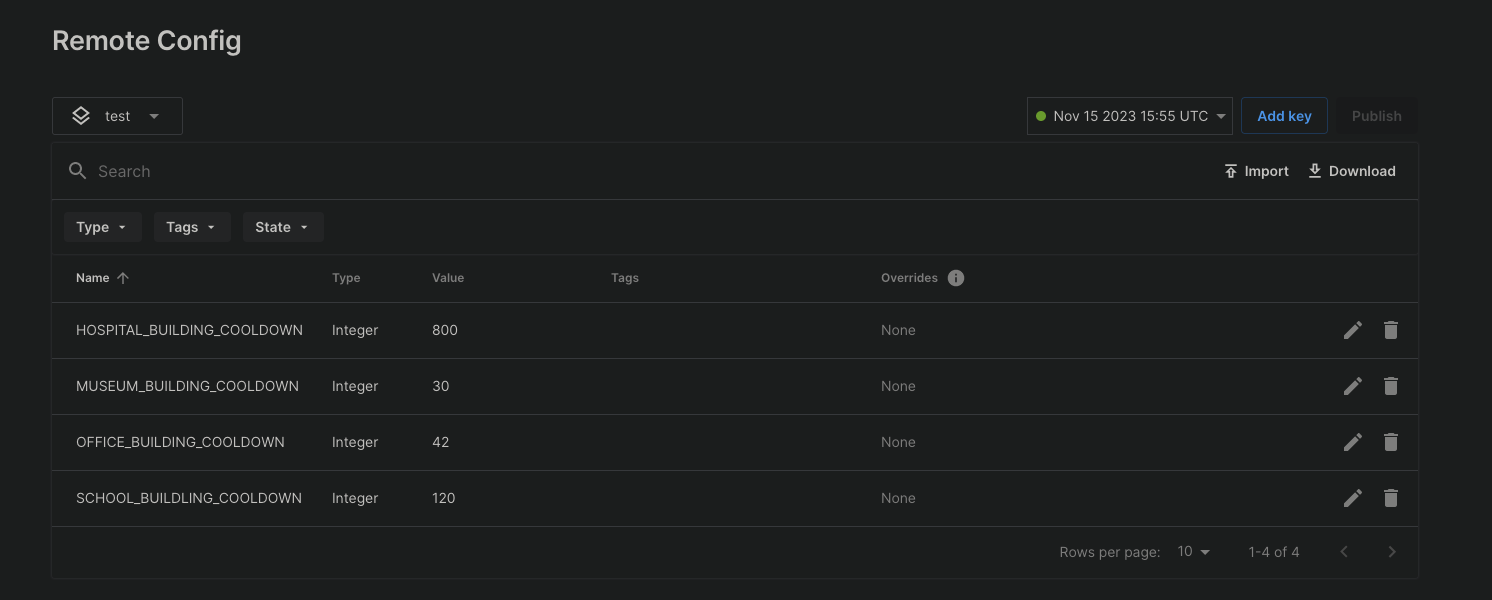
保存 Remote Config 设置后,可以通过 Cloud Code 脚本设置建筑物的冷却时间:
JavaScript
/* * Use a script parameter "builidngId" for fetching the cooldown settings for a building from Remote Config. * Calculate when the cooldown for a building will expire and set the timestamp in Cloud Save. * Note: The Remote Config settings need to be saved before they become available to a Cloud Code script. */const { DataApi } = require('@unity-services/cloud-save-1.4');const { SettingsApi } = require('@unity-services/remote-config-1.1');const _ = require('lodash-4.17');module.exports = async ({ params, context, logger }) => { // Initialize Cloud Save and RemoteConfig API clients using the player credentials const { projectId, playerId, environmentId } = context; const cloudSaveApi = new DataApi(context); const remoteConfig = new SettingsApi(context); const currentTimestamp = Date.now(); let configuredCooldown; let expiresAt; try { // Get the cooldown value for the "buildingId" from RemoteConfig const remoteConfigCooldownId = `${params.buildingId}_COOLDOWN`; const remoteConfigResponse = await remoteConfig.assignSettingsGet( projectId, environmentId, 'settings', [remoteConfigCooldownId] ); // Validate the value from RemoteConfig, for example "MUSEUM_BUILDING_COOLDOWN" configuredCooldown = remoteConfigResponse?.data?.configs?.settings?.[remoteConfigCooldownId]; if (!configuredCooldown || !_.isNumber(configuredCooldown)) { throw Error(`Invalid value for ${remoteConfigCooldownId}`); } // Calculate when the cooldown expires for the "buildingId" expiresAt = currentTimestamp + configuredCooldown * 1000; // Save the data in Cloud Save await cloudSaveApi.setItem(projectId, playerId, { key: params.buildingId, value: expiresAt, }); } catch (error) { let errorMessage; if (error.response) { // If the error is from one of the API clients errorMessage = JSON.stringify({ response: error.response.data, status: error.response.status, headers: error.response.headers, }); } else { // If the error is from the script errorMessage = JSON.stringify(error.message); } logger.error( `An error occurred when trying to set the cooldown for building id ${params.buildingId}. Got error: ${errorMessage}` ); // Return an error to the game client throw Error(`An error occurred when setting the cooldown of the ${params.buildingId}`); } // Return the current server time and when the cooldown expires return { serverTimestamp: currentTimestamp, cooldown: { durationSeconds: configuredCooldown, expiresAt: expiresAt, }, };};
还可以使用脚本的建筑物 ID 参数来验证冷却时间:
JavaScript
/* * Validate that the cooldown for a building with id passed as a Script parameter "buildingId" in Cloud Save has expired */const { DataApi } = require('@unity-services/cloud-save-1.4');module.exports = async ({ params, context, logger }) => { // Initialize a Cloud Save API client using the player credentials const { projectId, playerId } = context; const cloudSaveApi = new DataApi(context); const currentTimestamp = Date.now(); let cooldown; // Get the data from Cloud Save try { let { data: response } = await cloudSaveApi.getItems(projectId, playerId, [ params.buildingId, ]); cooldown = response?.results?.[0]?.value ?? 0; } catch (error) { let errorMessage; if (error.response) { // If the error is from the Cloud Save server errorMessage = JSON.stringify({ response: error.response.data, status: error.response.status, headers: error.response.headers, }); } else { // If the error is from the script errorMessage = JSON.stringify(error.message); } logger.error( `Could not get the key ${params.buildingId} in Cloud Save. Got error ${errorMessage}` ); // Return an error to the game client throw Error(`An error occurred when getting the cooldown of the ${params.buildingId}`); } // Return a response to the client which indicates if the building can be built and if not, how long is left on the cooldown const timeRemaining = (cooldown - currentTimestamp) / 1000; const hasExpired = timeRemaining < 0 ? true : false; return { serverTimestamp: currentTimestamp, cooldown: { hasExpired: hasExpired, timeRemaining: hasExpired ? 0 : timeRemaining, }, };};