每日奖励
Implement a daily rewards system that brings players back every day.
阅读时间4 分钟最后更新于 6 个月前
每日奖励正在成为一种越来越流行的游戏机制,可用于所有类型的游戏,尤其是在免费游戏中很常用。这种奖励可以吸引玩家每天回到游戏,让他们获得各种物品,包括纯粹的外观皮肤和头像到背包物品和游戏内货币。
Cloud Code 能够轻松与其他 Unity 服务集成,因此是构建每日奖励相关逻辑的绝佳选择。您可以在 Economy 中定义物品和货币,在 Remote Config 中定义概率,并在 Cloud Code 中编写底层算法。这样就可以即时更改每日奖励的逻辑,而无需更新游戏客户端。
例如,您可以:
- 降低某些物品的可用性
- 增加获得奖励的物品数量
- 增加额外的验证,防止玩家重复收到稀有物品
- 通过 Remote Config 广告系列更改物品和概率
设置
以下示例说明如何在 Economy 中将多个宠物玩具定义为背包物品。您可以在 Remote Config 中定义每日奖励参数,然后再将其与 Cloud Code 脚本绑定在一起。
Economy
创建此游戏机制的第一步是在 Economy 中定义奖励的背包物品类型。
导航到 Unity Dashboard 并从左侧导航栏中选择 Economy。
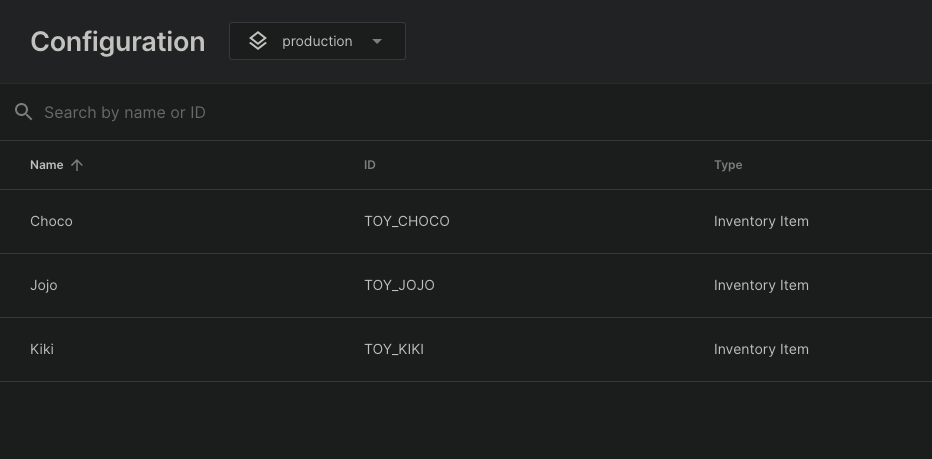
在 Economy 中创建以下背包物品:
- 背包物品 ,ID 为
ChocoTOY_CHOCO - 背包物品 ,ID 为
JojoTOY_JOJO - 背包物品 ,ID 为
KikiTOY_KIKI
Remote Config
您可以使用 Remote Config 将每日奖励参数定义为 键下的自定义 JSON 值:
DAILY_REWARDS_VARIABLESJSON
{ "rewards": [ {"id": "TOY_CHOCO", "probability": 10}, {"id": "TOY_JOJO", "probability": 65}, {"id": "TOY_KIKI", "probability": 80} ]}
每日奖励脚本
配置完成后,您可以编写一个简单的脚本与 Economy 和 Remote Config 进行交互,使用简单的加权随机算法向玩家赠送随机玩具:
JavaScript
/* * Retrieve the daily rewards configuration from Remote Config * Select a random item from the configuration and gift the item to the player in Economy * Note: the Economy configuration needs to be published and Remote Config values need to be saved before they are available in Cloud Code scripts. * */const { InventoryApi } = require('@unity-services/economy-2.4');const { SettingsApi } = require('@unity-services/remote-config-1.1');const _ = require('lodash-4.17');const REMOTE_CONFIG_VARIABLES_KEY = 'DAILY_REWARDS_VARIABLES';module.exports = async ({ context }) => { // Initialize the Economy and Remote Config API clients using the player credentials const { projectId, environmentId, playerId } = context; const inventoryApi = new InventoryApi(context); const remoteConfigApi = new SettingsApi(context); // Fetch the daily rewards configuration from Remote Config const remoteConfigResponse = await remoteConfigApi.assignSettingsGet( projectId, environmentId, 'settings', [REMOTE_CONFIG_VARIABLES_KEY] ); // Extract the daily rewards from the response const dailyRewardsConfig = remoteConfigResponse?.data?.configs?.settings?.[REMOTE_CONFIG_VARIABLES_KEY]; const dailyRewards = dailyRewardsConfig?.rewards; // Pick a random reward from the options const reward = selectRandomReward(dailyRewards); // Gift the reward to the player await inventoryApi.addInventoryItem({ projectId, playerId, addInventoryRequest: { inventoryItemId: reward.id } }); return { reward: reward.id };};// Select a random item based on the probability of each optionfunction selectRandomReward(options) { if (!_.isArray(options)) { throw Error('Invalid daily reward options'); } let sumOfProbabilities = 0; options.forEach((option) => { sumOfProbabilities += option.probability; }); let random = _.random(0, sumOfProbabilities); for (let i = 0; i < options.length; i++) { if (random < options[i].probability) { return options[i]; } random -= options[i].probability; } throw Error('Unable to select a daily reward');}