Decimate To Target
How to use the Decimate To Target function in Asset Transformer Studio
Read time 5 minutesLast updated 9 hours ago
In 3D data preparation, it can be required to reach a specific polycount to properly display a 3D model on a particular device or platform.
Decimate To Target reduces mesh density until a targeted polycount is reached.
The function is available from the Optimize Mesh menu.
Parameters
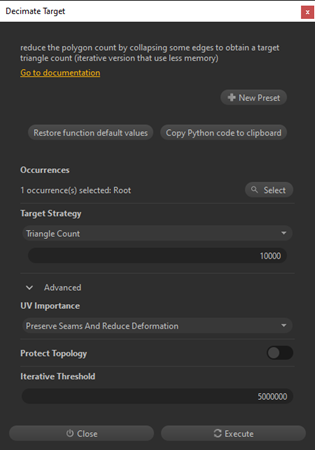
The function is mainly controlled by a criterion (or ).
Triangle CountTriangle ratioMore control can be achieved using the Optional Parameters tab:
Parameter | Description |
|---|---|
| UV Importance | Defines how UVs (texture coordinates) should be preserved during the decimation process:Note: Choosing |
| Protect Topology | If disabled (default), important topological singularities of the mesh (like holes) can change and some edges can become non-manifold. The visual quality will be better on models with complex topology, because you let the algorithm reach a better overall result rather than preserving topological singularities at all costs. If keeping the topology of your model is important, enable the parameter. |
| Iterative Threshold | Enables a different method for decimating large models with a very high polycount (several millions). This type of model requires a large quantity of memory to be processed, requiring a different, iterative decimation method. The iterative method is triggered when the quantity of triangles to decimate exceeds the threshold. Set the number of triangles according to your computer's memory capacity. As a rule of thumb, count 5 GB of RAM for 1,000,000 triangles. Warning: If the available memory is not sufficient to process the model, your CPU might swap and slow down your computer dramatically. |
| Process Mesh Independently | If enabled, each mesh will be processed independently and the |
| Max Quadric Edge | If >0, defines the maximum memory (number of collapses) of a vertex before a new evaluation of its quadric. |
General behavior
By default, the Decimate To Target function takes the whole selection into consideration: it is based on the whole set of parts to evaluate the target triangle count.
For AEC use cases (buildings, factories), it is advised to call the function a single time with a list of all parts, so that meshes made of very few triangles such as walls or windows are kept intact while the decimation focuses on denser meshes.
If is enabled, each mesh of the selection is decimated independently to reach the given triangle count.
Process Mesh IndependentlyAbout the algorithm
The algorithm behind the Decimate To Target function is based on the Quadric error metric method, which reduces the density of a mesh by collapsing its edges:
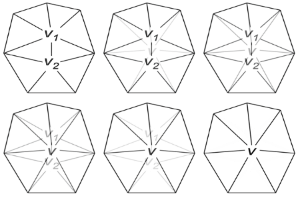
First, the algorithm calculates a new vertex placement, and then computes a misplacement error score for each edge. The score is calculated by adding different geometrical deviations (boundaries, normals and UVs).
Then, it removes in priority the edges generating the least errors until it reaches the targeted polycount.
The user can influence the computed score by modifying the parameter. The global edge error for the edges displacing UVs will get higher error scores than the others, and thus will be deleted last.
UV ImportanceExamples
Here are simple examples explaining how to set up the Decimate To Target function:
Game model
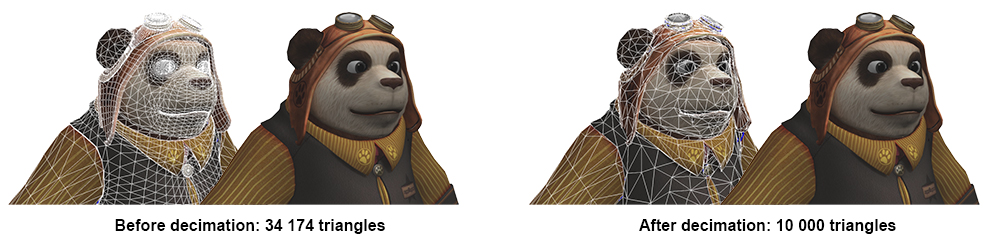
With the game asset below, here is how parameters should be set in order to obtain a well-decimated model:
- Repair mesh: as explained here, it is better to repair a mesh before decimating in order to reconnect edges and avoid gaps.
- Target Strategy: The model is already quite low poly for a character (~35k triangles), so the target should not be too low, but it mostly depends on how far from the camera the decimated model will be. Let's try the default 10,000 triangles value (~30%).
- Setting other parameters:
Parameter | Value | Explanation |
|---|---|---|
| UV Importance | Preserve Seams And Reduce Deformation | UVs need to be preserved because the model has textures applied. These textures play a great role in making it look good — we do not want them to be too distorted. |
| Protect Topology | Enabled | Enable it to preserve the panda's topological singularities (e.g. the eye sockets) as much as possible. As you can see below, when the parameter is disabled, holes like the eyes and mouth start to stretch: 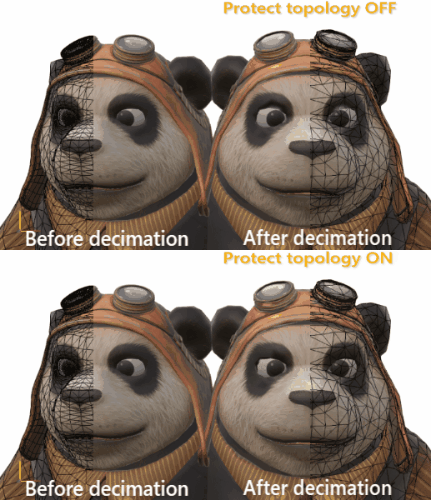 |
| Iterative Threshold | Disabled | No need to enable it as the model is very low poly and will not require a lot of memory to be processed. |
Here is the result of the decimation, which reduced the model and preserved the required attributes:
CAD model
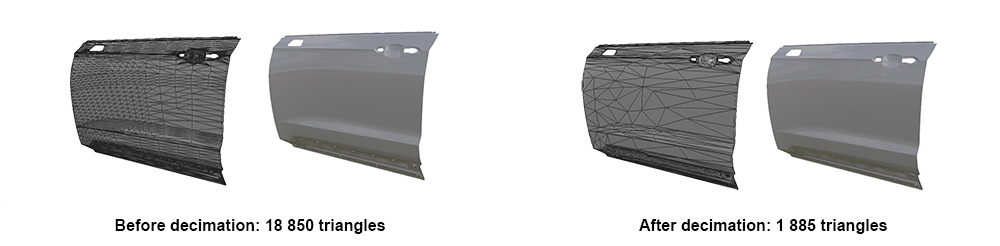
With the CAD/Hard Surface model below — a car door — here is how parameters should be set in order to obtain a well-decimated model:
- Repair mesh: as explained here, it is better to repair a mesh before decimating in order to reconnect edges and avoid gaps.
- Target Strategy: The model is quite dense (~18k triangles), so there is room for a good reduction. Let's try keeping 10%.
- Setting other parameters:
Parameter | Value | Explanation |
|---|---|---|
| UV Importance | Ignore UV | This model, like most CAD models, has no UVs (they can be added afterwards if necessary). As explained here, it can be useful to check first if the model has UVs that might prevent strong decimation, and remove them. |
| Protect Topology | Enabled | As the door panel has a rather simple topology, it is preferable to enable this parameter to try to keep its topological singularities like the small holes at the bottom. |
| Iterative Threshold | 5,000,000 | No need to enable it as the model is very low poly and will not require a lot of memory to be processed. |
Here is the result of the decimation, which reduced the model and preserved the required attributes: