BIGO 广告服务集成
使用 LevelPlay SDK 将 BIGO 广告服务 作为聚合网络集成到 React 本地 app程序中。
阅读时间3 分钟最后更新于 1 个月前
先决条件
创建 BIGO 广告服务帐户
在此处创建使用 BIGO 广告服务的帐户。
在 BIGO 广告服务平台中添加 app
- 登录 BIGO 广告服务开发平台。
- 转到 Inventory(清单),然后在左侧导航栏中选择 Apps and Sites(应用和站点)。
- 选择 Add(添加)。
- 输入 app 的信息,然后选择 Submit。
创建竞价席位
- 导航到 Inventory,然后在左侧栏中选择 Ad Slots。
- 选择 Add(添加)。
- 选择您的** app** 和 Ad Format。
- 输入您的 Ad Slot Name(广告位名称)。
- 在 Auction Type 下,选择 Server Bidding。
- 选择 Submit(提交)。
创建广告位时,BIGO 广告服务会生成相应的广告位 ID。您可以在 BIGO 广告服务开发者管理平台的 Ad Slots 部分中找到此设置。
服务器竞价集成中需要以下参数:
BIGO 广告服务参数 | 描述 |
|---|---|
| App ID(应用 ID) | 您的 app 在 BIGO 广告服务平台中的唯一 ID |
| 广告位 ID | 您在 BIGO 广告服务平台中的广告放置/位置的唯一 ID |
要查找 app 并复制 app 的 app ID:
- 在 BIGO 广告服务后台上,选择 Apps and Sites(应用和站点)
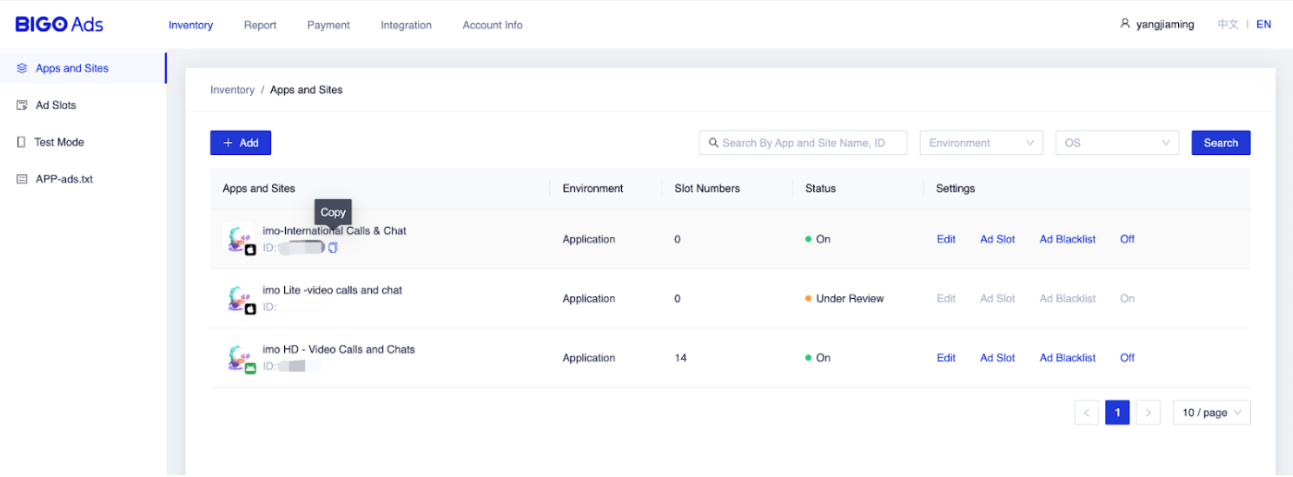
要查找广告位 ID:
- 转到 BIGO 广告服务后台,然后在左侧导航栏中选择 Ad Slot(广告位)
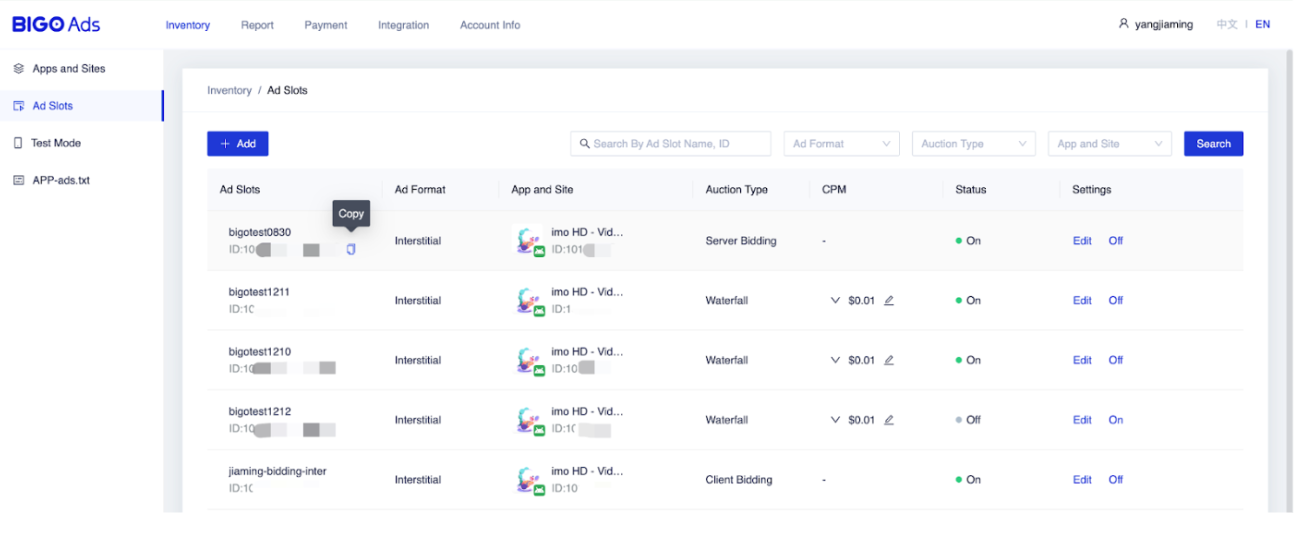
在 LevelPlay 平台上激活 BIGO 广告服务
- 登录 LevelPlay 帐户,然后转到 LevelPlay 侧导航栏 > Setup > Networks
- 从可用广告网络列表中找到 BIGO 广告服务,然后选择 Setup。然后输入相关信息
- 接下来,转到 Instances 页面,选择要在其上运行 LevelPlay 的 Mediation with BIGO 广告服务竞价的应用。
- 选择 BIGO 广告服务并输入 Interstitial、Rewarded、Banner 和 Native 设置的相关信息。然后选择 保存。
网络将针对 app 激活。
将 BIGO 广告服务适配器添加到构建中
您现在可以在应用程序中投放 BIGO 广告服务了!