Mediation Networks for Unity
Configure and integrate multiple ad networks into your Unity project using the ironSource LevelPlay mediation platform by downloading and adding the necessary adapters, setting up network accounts, and defining ad units for rewarded video, interstitial, or banner ads.
読み終わるまでの所要時間 4 分最終更新 15時間前
The Unity LevelPlay mediation platform supports banner, interstitial and video ads from 17 leading ad networks, equipped with smart loading, ad placement technology and ad delivery optimization.
Prerequisites
Ensure that you have correctly integrated ironSource's Rewarded Video, Interstitial or Banner Mediation into your application. AndroidX: As of SDK 18.0.0, AdMob migrated from Android Support Libraries to Jetpack (AndroidX) Libraries. Refer to the Google Play services release notes for more information.LevelPlay Network Manager (Recommended)
Manage Adapters
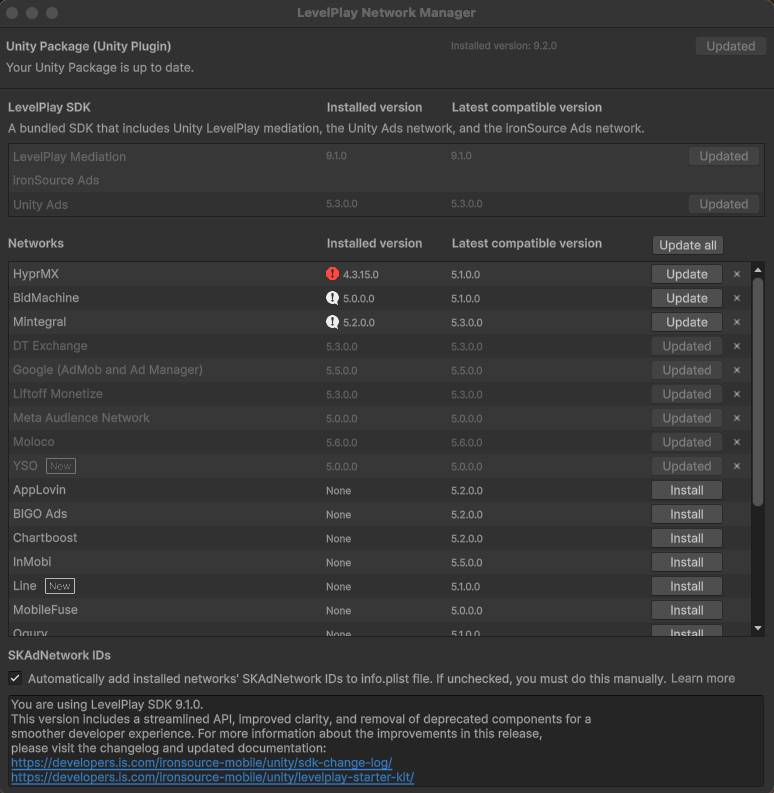
To add a new network or to upgrade to the latest adapter:- Go to Ads Mediation > Network Manager
- Choose “Install” or “Update”
Android (Manual Resolve)
To apply your changes, make sure you use the "Resolve" process. This will download all relevant artifacts, according to your choices. For detailed information see instructions here.Unity Ads SDK
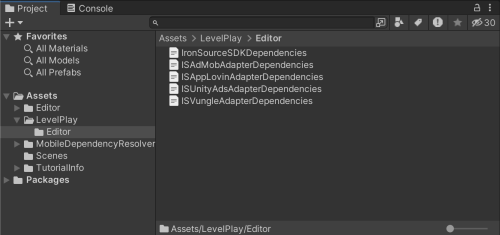
As of LevelPlay Unity package version 9.0.0, the Unity Ads network adapter will be automatically updated to the latest compatible version when the Unity package is updated. We recommend always updating to the latest adapter version to take advantage of new features, fixes, and improvements from the ad network. If necessary, a different compatible Unity Ads adapter version can be manually specified by following these steps:- After installing the LevelPlay package, locate the file under the folder
ISUnityAdsAdapterDependencies.xml.LevelPlay > Editor - Specify the version you would like to install between the tag and
<unityversion>.</unityversion> - Verify that the Android () and iOS (
<androidPackage spec="…">) dependency versions in the XML match or are compatible with your specified adapter version.<iosPod version="…">
Manual Integration of Mediation Adapters
To use Manual Download to integrate our adapters, you can find all the necessary links and information to do so here. Download the XML file from the table below and follow the ad network integration guides to access premium ad inventory through the LevelPlay mediation platform:Ad Network | Adapter version | Supported SDK version | Supported Ad Units | Adapter & SDK |
|---|---|---|---|---|
| APS | 4.3.20.0 | iOS 5.2.0 / Android 11.0.0+ | Banner, interstitial, rewarded video | Adapter |
| App Lovin | 4.3.60 | iOS 13.3.1 / Android 13.3.1 | Banner, interstitial, rewarded video | Adapter |
| BIGO Ads | 4.3.14.0 | iOS 4.8.1 / Android 5.4.0 | Banner, interstitial, rewarded video | Adapter |
| BidMachine | 4.3.18 | iOS 3.3.0 / Android 3.3.0 | Banner, interstitial, rewarded video | Adapter |
| Chartboost | 4.3.31.0 | iOS 9.9.1 / Android 9.9.1 | Banner, interstitial, rewarded video | Adapter |
| CSJ | 4.3.28.0 | iOS 6.9.1.8 / Android - | Banner, interstitial, rewarded video | Adapter |
| DT Exchange | 4.3.60.0 | iOS 8.3.8 / Android 8.3.8 | Banner, interstitial, rewarded video | Adapter |
| 4.3.80.0 | iOS 12.7.0 / Android 24.4.0 | Banner, interstitial, rewarded video | Adapter | |
| HyprMX | 4.3.18.0 | iOS 6.4.3 / Android 6.4.3 | Banner, interstitial, rewarded video | Adapter |
| InMobi | 4.3.40.0 | iOS 10.8.7 / Android 10.8.7 | Banner, interstitial, rewarded video | Adapter |
| LINE Ads Network | 5.1.0 | 9.0.0 | Banner, interstitial, rewarded video | Adapter |
| Liftoff Monetize | 4.3.57.0 | iOS 7.5.2 / Android 7.5.0 | Banner, interstitial, rewarded video | Adapter |
| Maio | 4.1.14.0 | iOS 1.6.3 / Android 1.1.16 | Interstitial, rewarded video | Adapter |
| Meta Audience Network | 4.3.74.0 | iOS 6.20.1 / Android 6.20.0 | Banner, interstitial, rewarded video | Adapter |
| Mintegral | 4.3.49.0 | iOS 7.7.9 / Android 16.9.91 | Banner, interstitial, rewarded video | Adapter |
| MobileFuse | 4.3.9.0 | iOS 1.9.2 / Android 1.9.2 | Banner, interstitial, rewarded video | Adapter |
| Moloco | 4.3.28.0 | iOS 3.12.0 / Android 3.12.0 | Banner, interstitial, rewarded video | Adapter |
| Ogury | 4.3.6.0 | iOS 5.0.2 / Android 6.1.0 | Banner, interstitial, rewarded video | Adapter |
| Pangle | 4.3.61.0 | iOS 7.4.1.0 / Android 7.3.0.4 | Banner, interstitial, rewarded video | Adapter |
| PubMatic | 5.0.0 | 9.0.0 | Banner, interstitial, rewarded video | Adapter |
| Smaato | 4.3.19 | iOS 22.9.3 / Android 22.7.2 | Banner, interstitial, rewarded video | Adapter |
| SuperAwesome | 4.1.14.0 | iOS 9.4.0 / Android 9.4.0 | Interstitial, rewarded video | Adapter |
| Tencent | 4.3.63.0 | iOS 4.15.50 / Android - | Banner, interstitial, rewarded video | Adapter |
| UnityAds | 4.3.58 | iOS 4.16.0 / Android 4.16.0 | Banner, interstitial, rewarded video | Adapter |
| Verve | 4.3.9.0 | iOS 3.6.0 / Android 3.6.0 | Banner, interstitial, rewarded video | Adapter |
| VK Ad Network | 4.3.7.0 | iOS 5.33.0 / Android 5.27.2 | Banner, interstitial, rewarded video | Adapter |
| Yandex Ads | 4.3.25.0 | iOS 7.15.1 / Android 7.15.0 | Banner, interstitial, rewarded video | Adapter |
| YSO Network | 5.0.0 | 9.0.0 | Banner, interstitial, rewarded video | Adapter |
Manual integration of adapters using XML
- Download the adapters XML file
- Add the files to Assets > LevelPlay > Editor (or Assets > IronSource > Editor for those using LevelPlay SDK versions 8.0.0 or earlier)
Manual integration of Android and iOS adapters
Use the manual download of the adapters only if you are not using LevelPlay Network Manager. Android Manual Integration- Download the relevant adapters using the relevant download links from here.
- Copy the .aar or .jar files into /Assets/Plugins/Android in your Unity Project
- Download the relevant adapters using the relevant download links from here.
- Unzip the file and add IronSource.framework into /Assets/Plugins/iOS in your Unity Project