Multi rewards offer best practices
Learn the recommended best practices for multi rewards offers in cost per engagement (CPE) campaigns.
Read time 4 minutesLast updated a day ago
Consider the following recommended practices to define multi rewards offers that keep users engaged with your app and help maximize revenue.
- Choose 6 to 10 events where bids increase with effort and completion time
- Choose common events
- Use short and simple instructions
- Use simple icons or GIFs
- Include static images or a video on the instruction page
- Target United States users and then expand to other countries in phases
- Go to Campaigns and select your campaign to expand its ad set list.
- Select Edit Ad Set next to the right ad set to open the Edit Ad Set dialog.
Choose 6 to 10 events where bids increase with effort and completion time
Choose 6 to 10 events that start with events that yield quick wins for users to help them feel successful early in the game. Continue with events that are progressively more demanding and that give greater rewards to keep users motivated and engaged over time. Bid progressively higher for each subsequent event as the required effort and time to complete increase. Higher bids on your side can translate into higher rewards for users. The 6-to-10-events count helps to keep reasonable completion-time gaps between linear events. With this count, events occur at intervals that are not so short that the events feel trivial and not so long that users lose interest. What is considered a reasonable completion-time gap depends on your game’s playstyle and session length. The events can be linear, non-linear, or a combination of both.
The following is a basic example of a multi rewards offer of six events: five linear events, and one non-linear event. In this example, each successive non-linear event requires more effort and time, and the bid increases accordingly. As bids rise, rewards increase. After users spend significant time in the app, they can be interested to purchase a premium subscription.
Refer to the following linear and non-linear events for examples of each event’s effort level, time to complete, bid percentage, and reward. The bid percentage for each event applies to the total bid amount that you allocate for one completion of the entire offer.
Publishers set the bid-to-reward exchange rate. The earned reward amount can vary across publisher apps that show the offer. The following rewards are examples only.
Event | Bid percentage | Reward example |
|---|---|---|
| Purchase a premium subscription. | 9% | 90 |
Choose common events
Select events that are easy to understand and involve actions most users do regularly as part of your app’s normal flow. Examples of common events include reaching a specific level, completing a specific number of games, and winning a specific number of matches. Simple events can encourage more users to participate. For instructions on how to set up CPE offer events, refer to the Configure budgeting section of the Add a multi rewards ad set article.Use short and simple instructions
Give short names to each event, and provide brief and plain-language instructions for each so that users clearly understand what to do and how to progress.
For the offer instructions setup steps, refer to the Configure the offer instructions section of the Add a multi rewards ad set article.
For instructions on how to configure user-friendly event names, refer to the Enter user-friendly event names in the instructions section of the Add a multi rewards ad set article.
Use simple icons or GIFs
When you design the icon or GIF for your offer listing, choose clear visuals that effectively display what the game is about and how entertaining it is. Your offer’s icon or GIF is displayed alongside other offers on the Offerwall. The following image shows a list of example offers with their corresponding icon or GIF.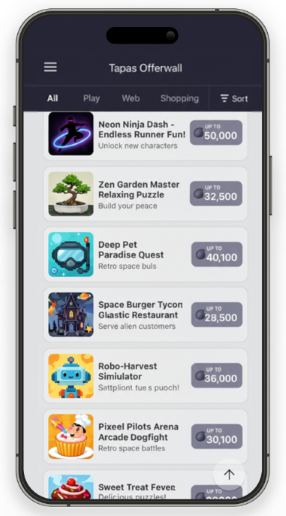
Include static images or a video on the instruction page
Add clear images or a short video to the offer’s instruction page to show what the event looks like and how to complete it. For the offer instructions setup steps, refer to the Configure the offer instructions section of the Add a multi rewards ad set article.Target United States users and then expand to other countries in phases
Target United States users first, and then expand to additional countries in phases as results stabilize.Phases | Countries to target | Number of ad sets to run |
|---|---|---|
| 1 | United States | One ad set for the United States. |
| 2 |
| A separate ad set for each country. |
| 3 |
| One ad set for all countries. |
| 4 |
| One ad set for all countries. |
| 5 | Worldwide | One ad set. |
To run the same offer with different bids by country, clone your CPE ad set for each country. In each new ad set, follow these steps:
- Set user targeting to the specific geographic location. For instructions, refer to the Configure user targeting section of the Add a multi rewards ad set article.
- Update the event bids for that location. For instructions, refer to the Configure budgeting section of the Add a multi rewards ad set article.