Daily rewards offer best practices
Learn the recommended best practices for daily rewards offers in cost per engagement (CPE) campaigns.
Read time 3 minutesLast updated 4 days ago
Consider the following recommended practices to define daily rewards offers that keep users engaged with your app and help maximize revenue.
- Choose simple and repeatable events
- Set a maximum daily completion rate that helps increase user engagement
- Set a total bid that preserves profitability
- Use simple icons or GIFs
- Include static images or a video on the instruction page
- Target United States users and then expand to other countries in phases
- Go to Campaigns and select your campaign to expand its ad set list.
- Select Edit Ad Set next to the right ad set to open the Edit Ad Set dialog.
Choose simple and repeatable events
Use simple and repeatable events that users can complete frequently daily and easily track their progress in your app. Examples of simple and repeatable events include reaching the next level, complete mini-games, and winning matches in the game. For instructions on how to set up a daily reward event, refer to the Configure budgeting section of the Add a daily rewards ad set article.Set a maximum daily completion rate that helps increase user engagement
Aim for a maximum daily completion rate that’s high enough for users to feel meaningful progress, but low enough to encourage users to return the next day for more rewards. For example, if your game has up to 150 levels available, set a maximum daily completion rate of 10 level completions to encourage steady and consistent play.
You set the number of total conversions in the ad set’s Budgeting section. For more information, refer to the Configure budgeting section of Add a daily rewards ad set article.
Set a total bid that preserves profitability
To maintain a profit margin, set a total bid that’s lower than the expected revenue from a user who completes the event the maximum number of times in a day. For example,100Use simple icons or GIFs
When you design the icon or GIF for your offer listing, choose clear visuals that effectively display what the game is about and how entertaining it is. Your offer’s icon or GIF is displayed alongside other offers on the Offerwall. The following image shows a list of example offers with their corresponding icon or GIF.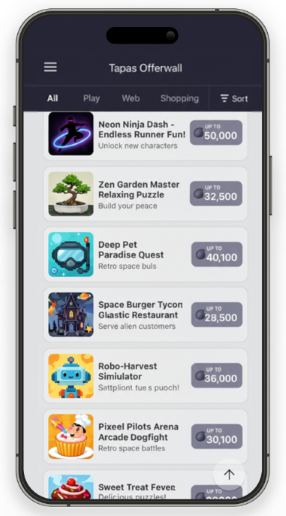
Include static images or a video on the instruction page
Add clear images or a short video to the offer’s instruction page to show what the event looks like and how to complete it. For the offer instructions setup steps, refer to the Configure the offer instructions section of the Add a daily rewards ad set article.Target United States users and then expand to other countries in phases
Target United States users first, and then expand to additional countries in phases as results stabilize.Phases | Countries to target | Number of ad sets to run |
|---|---|---|
| 1 | United States | One ad set for the United States. |
| 2 |
| A separate ad set for each country. |
| 3 |
| One ad set for all countries. |
| 4 |
| One ad set for all countries. |
| 5 | Worldwide | One ad set. |
To run the same offer with different bids by country, clone your CPE ad set for each country. In each new ad set, follow these steps:
- Set user targeting to the specific geographic location. For instructions, refer to the Configure user targeting section of the Add a daily rewards ad set article.
- Update the event bids for that location. For instructions, refer to the Configure budgeting section of the Add a daily rewards ad set article.