Documentation

Development

User Acquisition

Monetization

Industry

LevelPlay SDK - React Native

Unity SDK

Android SDK

iOS SDK

Adobe AIR SDK

Flutter SDK

React Native SDK

LevelPlay SDK - React Native

Unity LevelPlay
​
​
React Native SDK
  • Get started
  • Regulations and settings
  • Ad formats
  • Mediated networks
    • Mediation networks for React Native
    • Mediation network guides
      • AppLovin
      • APS
      • BidMachine
      • BIGO Ads
      • Chartboost
      • CSJ
      • DT Exchange
      • Google Ad Manager
      • Google AdMob
      • Google Bidding
      • HyprMX
      • InMobi
      • Liftoff Monetize
      • LY Ads Network
      • Meta Audience Network
      • Mintegral
      • MobileFuse
      • Moloco
      • Ogury
      • Pangle
      • PubMatic
      • Smaato
      • SuperAwesome
      • Tencent
      • Unity Ads
      • Verve
      • VK Ad Network
      • Yandex Ads
    • Add SKAdNetwork IDs manually
  • Test your integration
  1. Grow your game
  2. Unity LevelPlay
  3. LevelPlay SDK
  4. LevelPlay SDK for React Native developers

Integrate LY Ads Network with LevelPlay

Learn how to integrate LY Ads Network with your LevelPlay-enabled app.
Read time 1 minute
Last updated 4 months ago

Important
The following documentation discusses products or services (“Third-party Products”) not developed, owned, or operated by Unity. This information might be outdated or incomplete and is provided for your convenience. Your use of any Third-party Product is subject to its own terms. Unity makes no warranties regarding these products and isn't liable for any damages or losses arising from their use, including issues related to content, advertising, or materials from Third-party providers.
This guide explains how to integrate LY Ads Network (formerly LINE Ads Network) with your LevelPlay-enabled app.

Prerequisites

Register for a business account at the LY Ads Network site.

Create an application

To add your app, complete the following steps:
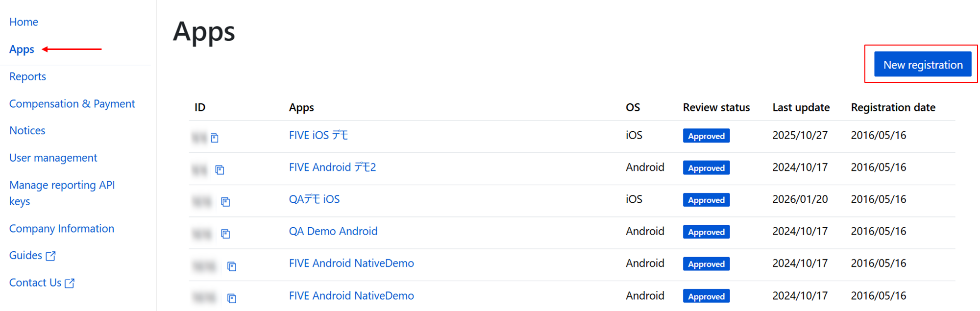
  1. Sign in to the LY Ads Network Dashboard.
  2. In the left navigation menu, select Apps.
  3. Select New registration.
    The New registration button on the app dashboard
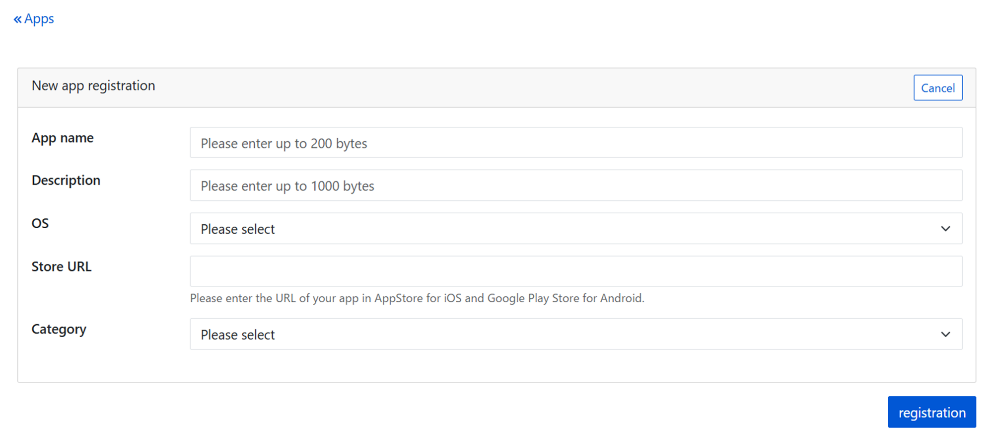
  4. In the New app registration panel, configure the following app settings:
    • App name: Enter the name of your app.
    • Description: Enter a description of your app.
    • OS: Select iOS or Android.
    • Store URL: Enter the store URL.
    • Category: Select an app category.
  5. Select registration to add your app.
    The New app registration pane

Create a slot

To add a slot, complete the following steps:
  1. Select the name of the app you want to add a slot for.
  2. Select Add.
    The Add button on the slot dashboard
  3. Set the following slot settings:
    • Slot name: Enter a name for the slot.
    • Advertising format: Choose a slot format from the following list.
      • Rewarded
      • Interstitial
    • Bidding Type: Select Unity LevelPlay Bidding.
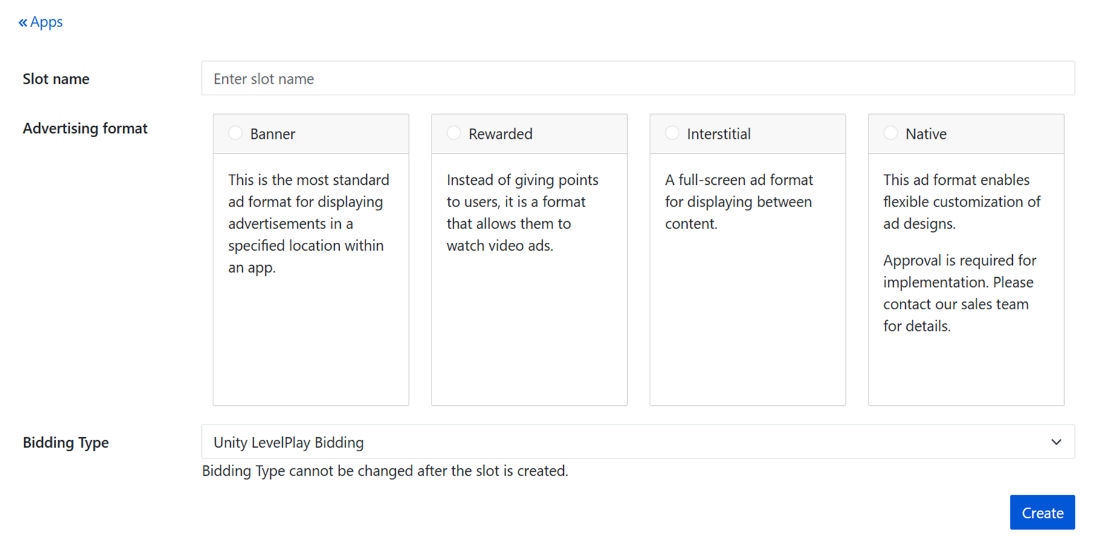
      The slot configuration pane
  4. Select Create to add your slot.

Set a CPM floor price

To set a cost per mille (CPM) floor price, complete the following steps:
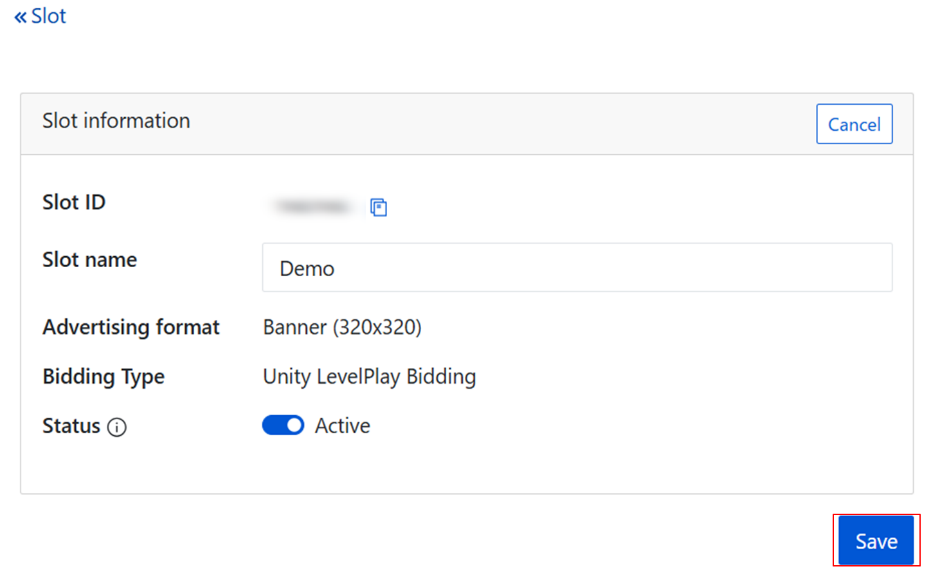
  1. Go to the Slot information page.
  2. Select Edit.
    The Edit button used to customize slot information
  3. Enter the CPM.
  4. Select Save.
    The slot information pane

Submit your slot for approval

After you create your first slot, select Review to request approval from LY Corporation.
Note
The approval process can take some time to complete.
If you have any questions about the approval process, contact your LY Corporation representative.

Get your App ID and Slot ID

To obtain your App ID and Slot ID, complete the following steps:
  1. On the LY Dashboard, select Apps.
  2. Select the name of the app for which you want to retrieve your App ID and Slot ID.
  3. Go to the app details page and locate the App ID and Slot ID for the specified app.

Add the LY Ads Network Adapter to Your Build

Continue your integration using native adapters for Android and iOS.
You are now all set to deliver LY Ads Network within your application!

Copyright © 2026 Unity Technologies
LegalPrivacy PolicyCookiesDocumentation Terms of UseDo Not Sell or Share My Personal InformationYour Privacy Choices (Cookie Settings)

"Unity", Unity logos, and other Unity trademarks are trademarks or registered trademarks of Unity Technologies or its affiliates in the U.S and elsewhere (more info here). Other names or brands are trademarks of their respective owners.

Some pages are machine-translated for convenience, and may contain inaccuracies. In the event of conflicting information, the English version is authoritative.

  • On this page
    • Prerequisites

    • Create an application

    • Create a slot

      • Set a CPM floor price

      • Submit your slot for approval

    • Get your App ID and Slot ID

    • Add the LY Ads Network Adapter to Your Build


Report a problem with this page
​
​