Documentation

​
​

Development

User Acquisition

Monetization

Industry

LevelPlay SDK - React Native

Unity SDK

Android SDK

iOS SDK

Adobe AIR SDK

Flutter SDK

React Native SDK

LevelPlay SDK - React Native

Unity LevelPlay
​
​
React Native SDK
  • Get started
  • Regulations and settings
  • Ad formats
  • Mediated networks
    • Mediation networks for React Native
    • Mediation network guides
      • AppLovin
      • APS
      • BidMachine
      • BIGO Ads
      • Chartboost
      • CSJ
      • DT Exchange
      • Google Ad Manager
      • Google AdMob
      • Google Bidding
      • HyprMX
      • InMobi
      • Liftoff Monetize
      • LY Ads Network
      • Meta Audience Network
      • Mintegral
      • MobileFuse
      • Moloco
      • Ogury
      • Pangle
      • PubMatic
      • Smaato
      • SuperAwesome
      • Tencent
      • Unity Ads
      • Verve
      • VK Ad Network
      • Yandex Ads
    • Add SKAdNetwork IDs manually
  • Test your integration
  1. Grow your game
  2. Unity LevelPlay
  3. LevelPlay SDK
  4. LevelPlay SDK for React Native developers

APS integration

Integrate Amazon Publisher Services (APS) as a mediation network in your React Native app using the LevelPlay SDK.
Read time 2 minutes
Last updated 2 months ago

Prerequisites

Amazon Publisher Services (APS) is an invitation-only program. To integrate APS, you will need to integrate and initialize both the LevelPlay SDK and APS SDK. Make sure you have correctly integrated LevelPlay's Rewarded Video, Interstitial, or Banner ads into your application.

Create an APS Account

  1. Reach out to APS to set up your app's account. To create an APS account, go to the APS website, select Contact us, and open a request.
  2. If your APS request is approved, you will receive an invitation link to sign up and create your account with APS.
  3. The above steps must be completed before you proceed to set up APS in LevelPlay.

Set Up Your Slots in APS Network

  1. Choose the right application from the apps menu and select setup
  2. Choose LevelPlay as your monetization service setup menu
  3. Add slots and define for each slot:
    • Name
    • Ad size
    • Price points (auto/manual)
  4. Finish adding all slots and pick up your credentials:
    • Get your app ID
    • Download the price point CSV file

Activate APS Network

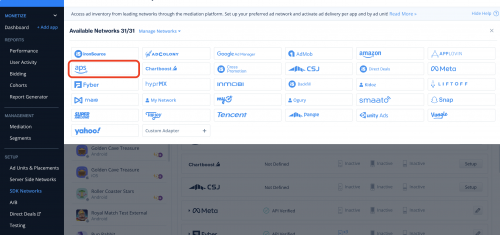
  1. When you have the credentials mentioned above, log in to your LevelPlay account and go to Monetize > Setup > SDK Networks
  2. Select APS from the table of Available Networks and select Activate.
The APS network selected from the LevelPlay SDK Networks list.
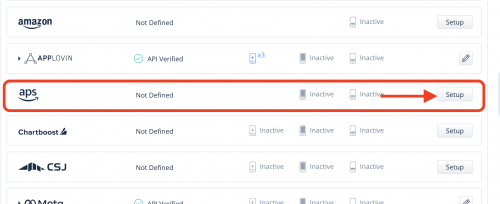
  1. Select APS from the list of ad networks and select Setup
The APS account dashboard setup in LevelPlay.
  1. Enter your APS app ID and upload CSV file as is
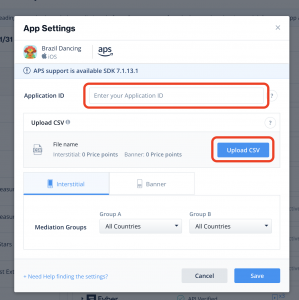
The Upload CSV file option for APS configuration in LevelPlay.

Share APS Bid Info with LevelPlay Mediation Per Ad

Before loading each ad, call the APS API to get the load info that is required for LevelPlay SDK to load an ad.
These are the required steps:
  1. Load the APS ad request before each LevelPlay ad unit load.
  2. Call SetNetworkData to share the APS bid info with LevelPlay.
  3. Load the relevant ad unit using LevelPlay mediation APIs.
You're now ready to deliver APS demand within your application.
Continue your integration using native adapters for Android and iOS.

Next steps

To leverage additional ad networks through LevelPlay, integrate the network adapters and follow our integration guides.

Copyright © 2026 Unity Technologies
LegalPrivacy PolicyCookiesDocumentation Terms of UseDo Not Sell or Share My Personal InformationYour Privacy Choices (Cookie Settings)

"Unity", Unity logos, and other Unity trademarks are trademarks or registered trademarks of Unity Technologies or its affiliates in the U.S and elsewhere (more info here). Other names or brands are trademarks of their respective owners.

Some pages are machine-translated for convenience, and may contain inaccuracies. In the event of conflicting information, the English version is authoritative.

  • On this page
    • Prerequisites

    • Create an APS Account

    • Set Up Your Slots in APS Network

    • Activate APS Network

    • Share APS Bid Info with LevelPlay Mediation Per Ad

    • Next steps


Report a problem with this page