SetString(string, string)
Sets the value of the preference identified by key. Note that EditorPrefs does not support null strings and will store an empty string instead.
Read time 1 minuteLast updated 3 days ago
Definition
- Type: Method
- Namespace: UnityEditor
- Assembly: UnityEditor
public static void SetString(string key, string value)
Parameters
Remarks
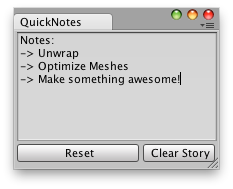
Quick notes that last between Unity Sessions.
Examples
// Simple Editor Script that lets you create / save quick notes// Between Unity Sessions.using UnityEngine;using UnityEditor;public class ExampleClass : EditorWindow{ string note = "Notes:\n->\n->"; [MenuItem("Examples/QuickNotes")] static void Init() { ExampleClass window = (ExampleClass)EditorWindow.GetWindow(typeof(ExampleClass)); window.Show(); } void OnGUI() { note = EditorGUILayout.TextArea(note, GUILayout.Width(position.width - 5), GUILayout.Height(position.height - 30)); EditorGUILayout.BeginHorizontal(); if (GUILayout.Button("Reset")) note = ""; if (GUILayout.Button("Clear Story", GUILayout.Width(72))) { note = "Notes:\n->\n->"; } EditorGUILayout.EndHorizontal(); } void OnFocus() { if (EditorPrefs.HasKey("QuickNotes")) note = EditorPrefs.GetString("QuickNotes"); } void OnLostFocus() { EditorPrefs.SetString("QuickNotes", note); } void OnDestroy() { EditorPrefs.SetString("QuickNotes", note); }}