Manage data privacy with the SDK
Implement player consent, data deletion, and privacy controls in your game using the Analytics SDK.
Read time 5 minutesLast updated 8 months ago
Analytics collects data to help you improve the player experience in your game. Some of that data includes personal data regulated under data privacy laws.
Some regions might require consent to collect personal data by law, while others might require end-user notice and the opportunity to opt-out. However, consent and opt-out requirements extend beyond these use cases and must be applied in any region that requires it. By using these functions, you take responsibility for providing this consent correctly and for all regions.
When a user does not consent to, or opts out of personal data collection and processing under a data privacy regulation (for example GDPR, CCPA, or PIPL), this prevents personal data from being collected about your users and may impact your analytics and key metrics.
For a full breakdown of your responsibilities, refer to the Privacy overview.
Unity 6.2 and later with Analytics SDK 6.1 and later
Start data collection
In Unity 6.2 and later, the Developer Data framework's API controls the Analytics SDK. To start or stop data collection, use this API to set the consent to or .
EndUserConsentAnalyticsIntentGrantedRevokedFor specific information about granting consent with the API, refer to Developer Data framework.
EndUserConsentData deletion
Call to request personal data deletion, which triggers a purge of user data from the server. In order to make a data deletion request, you must first deny consent using the API.
AnalyticsService.Instance.RequestDataDeletion()EndUserConsentpublic void RequestDataDeletion(){ ConsentState consentState = EndUserConsent.GetConsentState(); consentState.AnalyticsIntent = ConsentStatus.Denied; EndUserConsent.SetConsentState(consentState); AnalyticsService.Instance.RequestDataDeletion();}
If there is no internet connection when this request is made, the SDK reattempts the request at regular intervals until it is successful. It will remember this across application restarts using Unity's system, so be aware that using may disrupt this process.
PlayerPrefsPlayerPrefs.DeleteAll()Unity 6.1 and earlier, or Analytics SDK 6.0 and earlier
Start data collection
As of version 5.0.0, the Analytics SDK does not collect any personal data by default. The SDK initializes in a dormant state, in which it ignores all events. You are responsible for determining what data privacy legislation affects the player and when it is appropriate for you to enable data collection by the SDK (i.e. have the player’s consent for an opt-in legislation, or that the player has not denied consent for an opt-out legislation). If you are not using SDK version 5.0.0 or greater, it is strongly recommended that you upgrade as soon as possible.
Only once you've confirmed that you have the player's consent to collect data, you can activate the SDK by calling .
AnalyticsService.Instance.StartDataCollection()If the player has denied or revoked their consent, you can avoid calling and so leave the SDK inactive.
StartDataCollectionFor specific information about how to start data collection in compliance with the two major kinds of legislation, see these pages:
The following diagrams display the methods that the SDK offers to manage consent and privacy scenarios:
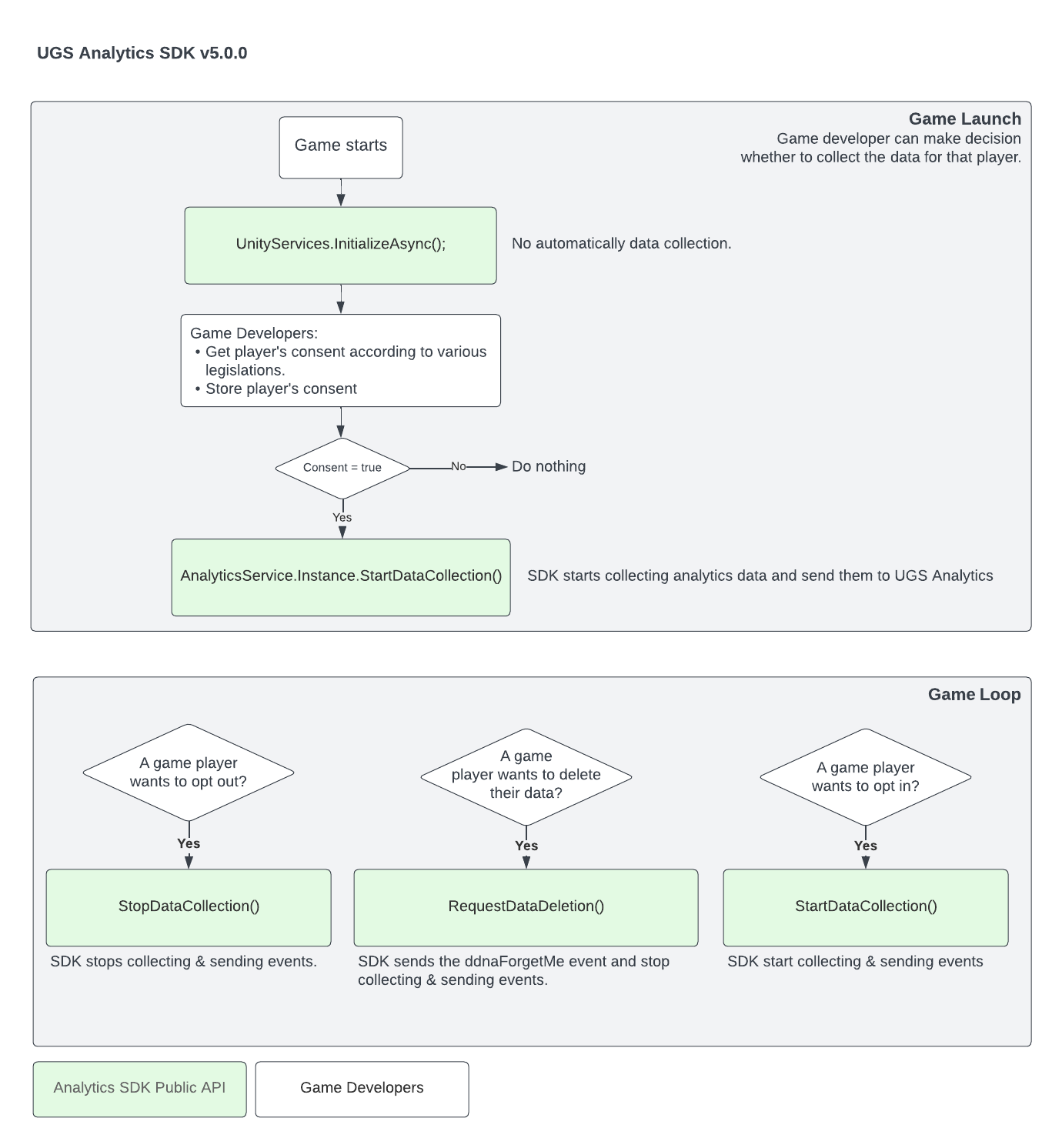
If the user wants to opt out after data collection has been started, use the method.
AnalyticsService.Instance.StopDataCollection()public void OptOut(){ AnalyticsService.Instance.StopDataCollection();}
Data deletion
Call to request personal data deletion, which triggers a purge of user data from the server. This will also stop data collection if it has not already been stopped.
AnalyticsService.Instance.RequestDataDeletion()public void RequestDataDeletion(){ AnalyticsService.Instance.RequestDataDeletion();}
If there is no internet connection when this request is made, the SDK reattempts the request at regular intervals until it is successful. It will remember this across application restarts using Unity's system, so be aware that using may disrupt this process.
PlayerPrefsPlayerPrefs.DeleteAll()Privacy URL
If you need to present the user with Unity's privacy policy, the privacy URL is available in the SDK as the property. Use the following code to open a browser window with Unity's privacy policy:
AnalyticsService.Instance.PrivacyUrlApplication.OpenURL(AnalyticsService.Instance.PrivacyUrl);