単純なサーバー時間のチート対策
Prevent timing-based exploits by using server time as the source of truth.
読み終わるまでの所要時間 11 分最終更新 8ヶ月前
ゲームは、多くの場合にタイミング要素の形式でビルドされます。タイミング要素の例として、以下のようなものがあります。
- ゲーム内アイテムは、特定の日付に失効するオークションからのみ購入できます。
- RTS ゲームの世界では、クールダウンに達するまで建物を建築できません。
- ノンプレイヤーキャラクター (NPC) は、ゲームの開始から数日後にのみ表示されます。
このロジックをビルドする最も単純な方法は、デバイス時間を使用することです。ただし、デバイス時間の使用は、独自の一連の課題を伴う場合があります。
オークションの例では、複数のタイムゾーン内の複数のデバイス間で入札の終わりを同期するのは非常に困難です。これを行うと、一部のプレイヤーが他のプレイヤーより高い値を付けたりアイテムの追加リソースを収集したりするための時間が長くなる可能性があります。さらに、プレイヤーはデバイスのクロックを変更してオークションの残り時間を増やすことによりゲーム内でチート行為を行うことができます。デバイス時間に依存する場合の意図しない影響は、ワールド構築ゲームでの悪意のある動作 (クールダウンのスピードアップの例など) に限られません。プレイヤーのデバイスが意図せず間違った時間になる可能性があり、結果として NPC が間違った時間に表示され、ユーザー体験を損ないます。
これらの例は、悪意のある動作をすべて防ぐものではありません。Cloud Code は、プレイヤーがゲームクライアントのコードを変更して他の Unity サービスを直接操作できるようになることを防止できません。本格的なサーバー主導型コードの記述は、Cloud Code で予定されている機能です。
基本的な例
Cloud Code は中央 "サーバー時間" を提供するので、それをゲームロジックで使用できます。以下の例は、Cloud Code の中央サーバー時間を使用する単純な方法を示します。
JavaScript
/* * Return the current UNIX timestamp of the server and its UTC string representation */module.exports = async () => { // Get the current server timestamp const unixTimestamp = Date.now(); // Convert the timestamp to a JavaScript Date object const currentDate = new Date(unixTimestamp); // Create a Universal Coordinate Time (UTC) string const utcString = currentDate.toUTCString(); // Return both the timestamp and the formatted string back to the game client return { timestamp: unixTimestamp, formattedDate: utcString, };};
Cloud Save の活用
Cloud Save を加えることで、ワールド構築の例をさらに進めることができます。建物が利用可能になる前に Cloud Save のキーの UNIX タイムスタンプとしてクールダウンを設定できます。
JavaScript
/* * Set the cooldown for a building with id "MUSEUM_BUILDING" in Cloud Save */const { DataApi } = require('@unity-services/cloud-save-1.4');// The Cloud Save key for the buildingconst MUSEUM_KEY = 'MUSEUM_BUILDING';// The cooldown before the "MUSEUM_BUILDING" is allowed to be built again.const MUSEUM_COOLDOWN = 30;module.exports = async ({ context, logger }) => { // Initialize a Cloud Save API client using the player credentials const { projectId, playerId } = context; const cloudSaveApi = new DataApi(context); // Get the current server timestamp and calculate when the cooldown is finished (in milliseconds) const currentTimestamp = Date.now(); const expiresAt = currentTimestamp + MUSEUM_COOLDOWN * 1000; // Save the data in Cloud Save try { await cloudSaveApi.setItem(projectId, playerId, { key: MUSEUM_KEY, value: expiresAt }); } catch (error) { let errorMessage; if (error.response) { // If the error is from the Cloud Save server errorMessage = JSON.stringify({ response: error.response.data, status: error.response.status, headers: error.response.headers, }); } else { // If the error is from the script errorMessage = JSON.stringify(error.message); } logger.error( `Could not save the key ${MUSEUM_KEY} in Cloud Save. Got error ${errorMessage}` ); // Return an error to the game client throw Error(`An error occurred when setting the cooldown of the ${MUSEUM_KEY}`); } // Return the current server time and when the cooldown expires return { serverTimestamp: currentTimestamp, cooldown: { durationSeconds: MUSEUM_COOLDOWN, expiresAt: expiresAt, }, };};
ユーザーがワールドに建物を配置しようとした場合、Cloud Code スクリプトを使用して、クールダウンが終了したことを確認できます。
JavaScript
/* * Validate that the cooldown for a building with id "MUSEUM_BUILDING" in Cloud Save has expired */const { DataApi } = require('@unity-services/cloud-save-1.4');// The Cloud Save key for the buildingconst MUSEUM_KEY = 'MUSEUM_BUILDING';module.exports = async ({ context, logger }) => { // Initialize a Cloud Save API client using the player credentials const { projectId, playerId } = context; const cloudSaveApi = new DataApi(context); const currentTimestamp = Date.now(); let cooldown; // Get the data from Cloud Save try { let { data: response } = await cloudSaveApi.getItems(projectId, playerId, [MUSEUM_KEY]); cooldown = response?.results?.[0]?.value ?? 0; } catch (error) { let errorMessage; if (error.response) { // If the error is from the Cloud Save server errorMessage = JSON.stringify({ response: error.response.data, status: error.response.status, headers: error.response.headers, }); } else { // If the error is from the script errorMessage = JSON.stringify(error.message); } logger.error( `Could not get the key ${MUSEUM_KEY} in Cloud Save. Got error ${errorMessage}` ); // Return an error to the game client throw Error(`An error occurred when getting the cooldown of the ${MUSEUM_KEY}`); } // Return a response to the client which indicates if the building can be built and if not, how long is left on the cooldown const timeRemaining = (cooldown - currentTimestamp) / 1000; const hasExpired = timeRemaining < 0 ? true : false; return { serverTimestamp: currentTimestamp, cooldown: { hasExpired: hasExpired, timeRemaining: hasExpired ? 0 : timeRemaining, }, };};
スクリプトのパラメーター化と Remote Config の追加
スクリプトパラメーターは Cloud Code の便利な機能であり、スクリプトをよりジェネリックにし、さまざまな建物タイプに再利用できます。Lodash を使用して、オブジェクトと配列をより簡単にイテレートすることもできます。
Remote Config を追加して、スクリプトをより設定しやすくすることができます。 キーを使用して、ゲーム内の各建物の整数設定を作成できます。次に、各クールダウンの値を設定し、設定を保存できます。
${BUILDING_ID}_COOLDOWN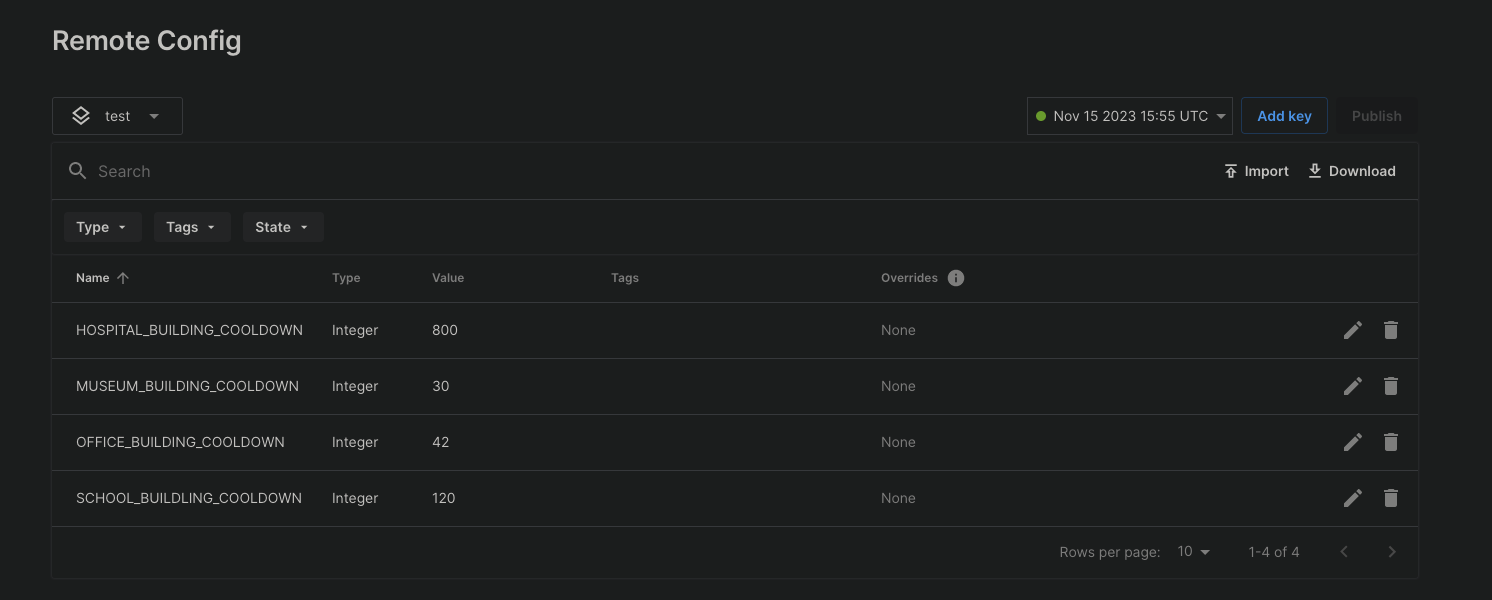
Remote Config 設定を保存した後で、Cloud Code スクリプトから建物のクールダウンを設定できます。
JavaScript
/* * Use a script parameter "builidngId" for fetching the cooldown settings for a building from Remote Config. * Calculate when the cooldown for a building will expire and set the timestamp in Cloud Save. * Note: The Remote Config settings need to be saved before they become available to a Cloud Code script. */const { DataApi } = require('@unity-services/cloud-save-1.4');const { SettingsApi } = require('@unity-services/remote-config-1.1');const _ = require('lodash-4.17');module.exports = async ({ params, context, logger }) => { // Initialize Cloud Save and RemoteConfig API clients using the player credentials const { projectId, playerId, environmentId } = context; const cloudSaveApi = new DataApi(context); const remoteConfig = new SettingsApi(context); const currentTimestamp = Date.now(); let configuredCooldown; let expiresAt; try { // Get the cooldown value for the "buildingId" from RemoteConfig const remoteConfigCooldownId = `${params.buildingId}_COOLDOWN`; const remoteConfigResponse = await remoteConfig.assignSettingsGet( projectId, environmentId, 'settings', [remoteConfigCooldownId] ); // Validate the value from RemoteConfig, for example "MUSEUM_BUILDING_COOLDOWN" configuredCooldown = remoteConfigResponse?.data?.configs?.settings?.[remoteConfigCooldownId]; if (!configuredCooldown || !_.isNumber(configuredCooldown)) { throw Error(`Invalid value for ${remoteConfigCooldownId}`); } // Calculate when the cooldown expires for the "buildingId" expiresAt = currentTimestamp + configuredCooldown * 1000; // Save the data in Cloud Save await cloudSaveApi.setItem(projectId, playerId, { key: params.buildingId, value: expiresAt, }); } catch (error) { let errorMessage; if (error.response) { // If the error is from one of the API clients errorMessage = JSON.stringify({ response: error.response.data, status: error.response.status, headers: error.response.headers, }); } else { // If the error is from the script errorMessage = JSON.stringify(error.message); } logger.error( `An error occurred when trying to set the cooldown for building id ${params.buildingId}. Got error: ${errorMessage}` ); // Return an error to the game client throw Error(`An error occurred when setting the cooldown of the ${params.buildingId}`); } // Return the current server time and when the cooldown expires return { serverTimestamp: currentTimestamp, cooldown: { durationSeconds: configuredCooldown, expiresAt: expiresAt, }, };};
スクリプトの建物 ID パラメーターを使用して、クールダウンを検証することもできます。
JavaScript
/* * Validate that the cooldown for a building with id passed as a Script parameter "buildingId" in Cloud Save has expired */const { DataApi } = require('@unity-services/cloud-save-1.4');module.exports = async ({ params, context, logger }) => { // Initialize a Cloud Save API client using the player credentials const { projectId, playerId } = context; const cloudSaveApi = new DataApi(context); const currentTimestamp = Date.now(); let cooldown; // Get the data from Cloud Save try { let { data: response } = await cloudSaveApi.getItems(projectId, playerId, [ params.buildingId, ]); cooldown = response?.results?.[0]?.value ?? 0; } catch (error) { let errorMessage; if (error.response) { // If the error is from the Cloud Save server errorMessage = JSON.stringify({ response: error.response.data, status: error.response.status, headers: error.response.headers, }); } else { // If the error is from the script errorMessage = JSON.stringify(error.message); } logger.error( `Could not get the key ${params.buildingId} in Cloud Save. Got error ${errorMessage}` ); // Return an error to the game client throw Error(`An error occurred when getting the cooldown of the ${params.buildingId}`); } // Return a response to the client which indicates if the building can be built and if not, how long is left on the cooldown const timeRemaining = (cooldown - currentTimestamp) / 1000; const hasExpired = timeRemaining < 0 ? true : false; return { serverTimestamp: currentTimestamp, cooldown: { hasExpired: hasExpired, timeRemaining: hasExpired ? 0 : timeRemaining, }, };};