1 日ごとのゲーム内報酬
Implement a daily rewards system that brings players back every day.
読み終わるまでの所要時間 6 分最終更新 6ヶ月前
1 日ごとのゲーム内報酬は、すべてのジャンルのゲームで使用される人気のゲームメカニクスになっており、特にフリートゥプレイのタイトルで人気です。これらは、プレイヤーが毎日戻ってくるようにする魅力的な方法を提供すると同時に、純粋に装飾的なスキンやアバターからインベントリアイテムやゲーム内通貨まで、さまざまなアイテムを獲得できるようにします。
Cloud Code の他の Unity サービスと簡単に統合する機能により、1 日ごとのゲーム内報酬に関するロジックをビルドするための優れた選択肢になります。Economy でアイテムと通貨、Remote Config で確率を定義し、基礎となるアルゴリズムを Cloud Code で記述できます。これにより、ゲームクライアントを更新する必要なしに、1 日ごとのゲーム内報酬のロジックをその場で変更できます。
例えば、以下のような使い方が可能です。
- 一部のアイテムの可用性を低減します。
- 報酬として受け取れるアイテム数を増やします
- プレイヤーがレアアイテムを重複して受け取ることを防ぐ追加の検証を入れます。
- Remote Config キャンペーンを通じてアイテムと確率を変更します。
設定
以下の例は、複数のペット用おもちゃを Economy でインベントリアイテムとして定義する方法を示します。Cloud Code スクリプトですべてを結びつける前に、Remote Config で 1 日ごとのゲーム内報酬パラメーターを定義できます。
Economy
このゲームメカニクスの作成の最初のステップでは、Economy でインベントリアイテムタイプのゲーム内報酬を定義します。
Unity Dashboard に移動し、左のナビゲーションバーから Economy を選択します。
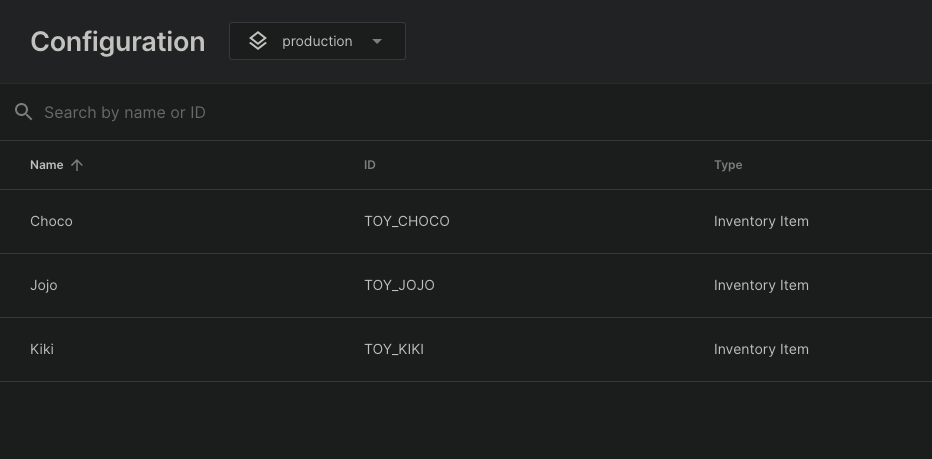
Economy で以下のインベントリアイテムを作成します。
- ID のインベントリアイテム
TOY_CHOCOChoco - ID のインベントリアイテム
TOY_JOJOJojo - ID のインベントリアイテム
TOY_KIKIKiki
Remote Config
Remote Config を使用して、キー で 1 日ごとのゲーム内報酬パラメーターをカスタム JSON 値として定義できます。
DAILY_REWARDS_VARIABLESJSON
{ "rewards": [ {"id": "TOY_CHOCO", "probability": 10}, {"id": "TOY_JOJO", "probability": 65}, {"id": "TOY_KIKI", "probability": 80} ]}
1 日ごとのゲーム内報酬のスクリプト
設定が行われると、シンプルな加重ランダムアルゴリズムを使用してプレイヤーにランダムなおもちゃを贈呈するように Economy および Remote Config を操作するシンプルなスクリプトを記述できます。
JavaScript
/* * Retrieve the daily rewards configuration from Remote Config * Select a random item from the configuration and gift the item to the player in Economy * Note: the Economy configuration needs to be published and Remote Config values need to be saved before they are available in Cloud Code scripts. * */const { InventoryApi } = require('@unity-services/economy-2.4');const { SettingsApi } = require('@unity-services/remote-config-1.1');const _ = require('lodash-4.17');const REMOTE_CONFIG_VARIABLES_KEY = 'DAILY_REWARDS_VARIABLES';module.exports = async ({ context }) => { // Initialize the Economy and Remote Config API clients using the player credentials const { projectId, environmentId, playerId } = context; const inventoryApi = new InventoryApi(context); const remoteConfigApi = new SettingsApi(context); // Fetch the daily rewards configuration from Remote Config const remoteConfigResponse = await remoteConfigApi.assignSettingsGet( projectId, environmentId, 'settings', [REMOTE_CONFIG_VARIABLES_KEY] ); // Extract the daily rewards from the response const dailyRewardsConfig = remoteConfigResponse?.data?.configs?.settings?.[REMOTE_CONFIG_VARIABLES_KEY]; const dailyRewards = dailyRewardsConfig?.rewards; // Pick a random reward from the options const reward = selectRandomReward(dailyRewards); // Gift the reward to the player await inventoryApi.addInventoryItem({ projectId, playerId, addInventoryRequest: { inventoryItemId: reward.id } }); return { reward: reward.id };};// Select a random item based on the probability of each optionfunction selectRandomReward(options) { if (!_.isArray(options)) { throw Error('Invalid daily reward options'); } let sumOfProbabilities = 0; options.forEach((option) => { sumOfProbabilities += option.probability; }); let random = _.random(0, sumOfProbabilities); for (let i = 0; i < options.length; i++) { if (random < options[i].probability) { return options[i]; } random -= options[i].probability; } throw Error('Unable to select a daily reward');}