BeginGUI
Begin a 2D GUI block inside the 3D handle GUI.
Read time 2 minutesLast updated 6 days ago
Definition
- Type: Method
- Namespace: UnityEditor
- Assembly: UnityEditor.CoreModule
BeginGUI()
Begin a 2D GUI block inside the 3D handle GUI.
public static void BeginGUI()
Remarks
The start of a GUILayout sequence of function calls. As expected the Handles.EndGUI is used to close these.
Additional Resources: Handles.EndGUI.
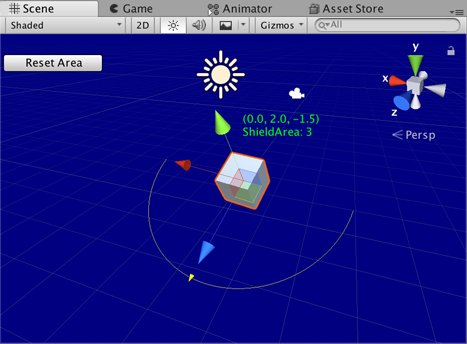
GUI in the Scene View.
// Change the transform values for the selected object.// When selected this script starts and the handleExample is managed.// The HandlesGUI.BeginGUI() and EndGUI() functions allow the shieldArea// to be changed back to five, which is the starting value.using UnityEditor;using UnityEngine;[CustomEditor(typeof(HandleExample))]class HandleExampleEditor : Editor{ protected virtual void OnSceneGUI() { HandleExample handleExample = (HandleExample)target; if (handleExample == null) { return; } Handles.color = Color.yellow; GUIStyle style = new GUIStyle(); style.normal.textColor = Color.green; Vector3 position = handleExample.transform.position + Vector3.up * 2f; string posString = position.ToString(); Handles.Label(position, posString + "\nShieldArea: " + handleExample.shieldArea.ToString(), style ); Handles.BeginGUI(); if (GUILayout.Button("Reset Area", GUILayout.Width(100))) { handleExample.shieldArea = 5; } Handles.EndGUI(); Handles.DrawWireArc( handleExample.transform.position, handleExample.transform.up, -handleExample.transform.right, 180, handleExample.shieldArea); handleExample.shieldArea = Handles.ScaleValueHandle(handleExample.shieldArea, handleExample.transform.position + handleExample.transform.forward * handleExample.shieldArea, handleExample.transform.rotation, 1, Handles.ConeHandleCap, 1); }}
Add a script that specifies the object that can be animated in the SceneView.
using UnityEngine;[ExecuteInEditMode]public class HandleExample : MonoBehaviour{ public float shieldArea = 5.0f;}
BeginGUI(Rect)
Begin a 2D GUI block inside the 3D handle GUI.
public static void BeginGUI(Rect position)
Parameters
Remarks
The start of a GUILayout sequence of function calls. As expected the Handles.EndGUI is used to close these.
Additional Resources: Handles.EndGUI.
GUI in the Scene View.
// Change the transform values for the selected object.// When selected this script starts and the handleExample is managed.// The HandlesGUI.BeginGUI() and EndGUI() functions allow the shieldArea// to be changed back to five, which is the starting value.using UnityEditor;using UnityEngine;[CustomEditor(typeof(HandleExample))]class HandleExampleEditor : Editor{ protected virtual void OnSceneGUI() { HandleExample handleExample = (HandleExample)target; if (handleExample == null) { return; } Handles.color = Color.yellow; GUIStyle style = new GUIStyle(); style.normal.textColor = Color.green; Vector3 position = handleExample.transform.position + Vector3.up * 2f; string posString = position.ToString(); Handles.Label(position, posString + "\nShieldArea: " + handleExample.shieldArea.ToString(), style ); Handles.BeginGUI(); if (GUILayout.Button("Reset Area", GUILayout.Width(100))) { handleExample.shieldArea = 5; } Handles.EndGUI(); Handles.DrawWireArc( handleExample.transform.position, handleExample.transform.up, -handleExample.transform.right, 180, handleExample.shieldArea); handleExample.shieldArea = Handles.ScaleValueHandle(handleExample.shieldArea, handleExample.transform.position + handleExample.transform.forward * handleExample.shieldArea, handleExample.transform.rotation, 1, Handles.ConeHandleCap, 1); }}
Add a script that specifies the object that can be animated in the SceneView.
using UnityEngine;[ExecuteInEditMode]public class HandleExample : MonoBehaviour{ public float shieldArea = 5.0f;}