Rect
A 2D Rectangle defined by X and Y position, width and height.
Read time 3 minutesLast updated 2 months ago
Definition
- Type: Struct
- Namespace: UnityEngine
- Assembly: UnityEngine.CoreModule
- Implements: IEquatable<Rect>, IFormattable
public struct Rect : IEquatable<Rect>, IFormattable
Remarks
Unity uses a number of 2D coordinate spaces, most of which define X as increasing to the right, and Y increasing upwards. The one exception is in the GUI and GUILayout classes, where Y increases downwards.
The following examples are illustrated in GUI space, where (0,0) represents the top-left corner and Y increases downwards.
Rectangles can be specified in two different ways. The first is with an Rect.x and Rect.y position and a Rect.width and Rect.height:

The previous image illustrates a rectangle formed by defining and and then extending by and by to form the rectangle's edges.
xyxwidthyheightThe other way is with the X and Y coordinates of each of its edges. These are called Rect.xMin, Rect.xMax, Rect.yMin and Rect.yMax:

The previous image illustrates a rectangle formed by defining , , and as the extreme points of the rectangle's edges.
xMinxMaxyMinyMaxNote that although and have the same values as and , they behave differently when you set them. Setting or changes the position of the rectangle, but preserves its size:
xyxMinyMinxy
In the previous image a rectangle remains the same size but shifts right when its property increases.
xSetting any of , , and will resize the rectangle, but preserve the position of the opposite edge:
xMinxMaxyMinyMax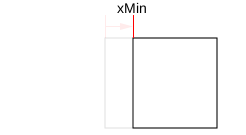
In the previous image, the value of increases while remains unchanged, which resizes the rectangle by reducing its width.
xMinxMaxConstructors
Constructor | Description |
|---|---|
| Rect(System.Single,System.Single,System.Single,System.Single) | Creates a new rectangle. |
| Rect(UnityEngine.Vector2,UnityEngine.Vector2) | Creates a rectangle given a size and position. |
| Rect(UnityEngine.Vector2@,UnityEngine.Vector2@) | Creates a rectangle given a size and position. |
Properties
Property | Description |
|---|---|
| center | The position of the center of the rectangle. |
| height | The height of the rectangle, measured from the Y position. |
| max | The position of the maximum corner of the rectangle. |
| min | The position of the minimum corner of the rectangle. |
| position | The X and Y position of the rectangle. |
| size | The width and height of the rectangle. |
| width | The width of the rectangle, measured from the X position. |
| x | The X coordinate of the rectangle. |
| xMax | The maximum X coordinate of the rectangle. |
| xMin | The minimum X coordinate of the rectangle. |
| y | The Y coordinate of the rectangle. |
| yMax | The maximum Y coordinate of the rectangle. |
| yMin | The minimum Y coordinate of the rectangle. |
Static Properties
Property | Description |
|---|---|
| zero | Shorthand for writing |
Methods
Method | Description |
|---|---|
| Contains | Returns true if the |
| Overlaps | Returns true if the other rectangle overlaps this one. If |
| Set | Set components of an existing Rect. |
| ToString | Returns a formatted string for this |
Static Methods
Method | Description |
|---|---|
| MinMaxRect | Creates a rectangle from min/max coordinate values. |
| NormalizedToPoint | Returns a point inside a rectangle, given normalized coordinates. |
| PointToNormalized | Returns the normalized coordinates corresponding to the point. |
Operators
Operator | Description |
|---|---|
| operator == | Returns true if the rectangles are the same. |