DrawLine(Vector3, Vector3, float)
Draws a line from p1 to p2.
Read time 2 minutesLast updated 7 days ago
Definition
- Type: Method
- Namespace: UnityEditor
- Assembly: UnityEditor.CoreModule
public static void DrawLine(Vector3 p1, Vector3 p2, float thickness)
Parameters
Remarks
The Handles.color and Handles.matrix properties colorize and additionally transform the line position. Unity ignores (that is, nothing happens) when the current GUI event type is not EventType.Repaint.
DrawLine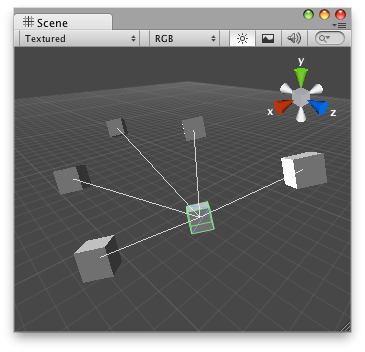
Draw Line in the Scene View.
Below is an example of an Editor script that draws lines in SceneView to GameObjects listed in a script.
// Draw lines to the connected game objects that a script has.// If the target object doesnt have any game objects attached// then it draws a line from the object to (0, 0, 0).using UnityEditor;using UnityEngine;[CustomEditor(typeof(ConnectedObjectsExampleScript))]class ConnectLineHandleExampleScript : Editor{ void OnSceneGUI() { ConnectedObjectsExampleScript connectedObjects = target as ConnectedObjectsExampleScript; if (connectedObjects.objs == null) return; Vector3 center = connectedObjects.transform.position; for (int i = 0; i < connectedObjects.objs.Length; i++) { GameObject connectedObject = connectedObjects.objs[i]; if (connectedObject) { Handles.DrawLine(center, connectedObject.transform.position); } else { Handles.DrawLine(center, Vector3.zero); } } }}
Example script to attach to a GameObject that will act as a handle:
using UnityEngine;public class ConnectedObjectsExampleScript : MonoBehaviour{ public GameObject[] objs = null;}
Line can be optionally set. Zero thickness draws a one-pixel line. Larger thickness values express line thickness in UI points. For example, a thickness of 1.0 could be two pixels wide on screen if the display zoom is 200% (see EditorGUIUtility.pixelsPerPoint).
thickness
Lines of varying thickness.
using UnityEngine;using UnityEditor;public class ExampleScript : MonoBehaviour{}// Displays lines of various thickness in the scene view[CustomEditor(typeof(ExampleScript))]public class ExampleEditor : Editor{ public void OnSceneGUI() { var t = target as ExampleScript; var tr = t.transform; var position = tr.position; Handles.color = Color.yellow; for (int i = 0; i < 10; ++i) { var linePos = position + Vector3.right * (i * 0.5f); Handles.DrawLine(linePos, linePos + Vector3.up, i); } }}
Additional Resources: Handles.lineThickness, Handles.DrawLines, Handles.DrawPolyLine, Handles.DrawWireDisc.