Documentation

​
​

Development

User Acquisition

Monetization

Industry

Asset Transformer SDK

2026.1

Supported
​

User Manual

Python API

C# API

Changelog

Discussions

Asset Transformer SDK

2026.1

Supported
​

​
​
Get started
  • System requirements
  • Licensing
  • Setup
  • Migrate from Scenario Processor
Framework
  • Framework
  • Preferences
Input/output files
  • Supported formats
  • Import files
  • Export files
  • Export textures
  • CAD vs Mesh
Scene
  • Product structure
  • Occurrence
  • Component
  • Material
  • Image
Algorithms
  • CAD
  • Healing
  • Optimization
    • Decimate to quality
    • Decimate to quality (edge collapse)
    • Decimate to target polygon count
    • Remesh surfacic holes
    • Remove occluded geometries (standard)
    • Remove occluded geometries (advanced)
    • Remove holes
    • Compute Visual Footprint
    • Filleting on meshes
    • Loop Subdivision on Triangular Meshes
  • Combine and bake
  • Reconstruction
  • UVs
Viewer
  • Viewer
Pixyz UI
  • Setup
  • Overview
  • Create a custom UI
Guidelines
  • Data preparation
  • Process point clouds
Debug and diagnose
  • Log files
  • Debug best practices
Other
  • Samples
  • Glossary
  1. Asset Transformer SDK (ex Pixyz)

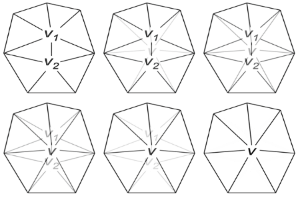
Decimate meshes by collapsing edges

Use this feature to reduce the polygon count by collapsing polygon edges, based on quality criteria.
Read time 1 minute
Last updated 9 months ago

API function: algo.decimateEdgeCollapse
Use this feature to reduce the polygon count by collapsing polygon edges, based on quality criteria.
This feature is particularly suitable for models that have soft edges or smooth textured surfaces, such as game assets and 3D scans.
Use quality criteria to avoid artifacts that result from smoothing and irregularities in topology.

Prerequisites

We strongly recommend that you perform these operations before decimation, to ensure the efficiency of decimation:
  • Repair meshes, to avoid widening cracks or gaps in meshes. Read more.
  • Remove unnecessary texture coordinates. Read more.

Parameters

This feature performs these operations:
  1. Calculate the position of a new vertex.
  2. Compute an error score for each edge with different deviations on boundaries, normals, and texture coordinates.
  3. Delete the edges that have the lowest score.

Example

This table shows examples of values:

Quality

Surface tolerance

Maximum deviation of normals

Maximum deviation of texture coordinates

High quality‚ very light decimation0.0005-1-1
Medium quality0.001-1-1
Low quality0.003-1-1

Copyright © 2026 Unity Technologies
LegalPrivacy PolicyCookiesDocumentation Terms of UseDo Not Sell or Share My Personal InformationYour Privacy Choices (Cookie Settings)

"Unity", Unity logos, and other Unity trademarks are trademarks or registered trademarks of Unity Technologies or its affiliates in the U.S and elsewhere (more info here). Other names or brands are trademarks of their respective owners.

Some pages are machine-translated for convenience, and may contain inaccuracies. In the event of conflicting information, the English version is authoritative.

  • On this page
    • Prerequisites

    • Parameters

    • Example


Report a problem with this page