Documentation

​
​

Development

User Acquisition

Monetization

Industry

Asset Transformer SDK

2026.1

Supported
​

User Manual

Python API

C# API

Changelog

Discussions

Asset Transformer SDK

2026.1

Supported
​

​
​
Get started
  • System requirements
  • Licensing
  • Setup
  • Migrate from Scenario Processor
Framework
  • Framework
  • Preferences
Input/output files
  • Supported formats
  • Import files
  • Export files
  • Export textures
  • CAD vs Mesh
Scene
  • Product structure
  • Occurrence
  • Component
  • Material
  • Image
Algorithms
  • CAD
  • Healing
  • Optimization
  • Combine and bake
  • Reconstruction
  • UVs
Viewer
  • Viewer
Pixyz UI
  • Setup
  • Overview
  • Create a custom UI
Guidelines
  • Data preparation
  • Process point clouds
Debug and diagnose
  • Log files
  • Debug best practices
Other
  • Samples
  • Glossary
  1. Asset Transformer SDK (ex Pixyz)

Framework

Learn about Pixyz's internal framework, including its C++ architecture, supported data types, modules, and entity-based system.
Read time 1 minute
Last updated 9 months ago

The internal structure of Pixyz is built to handle different types of product structures, geometry types and heavy algorithms thanks to a custom made and extensible architecture. Pixyz is entirely coded in C++. For high precision, Pixyz computes numbers in the double-precision floating-point format for most of its data structures.
The internal structure of Pixyz supports, among others, these data types:
  • BRep shapes
  • Meshes
  • Point Clouds
  • PMI
  • Variants
  • Materials
  • Images
  • ...

Modules

Pixyz API is organized into functional libraries that are referred to as modules:
  • Algo
  • CAD
  • Core
  • Geom
  • IO
  • Material
  • Polygonal
  • Scene
  • Unity
  • View

Entities

Pixyz API isn't strictly speaking object-oriented. Pixyz works with references to entities inside the framework. These references are IDs of
unsigned int
type. This processing simplifies the handling of objects that live within the framework, but requires to explicitly create or gather objects, and then to destroy them.
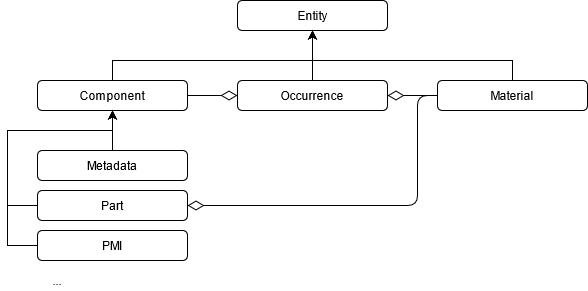
This diagram shows a simplified view of Pixyz's entity structure:
diagram
Entities are abstract objects that are defined by an unsigned integer ID. All occurrences, materials, and components have an ID property. Each ID is unique. Most functions take an ID or a list of IDs as input. Some functions can take entities of all types as input. In other words, you can indiscriminately use these functions to access occurrences, materials, and parts. Examples are these functions:
  • core.getProperty
  • core.setProperty
  • core.listProperties

Copyright © 2026 Unity Technologies
LegalPrivacy PolicyCookiesDocumentation Terms of UseDo Not Sell or Share My Personal InformationYour Privacy Choices (Cookie Settings)

"Unity", Unity logos, and other Unity trademarks are trademarks or registered trademarks of Unity Technologies or its affiliates in the U.S and elsewhere (more info here). Other names or brands are trademarks of their respective owners.

Some pages are machine-translated for convenience, and may contain inaccuracies. In the event of conflicting information, the English version is authoritative.

  • On this page
    • Modules

    • Entities


Report a problem with this page