Documentation

​
​

Development

User Acquisition

Monetization

Industry

Asset Transformer SDK

2026.1

Supported
​

User Manual

Python API

C# API

Changelog

Discussions

Asset Transformer SDK

2026.1

Supported
​

​
​
Get started
  • System requirements
  • Licensing
  • Setup
  • Migrate from Scenario Processor
Framework
  • Framework
  • Preferences
Input/output files
  • Supported formats
  • Import files
  • Export files
  • Export textures
  • CAD vs Mesh
Scene
  • Product structure
  • Occurrence
  • Component
  • Material
  • Image
Algorithms
  • CAD
  • Healing
  • Optimization
  • Combine and bake
  • Reconstruction
  • UVs
Viewer
  • Viewer
Pixyz UI
  • Setup
  • Overview
  • Create a custom UI
Guidelines
  • Data preparation
  • Process point clouds
Debug and diagnose
  • Log files
  • Debug best practices
Other
  • Samples
  • Glossary
  1. Asset Transformer SDK (ex Pixyz)

CAD vs Mesh

Learn the difference between CAD and Mesh files.
Read time 1 minute
Last updated 9 months ago

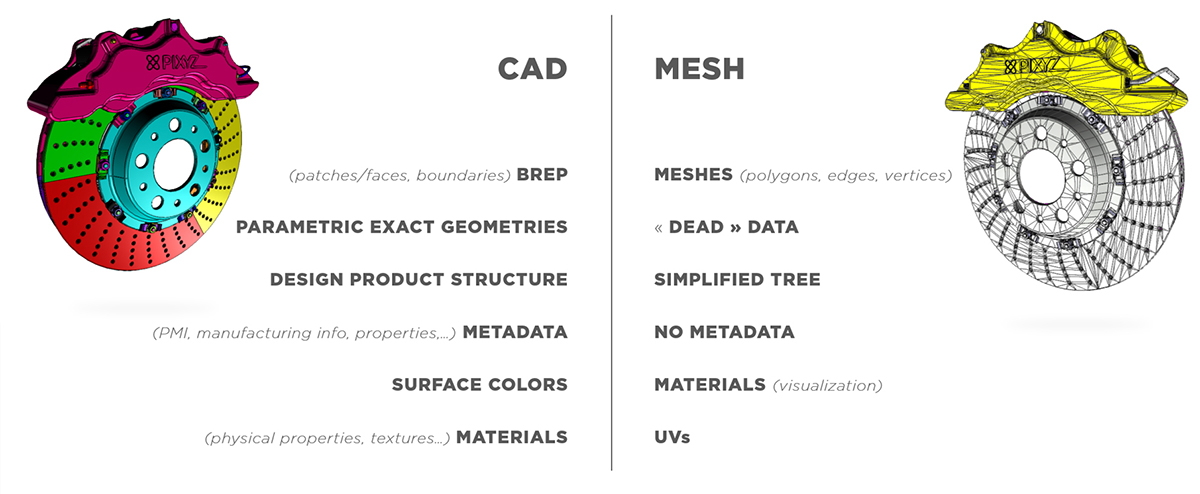
CAD models that have been created with CAD software aren't tessellated. Examples of CAD software are CATIA, NX, SolidWorks, Alias, and STEP. CAD models contain exact parametric geometries.
CAD geometries are also referred to as, among others:
  • Boundary representation (B-rep or BREP)
  • Non-uniform rational basis spline (NURBS)
  • Constructive solid geometry (CSG)
CAD bodies and CAD surfaces are made up of CAD faces, which are delimited by boundaries. CAD faces are also referred to as CAD patches.
To display CAD faces in a 3D application, you must create tessellated meshes, that is, polygonal models, from CAD geometries.
CAD models may contain additional engineering and design information, such as metadata and product manufacturing information (PMI). You can target data preparation based on this information.
Using digital content creation software (DCC), you can natively create tessellated meshes. Examples of DCC software are Maya, 3DS Max, Blender, and Modo. For example, you can export meshes as .fbx files. Then, for further optimization, you can reimport the exported files.
Meshes may contain, among others, these attributes:
  • Normals, which you can use to define how meshes react to light
  • Textures coordinates, which you can use to display textures on meshes
You can keep this information or recreate it.

Copyright © 2026 Unity Technologies
LegalPrivacy PolicyCookiesDocumentation Terms of UseDo Not Sell or Share My Personal InformationYour Privacy Choices (Cookie Settings)

"Unity", Unity logos, and other Unity trademarks are trademarks or registered trademarks of Unity Technologies or its affiliates in the U.S and elsewhere (more info here). Other names or brands are trademarks of their respective owners.

Some pages are machine-translated for convenience, and may contain inaccuracies. In the event of conflicting information, the English version is authoritative.


    Report a problem with this page