Remove occluded geometries – standard processing
Use this feature to reduce the polygon count of mesh models and optimize them for exterior viewing by deleting geometries that can't be viewed from the outside, such as parts completely concealed by others.
Read time 3 minutesLast updated 8 months ago
API function: algo.removeOccludedGeometries
To reduce the polygon count of mesh models and optimize them for exterior viewing, you can delete geometries that can't be viewed from the outside.
For example, some parts may be completely concealed by others. You can delete these parts without affecting the outside appearance of models.
This processing proves particularly efficient on these models:
- Models that have internal parts
- Models that have been designed as solids
- Models that have been designed using CAD software
This example shows a model whose polygon count decreases from 230,000 to 38,000 polygons after processing:
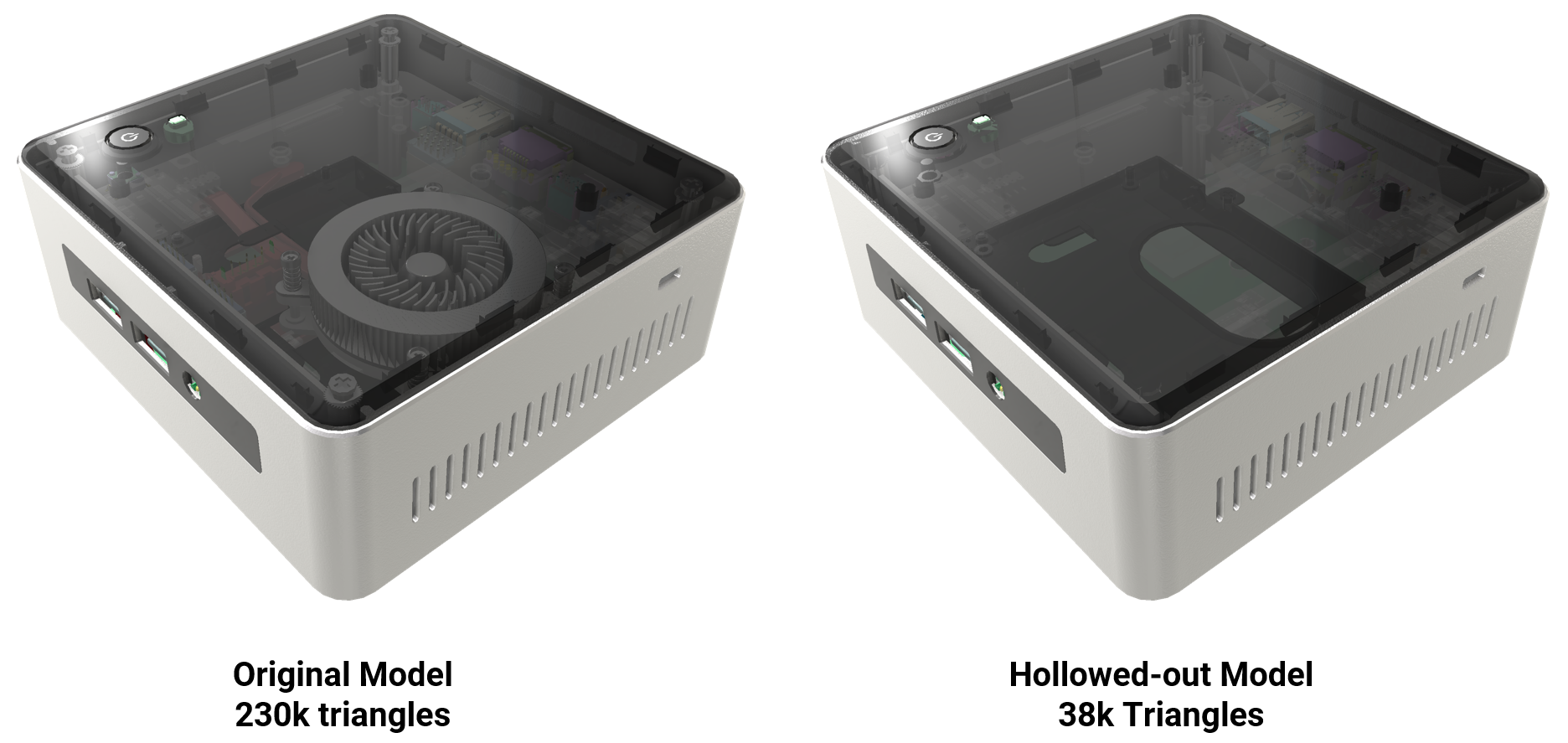
Visibility queries are performed from various angles to determine which polygons can be viewed from the outside of the model. These results are used to deduct which polygons are occluded.
The more detailed the processing, the better the final quality, but the longer the scene takes to process and the less the polygon count decreases.
To reduce the polygon count while preserving visual quality, you can set various parameters:
- The granularity level at which to process the scene – namely parts, patches, or polygons
- Camera parameters, such as the number of cameras and the image resolution
- Whether to preserve the neighboring polygons of captured polygons, to avoid apparent gaps
- Whether to preserve geometries that can be viewed through transparent materials, such as windows
Parameters
Occurrences
You can process the whole scene or part of it.
You don't need to process the areas that hide others, because these are already taken into account as potential occluders.
By definition, geometries whose property is set to aren't processed.
VisibleFalseGeometries whose property is set to are processed as follows:
VisibleTrue- Selected geometries can be deleted and are used to determine the placement of cameras.
- Unselected and selected geometries are all potential occluders.
Granularity level
Choose the granularity level at which to process the scene:
Type | Use |
|---|---|
| Part | For clean optimization, that is, to avoid apparent gaps, process the scene at the level of parts. |
Patch Polygon | To focus on reducing the polygon count, process the scene at the level of patches or polygons. |
Cameras
Placement
To simulate a 360° virtual tour, virtual cameras capture the scene from viewpoints that are located on a sphere around the selection. The geometries that can’t be captured are deleted. For better visual quality, increase the number of cameras.
The geometries whose Visible property is set to False are ignored for the placement of the sphere, so that cameras focus on the geometries to be rendered.
Resolution
Image resolution also affects how geometries are captured by cameras. The higher the resolution, the longer the processing time, but the more pixels are generated. As a result, smaller polygons are captured and preserved.
If viewers get close to the model, increase the resolution to preserve visual quality from up close. If viewers are far from the model, use low resolution.
Neighboring polygons
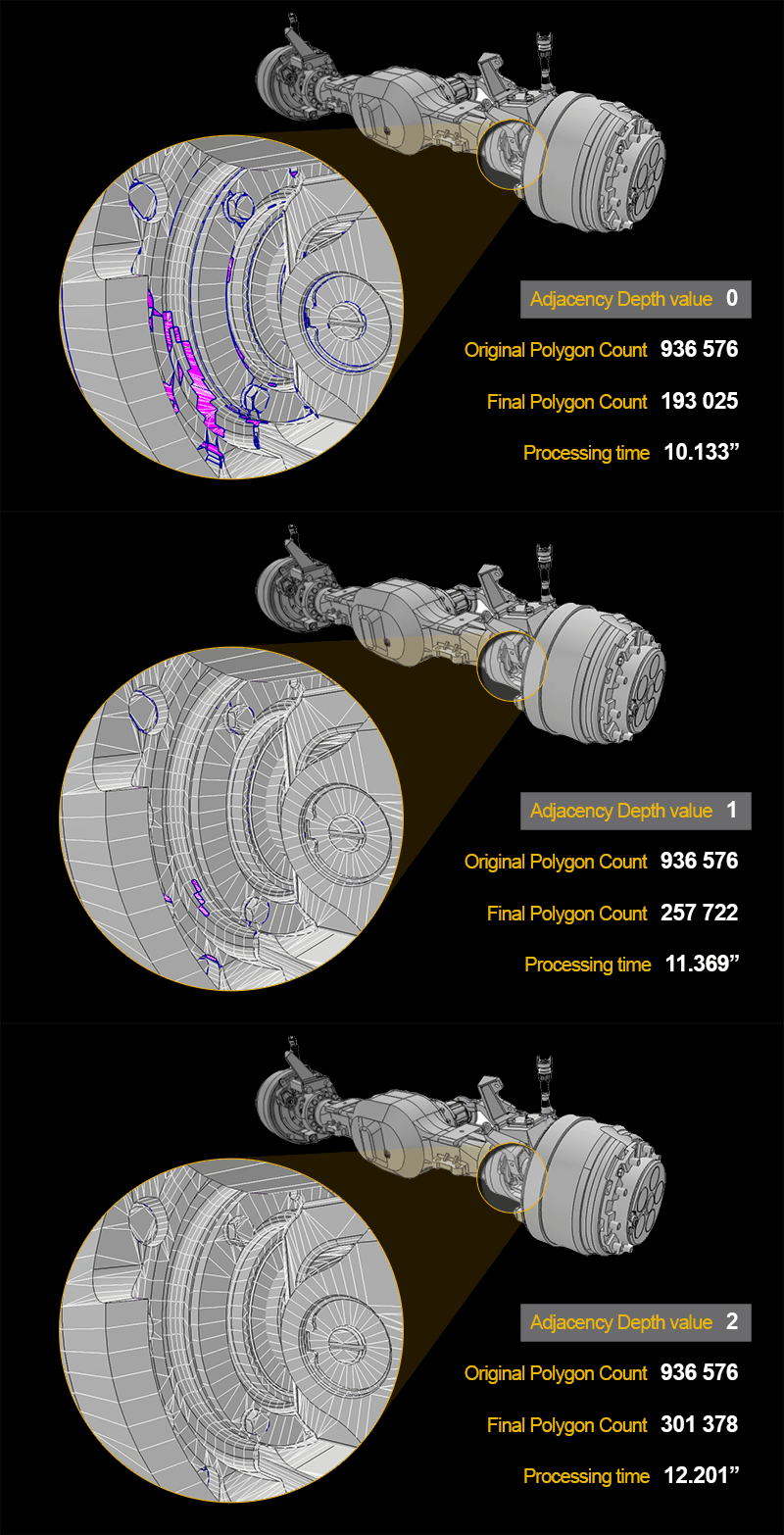
If you process the scene at the polygon level, you can preserve the neighboring polygons of captured polygons, to avoid apparent gaps. This table shows the most common options:
Adjacency depth | Neighboring polygons that are preserved | Example of use |
|---|---|---|
| 0 | None | Viewers are far from the model. You want to focus on reducing the polygon count. |
| 1 | Adjacent polygons | Viewers get closer to the model. You want to avoid apparent gaps. |
| 2 | Adjacent polygons and their adjacent polygons | Viewers get closer to the model. You want to avoid apparent gaps. |
This example illustrates how this parameter affects meshes:
Transparency
You can preserve geometries that can be viewed through transparent materials, such as windows and windshields.