Documentation

​
​

Development

User Acquisition

Monetization

Industry

Asset Transformer SDK

2026.1

Supported
​

User Manual

Python API

C# API

Changelog

Discussions

Asset Transformer SDK

2026.1

Supported
​

​
​
Get started
  • System requirements
  • Licensing
  • Setup
  • Migrate from Scenario Processor
Framework
  • Framework
  • Preferences
Input/output files
  • Supported formats
  • Import files
  • Export files
  • Export textures
  • CAD vs Mesh
Scene
  • Product structure
  • Occurrence
  • Component
  • Material
  • Image
Algorithms
  • CAD
  • Healing
  • Optimization
    • Decimate to quality
    • Decimate to quality (edge collapse)
    • Decimate to target polygon count
    • Remesh surfacic holes
    • Remove occluded geometries (standard)
    • Remove occluded geometries (advanced)
    • Remove holes
    • Compute Visual Footprint
    • Filleting on meshes
    • Loop Subdivision on Triangular Meshes
  • Combine and bake
  • Reconstruction
  • UVs
Viewer
  • Viewer
Pixyz UI
  • Setup
  • Overview
  • Create a custom UI
Guidelines
  • Data preparation
  • Process point clouds
Debug and diagnose
  • Log files
  • Debug best practices
Other
  • Samples
  • Glossary
  1. Asset Transformer SDK (ex Pixyz)

Filleting meshes

Use this feature to create fillets and chamfers on hard edges of meshes by identifying sharp edges and applying filleting operations.
Read time 1 minute
Last updated 9 months ago

API functions: algo.identifySharpEdges and algo.filletMesh
These functions allow to create fillets and chamfers on hard edges on meshes.
First, one must use the algo.identifySharpEdges to mark the edges on the
occurrences
that are to be filleted. This function allows to mark as "sharp" the edges whose angles are between
minSharpAngle
and
maxSharpAngle
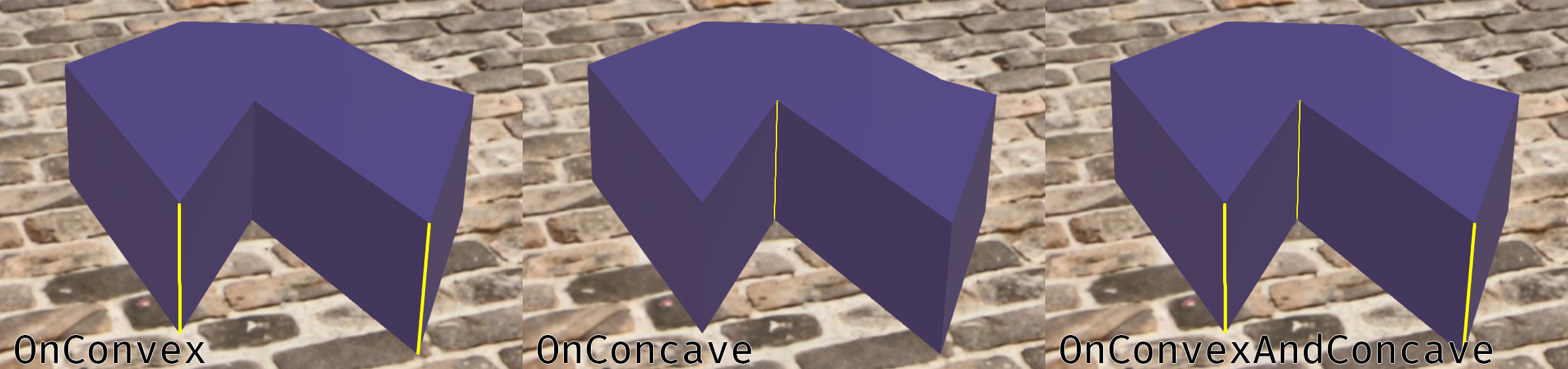
. They can be filtered by their
convexity
and using
onlyExplicitSharp
one can choose to also use the normals of the mesh for the flagging.
Convexity
Note
The viewer will not highlight the marked edges nor the ideal chamfers.
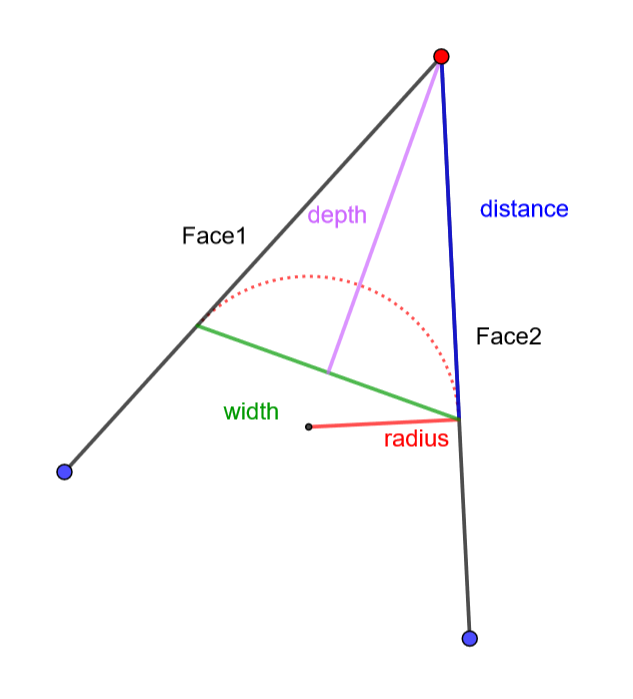
Once the edges are marked, the algo.filletMesh can be used. The
value
of the filleting depends on the
FilletingMode
.
As shown, all these parameters are linked to the angle of the edge. For instance for the same
width
a fillet on a sharp edge will have more
distance
than a fillet on a flatter edge.
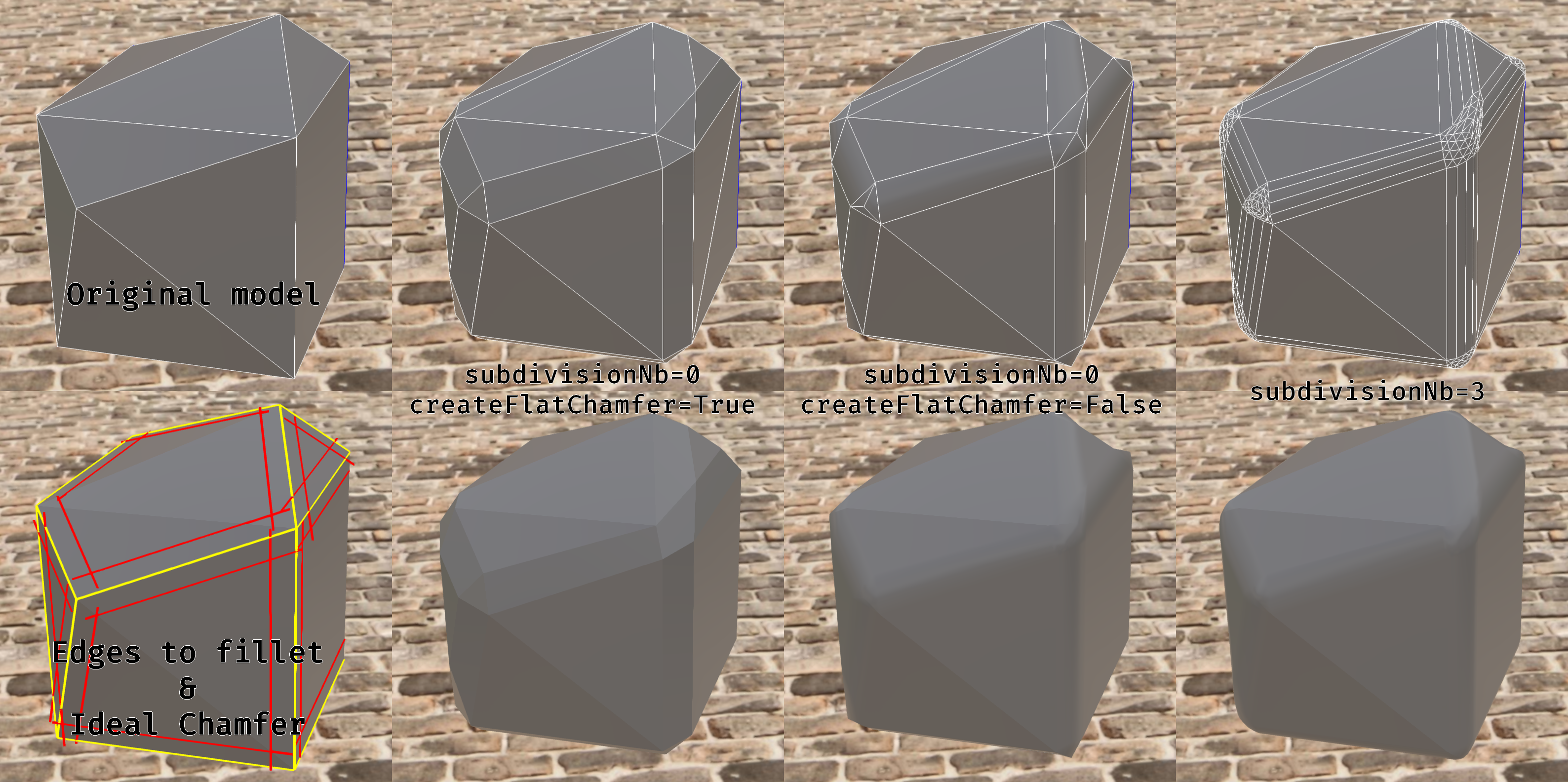
Using the parameters
subdivisionNb
and
createFlatChamfer
allows to create more or less rounded fillets and to create chamfers without normal interpolation.
FilletingMode

Copyright © 2026 Unity Technologies
LegalPrivacy PolicyCookiesDocumentation Terms of UseDo Not Sell or Share My Personal InformationYour Privacy Choices (Cookie Settings)

"Unity", Unity logos, and other Unity trademarks are trademarks or registered trademarks of Unity Technologies or its affiliates in the U.S and elsewhere (more info here). Other names or brands are trademarks of their respective owners.

Some pages are machine-translated for convenience, and may contain inaccuracies. In the event of conflicting information, the English version is authoritative.


    Report a problem with this page