Unity Authentication sessions
Manage player sessions by handling tokens, sign-in, sign-out, and token refresh during the player lifecycle.
Read time 5 minutesLast updated a month ago
This page describes the overall Unity Authentication flow from signing in, the token lifecycle, signing out, and general session management.
Signing in
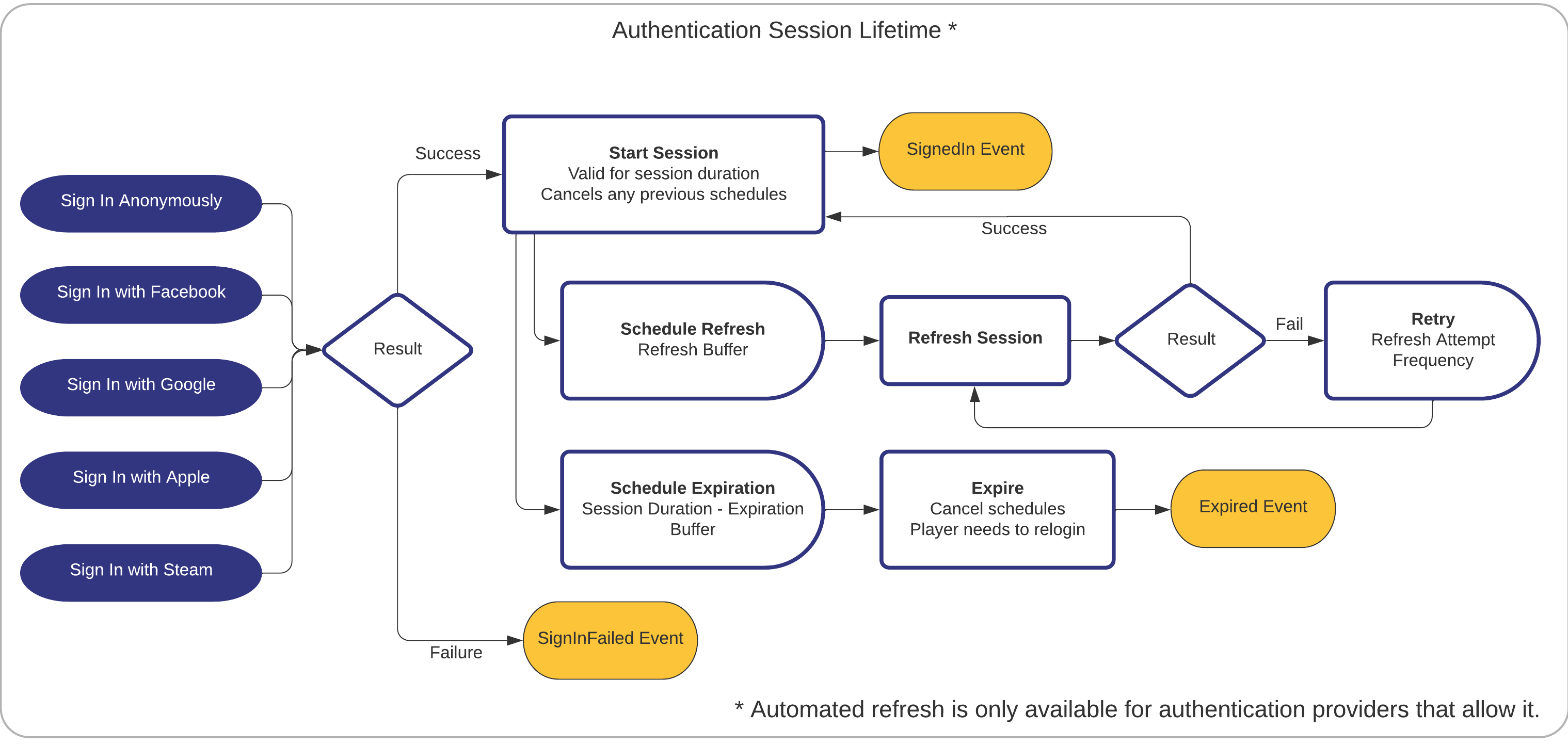
When a player successfully logs in to a device for the first time, the Unity Authentication service grants a long-lived session token. Based on this session token it also grants an access token which is valid for one hour. The access token is used to authenticate the player when calling other Unity services. Both tokens are stored on the device using Unity Player Prefs and are associated with a player profile. For more details on player profiles, refer to Profile management.
Token expiry and refreshing
To keep the player authorized beyond the one hour validity period of a single access token, the Unity Authentication service automatically attempts to periodically refresh the access token. If the refresh attempts fail before the expiration time, the access token expires and raises the event. Developers must handle this case and retry signing in for the player.
ExpiredWhen the player signs in successfully the event is raised.
SignedInIf a valid cached session token is available, then the method refreshes the access token and session token, regardless of whether the player signed in anonymously or through a platform provider. If there is no player sign-in information, this method creates a new anonymous player. For more details, refer to Sign in a cached player.
SignInAnonymouslyAsync()Signing out
Calling signs the player out by clearing the access token. By default the session token is retained. For details on clearing the session token, refer to Clearing session tokens.
AuthenticationService.Instance.SignOutWhen the player signs out successfully the event is raised.
SignedOutA player who is signed out, or where the access token has expired, retains a valid session token. However they are no longer authorized to make calls to other Unity services until the access token has been refreshed or they sign in again.
using Unity.Services.Authentication;void RegisterEvents(){ AuthenticationService.Instance.SignedIn += () => { Debug.Log($"The player has successfully signed in"); }; AuthenticationService.Instance.Expired += () => { Debug.Log($"The access token was not refreshed and has expired"); }; AuthenticationService.Instance.SignedOut += () => { Debug.Log($"The player has successfully signed out"); };}void CheckStates(){ // this is true if the access token exists, but it can be expired Debug.Log($"Is SignedIn: {AuthenticationService.Instance.IsSignedIn}"); // this is true if the access token exists and is valid/has not expired Debug.Log($"Is Authorized: {AuthenticationService.Instance.IsAuthorized}"); // this is true if the access token exists but has expired Debug.Log($"Is Expired: {AuthenticationService.Instance.IsExpired}");}
Clearing session tokens
By default the method retains the session token. This allows the player to re-authenticate without needing to sign in again. If a different player signs in using an external provider, then their tokens replace both the session and access token from the previous player.
SignOutOnly in specific circumstances it is required to explicitly clear the session token. For example when you need to sign in as a new anonymous player, because always tries to use the existing persisted session token. In that scenario you need to either clear the current player's session token, or use a different profile. You can clear the session token in the following ways:
SignInAnonymouslyAsync- Set the optional parameter during sign out, for example:
clearCredentials.AuthenticationService.Instance.SignOut(true) - If the player is already signed out, clear the token using .
AuthenticationService.Instance.ClearSessionToken()
Clearing the session token deletes it from .
PlayerPrefsTo verify if a session token is currently cached for the current profile, use .
AuthenticationService.Instance.SessionTokenExistsusing Unity.Services.Authentication;void SimpleSignOut(){ // The session token will remain but the player will not be authenticated AuthenticationService.Instance.SignOut();}void SignOutAndClearSession(){ // The session token will be deleted immediately, allowing for a new anonymous player to be created AuthenticationService.Instance.SignOut(true);}void SignOutThenClearSession(){ AuthenticationService.Instance.SignOut(); // Do something else... // Now clear the session token to allow a new anonymous player to be created AuthenticationService.Instance.ClearSessionToken();}
Sign in a cached player
A cached player is a player who has their session token persisted on the device. Every time a sign in is successful, the SDK caches a session token. A cached player exists if these conditions are fulfilled:
- The player previously signed in with Unity Authentication via anonymous login or platform login.
- The cached session token hasn't been deleted.
To verify if a session token is currently cached for the current profile, use .
AuthenticationService.Instance.SessionTokenExistsIf the session token exists, then the method recovers the existing credentials of a player, regardless of whether they signed in anonymously or through a platform account. A code example looks like this:
SignInAnonymouslyAsync()using Unity.Services.Authentication;async Task SignInCachedUserAsync(){ // Check if a cached player already exists by checking if the session token exists if (!AuthenticationService.Instance.SessionTokenExists) { // if not, then do nothing return; } // Sign in Anonymously // This call will sign in the cached player. try { await AuthenticationService.Instance.SignInAnonymouslyAsync(); Debug.Log("Sign in anonymously succeeded!"); // Shows how to get the playerID Debug.Log($"PlayerID: {AuthenticationService.Instance.PlayerId}"); } catch (AuthenticationException ex) { // Compare error code to AuthenticationErrorCodes // Notify the player with the proper error message Debug.LogException(ex); } catch (RequestFailedException ex) { // Compare error code to CommonErrorCodes // Notify the player with the proper error message Debug.LogException(ex); }}