Documentation

​
​

Development

User Acquisition

Monetization

Industry

Authentication

Unity SDK

Admin API

Client API

Open Unity Dashboard

Authentication

LiveOps
​
​
Authentication
  • Overview
  • Get started
  • Concepts
    • How Authentication works
    • Approaches to authentication
    • Sessions and cached players
    • Manage profiles
    • Manage player names
    • Manage linked external identities
    • Player prefs
    • Delete accounts
    • Authentication native SDK
    • Digital Services Act Notifications
  • Tutorials
  • Reference
  • Privacy and consent
  1. Unity Authentication

Manage linked external identities

Handle account linking conflicts and manage multiple linked external identities for players.
Read time 1 minute
Last updated 9 months ago

Managing a player’s linked external identities is important to ensure your players can secure their accounts and use the access method of their choice. When offering account linking to your customers, it's important to properly handle every scenario.
A player can have multiple linked unique external identities (e.g. Apple, Facebook, Google). However, an external identity can only be linked to a single player (e.g. one player ID cannot be linked to multiple Google identities).

Retrieve a player's information

GetPlayerInfoAsync()
can be used to load a player’s information which includes their linked identities.

Handle account linking conflicts

The linking operations will throw an error if an identity is already linked to another player.
When there’s a conflict, it’s important to inform the player of the situation.
An optional parameter can be provided to force the link to be created. Using this option will remove the initial link which can make the initial account unrecoverable.
We recommend offering the following options in case of conflict:
  • Choose to force the link and keep the current account.
  • Choose to switch to the initial account by using the
    SignInWith*
    API.
  • Choose to cancel the action and remain in the current state.
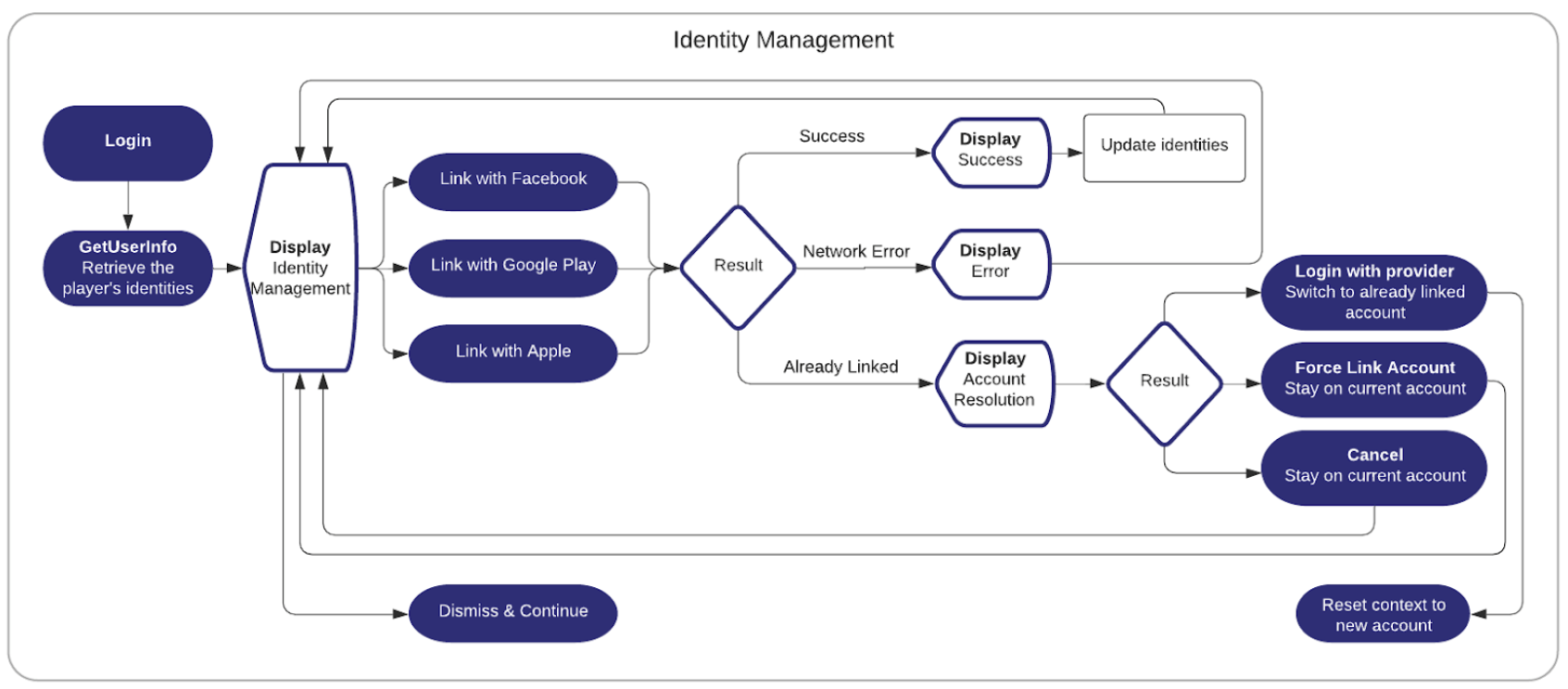
An example workflow for identity management that presents the previously mentioned options for how to handle conflicts.

Copyright © 2026 Unity Technologies
LegalPrivacy PolicyCookiesDocumentation Terms of UseDo Not Sell or Share My Personal InformationYour Privacy Choices (Cookie Settings)

"Unity", Unity logos, and other Unity trademarks are trademarks or registered trademarks of Unity Technologies or its affiliates in the U.S and elsewhere (more info here). Other names or brands are trademarks of their respective owners.

Some pages are machine-translated for convenience, and may contain inaccuracies. In the event of conflicting information, the English version is authoritative.

  • On this page
    • Retrieve a player's information

    • Handle account linking conflicts


Report a problem with this page