Profiler モジュールの詳細パネルの作成
Customize the module details panel to display specific data about your application.
読み終わるまでの所要時間 10 分最終更新 1ヶ月前
モジュールを選択すると、Profiler ウィンドウ の下部にモジュール詳細パネルが表示されます。このセクションをカスタマイズして、モジュールに関連する追加の詳細を表示したり、パフォーマンスデータをカスタム製の可視化で表示したりすることができます。
Profiler モジュールのモジュール詳細パネルを作成するには、以下を行います。
- カスタムモジュール詳細パネルを描画するための モジュール詳細パネルのコントローラースクリプト を作成します。
- コントローラーを Profiler モジュールに接続するための Profiler モジュールスクリプトを作成 します。
モジュール詳細パネルを制御するスクリプトの作成
ProfilerModuleViewControllerスクリプトでは以下の行う必要があります。
- 基本コンストラクター を呼び出すビューコントローラーのパブリックコンストラクターを定義します。
base(profilerWindow) - をオーバーライドして、カスタムモジュール詳細パネルを構築します。
CreateView
例:
public class CustomDetailsViewController : ProfilerModuleViewController { public CustomDetailsViewController(ProfilerWindow profilerWindow) : base(profilerWindow) { } protected override VisualElement CreateView() { // Create your UI. }}
モジュール詳細パネルコントローラースクリプト例
以下のサンプルスクリプトは、モジュール詳細パネルにテキストを表示するラベルを 1 つ描画するモジュール詳細パネルコントローラーを作成します。

スクリプト例では、以下の処理を行います。
- 取り込みたい値を表示するラベルを定義作成し、このラベルをモジュールの詳細パネルに加えます。
- モジュール詳細パネルを制御するためのコンストラクターを定義し、を使用してカスタムモジュール詳細パネルを構築します。
CreateView - ラベルに現在のフレームからのデータを入力し、各フレームの後にラベルを更新します。
- カウンターの値を文字列として取得し、モジュール詳細パネルに表示することができます。
- モジュールの詳細パネルに表示するテキストを指定し、Profiler がフレームごとに自動的に更新するように指示します。
using UnityEditor; using UnityEditorInternal; using Unity.Profiling.Editor; using UnityEngine.UIElements; public class TankEffectsDetailsViewController : ProfilerModuleViewController { // Define a label, which will display the total particle count for tank trails in the selected frame. Label m_TankTrailParticleCountLabel; // Define a constructor for the view controller, which calls the base constructor with the Profiler Window passed from the module. public TankEffectsDetailsViewController(ProfilerWindow profilerWindow) : base(profilerWindow) { } { var view = CreateView(); // Populate the view with the current data for the selected frame. ReloadData(); // Be notified when the selected frame index in the Profiler Window changes, so we can update the label. ProfilerWindow.SelectedFrameIndexChanged += OnSelectedFrameIndexChanged; return view; } protected virtual VisualElement CreateView() { var view = new VisualElement(); // Create the label and add it to the view. m_TankTrailParticleCountLabel = new Label() { style = { paddingTop = 8, paddingLeft = 8 } }; view.Add(m_TankTrailParticleCountLabel); } // Override Dispose to do any cleanup of the view when it is destroyed. This is a standard C# Dispose pattern. protected override void Dispose(bool disposing) { if (!disposing) return; // Unsubscribe from the Profiler window event that we previously subscribed to. ProfilerWindow.SelectedFrameIndexChanged -= OnSelectedFrameIndexChanged; base.Dispose(disposing); } protected virtual void ReloadData() { // Retrieve the TankTrailParticleCount counter value from the Profiler as a formatted string. var selectedFrameIndexInt32 = System.Convert.ToInt32(ProfilerWindow.selectedFrameIndex); var value = ProfilerDriver.GetFormattedCounterValue(selectedFrameIndexInt32, GameStatistics.TanksCategory.Name, GameStatistics.TankTrailParticleCountName); // Update the label's text with the value. m_TankTrailParticleCountLabel.text = $"The value of '{GameStatistics.TankTrailParticleCountName}' in the selected frame is {value}."; } void OnSelectedFrameIndexChanged(long selectedFrameIndex) { // Update the label with the current data for the newly selected frame. ReloadData(); }}
**豆知識:**Unity の UI Toolkit を使用して、モジュール詳細パネルのカスタム UI を構築できます。詳細については、UI Toolkit を参照してください。
以下の画像例は、カスタム Adaptive Performance モジュールに属するカスタムモジュール詳細パネルを示しています。
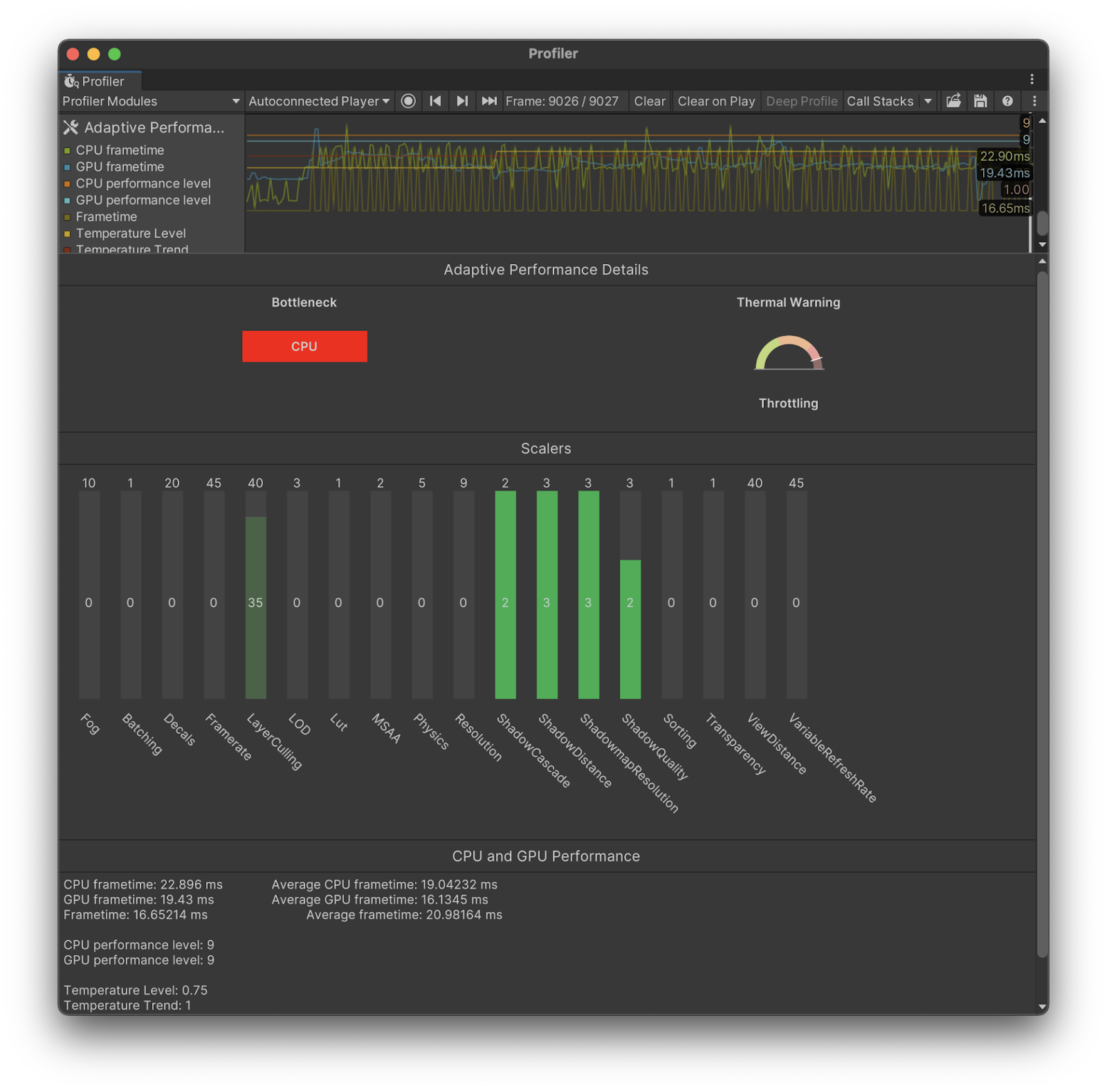
Profiler モジュールへカスタムモジュール詳細パネルを接続
カスタムモジュール詳細パネルを表示するには、Profiler モジュールを選択するときに、モジュール詳細パネルコントローラーをインスタンス化する必要があります。これを行うには、 をオーバーライドして、新しいモジュール詳細パネルコントローラーを作成し、描画します。その後、Unity は、モジュールの詳細パネルを表示するときにこのメソッドを呼び出します。
CreateDetailsViewController以下のコード例では、 というモジュールのカスタムモジュール詳細パネルをインスタンス化します。
TankEffectsProfilerModuleusing Unity.Profiling.Editor;[System.Serializable][ProfilerModuleMetadata("Tank Effects")]public class TankEffectsProfilerModule : ProfilerModule{ static readonly ProfilerCounterDescriptor[] k_Counters = new ProfilerCounterDescriptor[] { new ProfilerCounterDescriptor(GameStatistics.TankTrailParticleCountName, GameStatistics.TanksCategory), new ProfilerCounterDescriptor(GameStatistics.ShellExplosionParticleCountName, GameStatistics.TanksCategory), new ProfilerCounterDescriptor(GameStatistics.TankExplosionParticleCountName, GameStatistics.TanksCategory), }; public TankEffectsProfilerModule() : base(k_Counters) { } public override ProfilerModuleViewController CreateDetailsViewController() { return new TankEffectsDetailsViewController(ProfilerWindow); }}
モジュール詳細パネルで追加カウンターを可視化
モジュールのチャートビューに含まれていない追加の プロファイラーカウンター を表示できます。これは、選択したフレームの追加データを表示したい場合に便利です。
Profiler は、モジュールがアクティブなときに、モジュールのチャートビューに属するすべてのカウンターのカテゴリを自動的に取得します。追加のカウンターを取得するには、モジュールがアクティブなときに特定のカテゴリを取得するように Profiler に指示するスクリプトを記述します。
例えば、以下のスクリプトは、 コンストラクター引数を使用して、 カテゴリと カテゴリを指定しています。スクリプトは、モジュールがアクティブなときに、これらのカテゴリを有効にします。
autoEnabledCategoryNamesScriptsMemoryusing Unity.Profiling;using Unity.Profiling.Editor;[System.Serializable][ProfilerModuleMetadata("Tank Effects & Memory")]public class TankEffectsAndMemoryProfilerModule : ProfilerModule{ static readonly ProfilerCounterDescriptor[] k_Counters = new ProfilerCounterDescriptor[] { new ProfilerCounterDescriptor(GameStatistics.TankTrailParticleCountName, ProfilerCategory.Scripts), new ProfilerCounterDescriptor(GameStatistics.ShellExplosionParticleCountName, ProfilerCategory.Scripts), new ProfilerCounterDescriptor(GameStatistics.TankExplosionParticleCountName, ProfilerCategory.Scripts), }; // Enable the ProfilerCategory.Scripts and ProfilerCategory.Memory categories when the module is active. static readonly string[] k_AutoEnabledCategoryNames = new string[] { ProfilerCategory.Scripts.Name, ProfilerCategory.Memory.Name }; public override ProfilerModuleViewController CreateDetailsViewController() { return new TankEffectsAndMemoryDetailsViewController(ProfilerWindow); } // Pass the auto-enabled category names to the base constructor. public TankEffectsProfilerModule() : base(k_Counters, autoEnabledCategoryNames: k_AutoEnabledCategoryNames) { }}
以下のサンプルコードは、ビルトイン Mesh Memory プロファイラーカウンター と を表示します。
TankTrailParticleCountusing UnityEditor;using UnityEditorInternal;using Unity.Profiling.Editor;using UnityEngine.UIElements;public class TankEffectsAndMemoryDetailsViewController : TankEffectsDetailsViewController{ // Define a label, which will display the total mesh memory in the selected frame Label m_MeshMemoryLabel; protected override VisualElement CreateView() { var view = base.CreateView(); // Create the label and add it to the view. m_MeshMemoryLabel = new Label() { style = { paddingTop = 8, paddingLeft = 8 } }; view.Add(m_MeshMemoryLabel); } protected override void ReloadData() { base.ReloadData(); // Retrieve the Mesh Memory counter value from the Profiler as a formatted string. var selectedFrameIndexInt32 = System.Convert.ToInt32(ProfilerWindow.selectedFrameIndex); var value = ProfilerDriver.GetFormattedCounterValue(selectedFrameIndexInt32, ProfilerArea.Memory, "Mesh Memory"); // Update the label's text with the value. m_MeshMemoryLabel.text = $"The value of 'Mesh Memory' in the selected frame is {value}."; }}