Documentation

​
​

Development

User Acquisition

Monetization

Industry

LevelPlay SDK - Unity

Unity SDK

Android SDK

iOS SDK

Adobe AIR SDK

Flutter SDK

React Native SDK

LevelPlay SDK - Unity

Unity LevelPlay
​
​
Unity SDK
  • Get started
  • Regulations and settings
  • Ad formats
  • Mediated networks
    • Mediation Networks for Unity
      • Adapter range support
    • Mediation network guides
    • Add SKAdNetwork IDs manually
    • Ad Quality supported ad sources
  • Test your integration
  1. Grow your game
  2. Unity LevelPlay
  3. LevelPlay SDK
  4. LevelPlay SDK for Unity developers

Mediation Networks for Unity

Configure and integrate multiple ad networks into your project using the LevelPlay mediation platform by downloading and adding the necessary adapters.
Read time 14 minutes
Last updated 21 hours ago

The Unity LevelPlay mediation platform supports banner, interstitial, and video ads from multiple ad networks, equipped with smart loading, ad placement technology, and ad delivery optimization.

Prerequisites

Ensure that you have correctly integrated Rewarded Video, Interstitial or Banner Ads into your application.
AndroidX: Starting with SDK 18.0.0, AdMob migrated from Android Support Libraries to Jetpack (AndroidX) Libraries. For more information, refer to the Google Play services release notes.

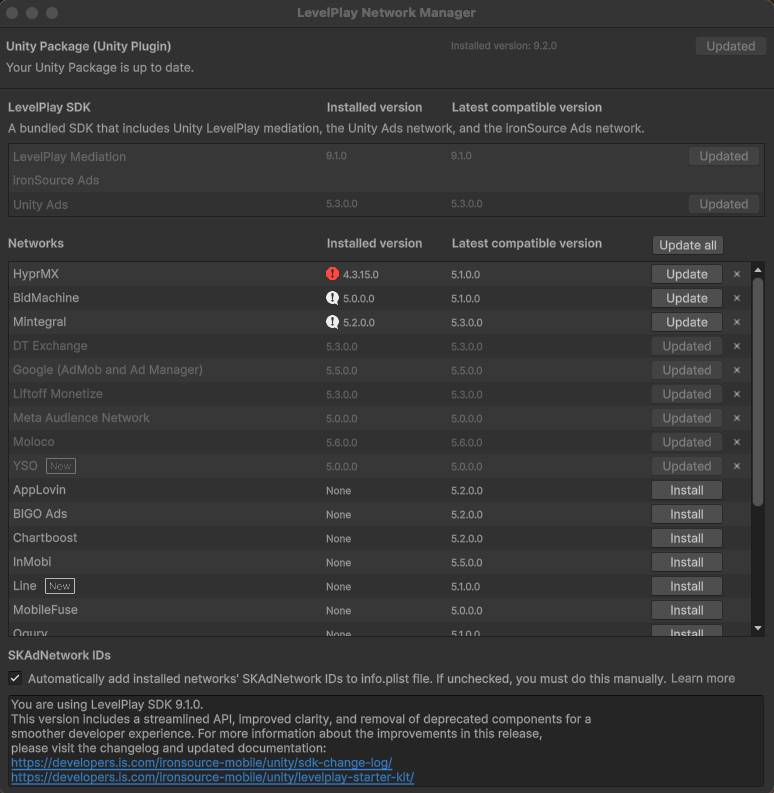
LevelPlay Network Manager

To add a new network or to upgrade to the latest adapter, complete the following steps:
  1. Go to Ads Mediation > Network Manager.
  2. Select Install or Update.
The LevelPlay Network Manager in Unity.

Android (Manual Resolve)

To apply your changes, ensure that you use the "Resolve" process. This will download all relevant artifacts, according to your choices. For more information, refer to Unity Package integration.

Unity Ads SDK

Starting with LevelPlay Unity package version 9.0.0, the Unity Ads network adapter will be automatically updated to the latest compatible version when the Unity package is updated. The recommended best practice is to always update to the latest adapter version to take advantage of new features, fixes, and improvements from the ad network.
If necessary, you can manually specify a different compatible Unity Ads adapter version by completing the following steps:
  1. After you install the LevelPlay package, locate the file
    ISUnityAdsAdapterDependencies.xml
    under the folder LevelPlay > Editor.
  2. Specify the version to install between the tag
    <unityversion>
    and
    </unityversion>
    .
  3. Verify that the Android (
    <androidPackage spec="…">
    ) and iOS (
    <iosPod version="…">
    ) dependency versions in the XML match or are compatible with your specified adapter version.

Integrate network adapters

Download a mediation adapter from the following table and refer to the corresponding ad network integration guide to access premium ad inventory through the LevelPlay mediation platform.
Note
An adapter contains the SDK of a specific ad network and the required code for operating the ad network. You do not need to integrate any additional SDKs or implement any further code in your app.

Ad network

Adapter version

Supported SDK version

Supported Ad Units

Changelog

AppLovin
5.12.0.0
  • iOS 13.6.4
  • Android 13.6.4
Banner, interstitial, rewarded video
  • iOS Changelog
  • Android Changelog
APS
5.11.0.0
  • iOS 5.6.5
  • Android 12.+
Banner, interstitial, rewarded video
  • iOS Changelog
  • Android Changelog
BidMachine
5.9.0.0
  • iOS 3.8.0
  • Android 3.8.0
Banner, interstitial, rewarded video
  • iOS Changelog
  • Android Changelog
BIGO Ads
5.20.0.0
  • iOS 6.0.0
  • Android 6.1.0
Banner, interstitial, rewarded video
  • iOS Changelog
  • Android Changelog
Chartboost
5.12.0.0
  • iOS 9.14.0
  • Android 9.14.0
Banner, interstitial, rewarded video
  • iOS Changelog
  • Android Changelog
DT Exchange
5.17.0.0
  • iOS 8.4.10
  • Android 8.4.7
Banner, interstitial, rewarded video
  • iOS Changelog
  • Android Changelog
  • Google Ad Manager
  • Google AdMob
5.26.0.0
  • iOS 13.9.0
  • Android 1.3.1
Banner, interstitial, rewarded video
  • iOS Changelog
  • Android Changelog
HyprMX
5.5.0.0
  • iOS 6.4.6
  • Android 6.4.6
Banner, interstitial, rewarded video
  • iOS Changelog
  • Android Changelog
InMobi
5.14.0.0
  • iOS 11.4.1
  • Android 11.4.1
Banner, interstitial, rewarded video
  • iOS Changelog
  • Android Changelog
Liftoff Monetize
5.23.0.0
  • iOS 7.7.7
  • Android 7.7.8
Banner, interstitial, rewarded video
  • iOS Changelog
  • Android Changelog
LY Ads Network
5.10.0.0
  • iOS 3.1.1
  • Android 3.1.1
Banner, interstitial, rewarded video
  • iOS Changelog
  • Android Changelog
Meta Audience Network
5.7.0.0
  • iOS 6.22.0
  • Android 6.22.0
Banner, interstitial, rewarded video
  • iOS Changelog
  • Android Changelog
Mintegral
5.32.0.0
  • iOS 8.1.7
  • Android 17.1.81
Banner, interstitial, rewarded video
  • iOS Changelog
  • Android Changelog
MobileFuse
5.6.0.0
  • iOS 1.12.0
  • Android 1.12.0
Banner, interstitial, rewarded video
  • iOS Changelog
  • Android Changelog
Moloco
5.25.0.0
  • iOS 4.10.0
  • Android 4.12.0
Banner, interstitial, rewarded video
  • iOS Changelog
  • Android Changelog
Ogury
5.12.0.0
  • iOS 5.3.0
  • Android 6.3.1
Banner, interstitial, rewarded video
  • iOS Changelog
  • Android Changelog
Pangle
5.38.0.0
  • iOS 8.3.0.6
  • Android 8.3.0.3
Banner, interstitial, rewarded video
  • iOS Changelog
  • Android Changelog
PubMatic
5.12.0.0
  • iOS 5.4.0
  • Android 5.4.0
Banner, interstitial, rewarded video
  • iOS Changelog
  • Android Changelog
Smaato
5.11.0.0
  • iOS 23.2.1
  • Android 23.2.2
Banner, interstitial, rewarded video
  • iOS Changelog
  • Android Changelog
SuperAwesome
5.6.0.0
  • iOS 9.4.0
  • Android 10.3.2
Interstitial, rewarded video
  • iOS Changelog
  • Android Changelog
Tencent
5.7.0.0
  • iOS 4.16.05
  • Android - Not applicable
Banner, interstitial, rewarded video
  • iOS Changelog
  • Android - Not applicable
Unity Ads
5.13.0.0
  • iOS 4.20.0
  • Android 4.20.0
Banner, interstitial, rewarded video
  • iOS Changelog
  • Android Changelog
Verve
5.12.0.0
  • iOS 3.8.1
  • Android 3.9.2
Banner, interstitial, rewarded video
  • iOS Changelog
  • Android Changelog
VK Ad Network
5.15.0.0
  • iOS 5.46.0
  • Android 5.51.2
Banner, interstitial, rewarded video
  • iOS Changelog
  • Android Changelog
Yandex Ads
5.21.0.0
  • iOS 8.5.0
  • Android 8.4.0
Banner, interstitial, rewarded video
  • iOS Changelog
  • Android Changelog

Manual integration of adapters using XML

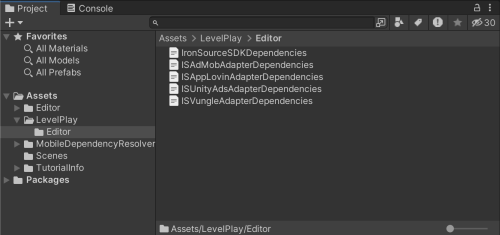
  1. Download the adapters XML file
  2. Add the files to Assets > LevelPlay > Editor.
Note
For LevelPlay SDK versions 8.0.0 or earlier, add the files to Assets > IronSource > Editor.
The Assets LevelPlay Editor folder structure in Unity.

Manual integration of Android and iOS adapters

Note
You can manually download an adapter only if you're not using LevelPlay Network Manager.

Android Manual Integration

  1. Download the relevant adapters.
  2. Copy the .aar or .jar files into
    /Assets/Plugins/Android
    in your Unity Project.

iOS Manual Integration

  1. Download the relevant adapters using the relevant download links from here.
  2. Unzip the file and add IronSource.framework into
    /Assets/Plugins/iOS
    in your Unity Project.

Verify your integration

To verify your LevelPlay SDK and additional ad network integrations, refer to Integration Helper for Unity.

Copyright © 2026 Unity Technologies
LegalPrivacy PolicyCookiesDocumentation Terms of UseDo Not Sell or Share My Personal InformationYour Privacy Choices (Cookie Settings)

"Unity", Unity logos, and other Unity trademarks are trademarks or registered trademarks of Unity Technologies or its affiliates in the U.S and elsewhere (more info here). Other names or brands are trademarks of their respective owners.

Some pages are machine-translated for convenience, and may contain inaccuracies. In the event of conflicting information, the English version is authoritative.

  • On this page
    • Prerequisites

    • LevelPlay Network Manager

      • Android (Manual Resolve)

    • Unity Ads SDK

    • Integrate network adapters

      • Manual integration of adapters using XML

      • Manual integration of Android and iOS adapters

        • Android Manual Integration

        • iOS Manual Integration

    • Verify your integration


Report a problem with this page