Simple server time anti-cheat
Prevent timing-based exploits by using server time as the source of truth.
Read time 8 minutesLast updated 8 months ago
Games are often built with some form of a timing element. Some examples of timing elements include:
- An in-game item is only available for purchase from an auction that expires at a certain date.
- A building cannot be built in the world of an RTS game until a cooldown has been reached.
- A non-player character (NPC) only appears after the first few days of starting the game.
The simplest way to build this logic is to use the device time. However, using the device time can come with its own set of challenges.
In the auction example, it would be very difficult to synchronize the end of the bidding across multiple devices in multiple time zones. Doing so might result in some players having more time to outbid others or gather additional resources for the item. Furthermore, players would be able to cheat in the game by changing the clock on their device and thus increasing the time left on the auction. The unintended effects of relying on device time are not limited to malicious behavior (such as in the example of speeding up the cooldown) in a world-building game. Players might unintentionally end up with the wrong time on their device which might result in an NPC appearing at the wrong time, spoiling the user experience.
These examples do not prevent all malicious behavior. Cloud Code cannot prevent players from altering the code of their game clients which might enable them to interact with other Unity services directly. The writing of fully-fledged server-authoritative code is a planned feature for Cloud Code.
Basic example
Cloud Code offers a central server time you can use in your game logic. The following example shows a simple way to use Cloud Code's central server time:
JavaScript
/* * Return the current UNIX timestamp of the server and its UTC string representation */module.exports = async () => { // Get the current server timestamp const unixTimestamp = Date.now(); // Convert the timestamp to a JavaScript Date object const currentDate = new Date(unixTimestamp); // Create a Universal Coordinate Time (UTC) string const utcString = currentDate.toUTCString(); // Return both the timestamp and the formatted string back to the game client return { timestamp: unixTimestamp, formattedDate: utcString, };};
Leveraging Cloud Save
You can take the world-building example a step further by including Cloud Save. You can set the cooldown before a building becomes available as a UNIX timestamp in a key in Cloud Save:
JavaScript
/* * Set the cooldown for a building with id "MUSEUM_BUILDING" in Cloud Save */const { DataApi } = require('@unity-services/cloud-save-1.4');// The Cloud Save key for the buildingconst MUSEUM_KEY = 'MUSEUM_BUILDING';// The cooldown before the "MUSEUM_BUILDING" is allowed to be built again.const MUSEUM_COOLDOWN = 30;module.exports = async ({ context, logger }) => { // Initialize a Cloud Save API client using the player credentials const { projectId, playerId } = context; const cloudSaveApi = new DataApi(context); // Get the current server timestamp and calculate when the cooldown is finished (in milliseconds) const currentTimestamp = Date.now(); const expiresAt = currentTimestamp + MUSEUM_COOLDOWN * 1000; // Save the data in Cloud Save try { await cloudSaveApi.setItem(projectId, playerId, { key: MUSEUM_KEY, value: expiresAt }); } catch (error) { let errorMessage; if (error.response) { // If the error is from the Cloud Save server errorMessage = JSON.stringify({ response: error.response.data, status: error.response.status, headers: error.response.headers, }); } else { // If the error is from the script errorMessage = JSON.stringify(error.message); } logger.error( `Could not save the key ${MUSEUM_KEY} in Cloud Save. Got error ${errorMessage}` ); // Return an error to the game client throw Error(`An error occurred when setting the cooldown of the ${MUSEUM_KEY}`); } // Return the current server time and when the cooldown expires return { serverTimestamp: currentTimestamp, cooldown: { durationSeconds: MUSEUM_COOLDOWN, expiresAt: expiresAt, }, };};
When a user attempts to place the building in their world, you can use a Cloud Code script to verify that the cooldown has finished:
JavaScript
/* * Validate that the cooldown for a building with id "MUSEUM_BUILDING" in Cloud Save has expired */const { DataApi } = require('@unity-services/cloud-save-1.4');// The Cloud Save key for the buildingconst MUSEUM_KEY = 'MUSEUM_BUILDING';module.exports = async ({ context, logger }) => { // Initialize a Cloud Save API client using the player credentials const { projectId, playerId } = context; const cloudSaveApi = new DataApi(context); const currentTimestamp = Date.now(); let cooldown; // Get the data from Cloud Save try { let { data: response } = await cloudSaveApi.getItems(projectId, playerId, [MUSEUM_KEY]); cooldown = response?.results?.[0]?.value ?? 0; } catch (error) { let errorMessage; if (error.response) { // If the error is from the Cloud Save server errorMessage = JSON.stringify({ response: error.response.data, status: error.response.status, headers: error.response.headers, }); } else { // If the error is from the script errorMessage = JSON.stringify(error.message); } logger.error( `Could not get the key ${MUSEUM_KEY} in Cloud Save. Got error ${errorMessage}` ); // Return an error to the game client throw Error(`An error occurred when getting the cooldown of the ${MUSEUM_KEY}`); } // Return a response to the client which indicates if the building can be built and if not, how long is left on the cooldown const timeRemaining = (cooldown - currentTimestamp) / 1000; const hasExpired = timeRemaining < 0 ? true : false; return { serverTimestamp: currentTimestamp, cooldown: { hasExpired: hasExpired, timeRemaining: hasExpired ? 0 : timeRemaining, }, };};
Parameterize the scripts and include Remote Config
Script parameters are a useful feature of Cloud Code that can make the script more generic and reusable for different building types. You can also use Lodash to more easily iterate over objects and arrays.
You can make the script even more configurable by including Remote Config. You can create an integer setting for each building in your game using a key. Then, you can set the values for each cooldown and save the configuration.
${BUILDING_ID}_COOLDOWN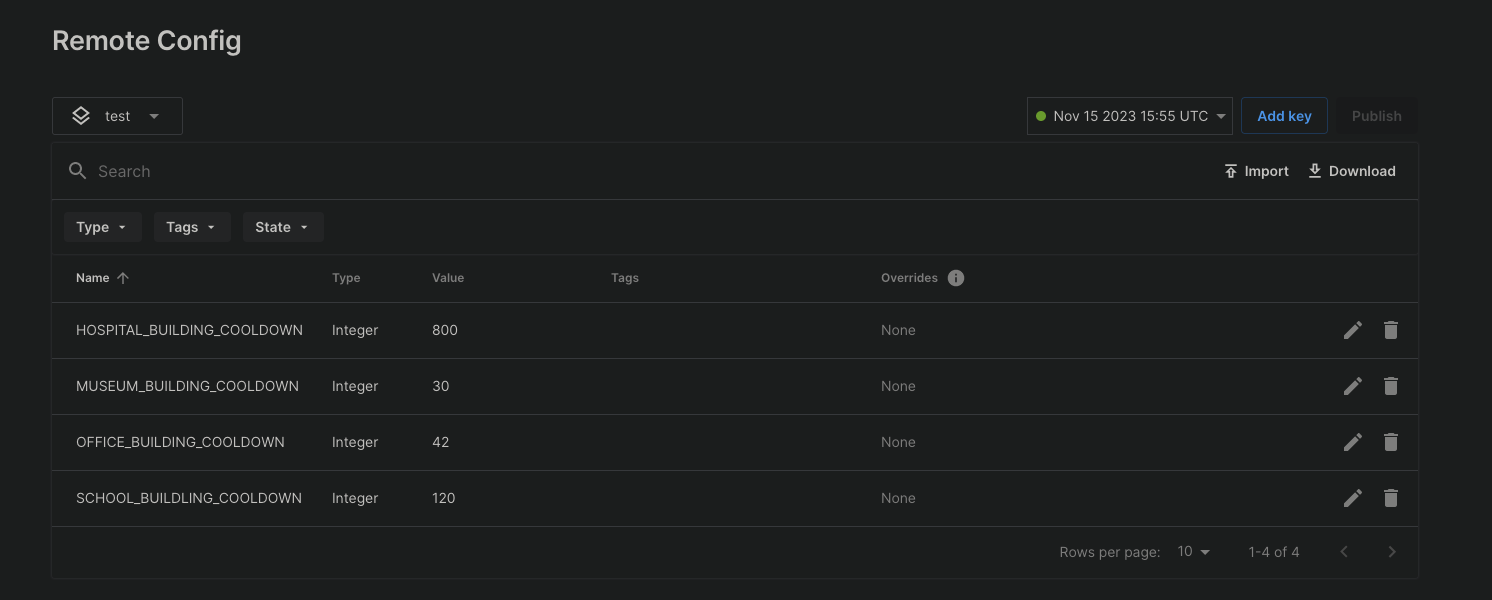
A list of integer settings and their values in the Remote Config configuration.
After saving the Remote Config settings, you can set the cooldown of a building from a Cloud Code script:
JavaScript
/* * Use a script parameter "builidngId" for fetching the cooldown settings for a building from Remote Config. * Calculate when the cooldown for a building will expire and set the timestamp in Cloud Save. * Note: The Remote Config settings need to be saved before they become available to a Cloud Code script. */const { DataApi } = require('@unity-services/cloud-save-1.4');const { SettingsApi } = require('@unity-services/remote-config-1.1');const _ = require('lodash-4.17');module.exports = async ({ params, context, logger }) => { // Initialize Cloud Save and RemoteConfig API clients using the player credentials const { projectId, playerId, environmentId } = context; const cloudSaveApi = new DataApi(context); const remoteConfig = new SettingsApi(context); const currentTimestamp = Date.now(); let configuredCooldown; let expiresAt; try { // Get the cooldown value for the "buildingId" from RemoteConfig const remoteConfigCooldownId = `${params.buildingId}_COOLDOWN`; const remoteConfigResponse = await remoteConfig.assignSettingsGet( projectId, environmentId, 'settings', [remoteConfigCooldownId] ); // Validate the value from RemoteConfig, for example "MUSEUM_BUILDING_COOLDOWN" configuredCooldown = remoteConfigResponse?.data?.configs?.settings?.[remoteConfigCooldownId]; if (!configuredCooldown || !_.isNumber(configuredCooldown)) { throw Error(`Invalid value for ${remoteConfigCooldownId}`); } // Calculate when the cooldown expires for the "buildingId" expiresAt = currentTimestamp + configuredCooldown * 1000; // Save the data in Cloud Save await cloudSaveApi.setItem(projectId, playerId, { key: params.buildingId, value: expiresAt, }); } catch (error) { let errorMessage; if (error.response) { // If the error is from one of the API clients errorMessage = JSON.stringify({ response: error.response.data, status: error.response.status, headers: error.response.headers, }); } else { // If the error is from the script errorMessage = JSON.stringify(error.message); } logger.error( `An error occurred when trying to set the cooldown for building id ${params.buildingId}. Got error: ${errorMessage}` ); // Return an error to the game client throw Error(`An error occurred when setting the cooldown of the ${params.buildingId}`); } // Return the current server time and when the cooldown expires return { serverTimestamp: currentTimestamp, cooldown: { durationSeconds: configuredCooldown, expiresAt: expiresAt, }, };};
You can also validate the cooldown using the script's building ID parameter:
JavaScript
/* * Validate that the cooldown for a building with id passed as a Script parameter "buildingId" in Cloud Save has expired */const { DataApi } = require('@unity-services/cloud-save-1.4');module.exports = async ({ params, context, logger }) => { // Initialize a Cloud Save API client using the player credentials const { projectId, playerId } = context; const cloudSaveApi = new DataApi(context); const currentTimestamp = Date.now(); let cooldown; // Get the data from Cloud Save try { let { data: response } = await cloudSaveApi.getItems(projectId, playerId, [ params.buildingId, ]); cooldown = response?.results?.[0]?.value ?? 0; } catch (error) { let errorMessage; if (error.response) { // If the error is from the Cloud Save server errorMessage = JSON.stringify({ response: error.response.data, status: error.response.status, headers: error.response.headers, }); } else { // If the error is from the script errorMessage = JSON.stringify(error.message); } logger.error( `Could not get the key ${params.buildingId} in Cloud Save. Got error ${errorMessage}` ); // Return an error to the game client throw Error(`An error occurred when getting the cooldown of the ${params.buildingId}`); } // Return a response to the client which indicates if the building can be built and if not, how long is left on the cooldown const timeRemaining = (cooldown - currentTimestamp) / 1000; const hasExpired = timeRemaining < 0 ? true : false; return { serverTimestamp: currentTimestamp, cooldown: { hasExpired: hasExpired, timeRemaining: hasExpired ? 0 : timeRemaining, }, };};