Documentation

​
​

Development

User Acquisition

Monetization

Industry

Asset Transformer SDK

2026.1

Supported
​

User Manual

Python API

C# API

Changelog

Discussions

Asset Transformer SDK

2026.1

Supported
​

​
​
Get started
  • System requirements
  • Licensing
  • Setup
  • Migrate from Scenario Processor
Framework
  • Framework
  • Preferences
Input/output files
  • Supported formats
  • Import files
  • Export files
  • Export textures
  • CAD vs Mesh
Scene
  • Product structure
  • Occurrence
  • Component
  • Material
  • Image
Algorithms
  • CAD
  • Healing
  • Optimization
  • Combine and bake
  • Reconstruction
    • Proxy mesh
    • Dual contouring
    • Retopologize
    • Decompose into convex meshes
    • Explode into connected subsets
    • Create occlusion meshes
  • UVs
Viewer
  • Viewer
Pixyz UI
  • Setup
  • Overview
  • Create a custom UI
Guidelines
  • Data preparation
  • Process point clouds
Debug and diagnose
  • Log files
  • Debug best practices
Other
  • Samples
  • Glossary
  1. Asset Transformer SDK (ex Pixyz)

Retopologize meshes

Generates a simplified mesh from selected occurrences. Commonly used in retopology workflows to create clean, optimized geometry for further processing such as baking materials or generating LODs.
Read time 1 minute
Last updated 9 months ago

API function: algo.retopologize
Use this feature to create a lightweight representation of a complex mesh by reducing the polygon count.
This feature is suitable for colliders, levels of detail (LODs), and devices with limited graphics power.
The algorithm

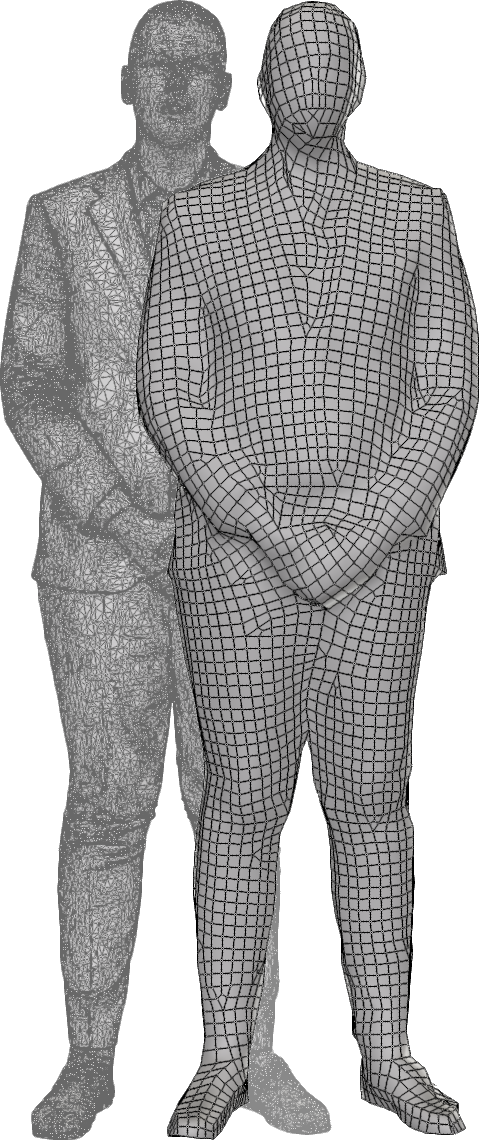
This algorithm is based on Instant Field-Aligned Meshes. It will produce a new mesh, containing either only quadrangles (if pureQuad is checked) or triangles and quadrangles. The target triangle count is indicative and will not create exactly the input number.
Tip
If the resulting mesh has lots of holes or missing parts, try running the algorithm again with a higher target triangle count. It can be reduced afterwards using the decimation.
One major advantage of this approach is that the final mesh will automatically align to the structure of the 3D model.

Precision

The precision parameter will increase the fidelity of the output mesh, at the expense of some more polygons and more processing time.
Tip
Decreasing the precision will require more RAM to process, so keep track of your RAM usage when using this parameter.

Limitation

This algorithm does not handle surfacic meshes correctly. For surfacic meshes, consider using the proxy mesh with the surfacic parameter checked, or the dual contouring that will automatically handle the surfacic parts.

Copyright © 2026 Unity Technologies
LegalPrivacy PolicyCookiesDocumentation Terms of UseDo Not Sell or Share My Personal InformationYour Privacy Choices (Cookie Settings)

"Unity", Unity logos, and other Unity trademarks are trademarks or registered trademarks of Unity Technologies or its affiliates in the U.S and elsewhere (more info here). Other names or brands are trademarks of their respective owners.

Some pages are machine-translated for convenience, and may contain inaccuracies. In the event of conflicting information, the English version is authoritative.

  • On this page
    • The algorithm

    • Precision

    • Limitation

  • Additional resources
  • Bake materials
  • Proxy from meshes

Report a problem with this page