Asset Dependencies
How to use and manage Asset Dependencies.
읽는 시간 3분최근 업데이트: 일 년 전
You can use Asset Dependencies to identify which assets depend on other assets in Asset Manager. You can also track dependencies of specific Unity Editor assets when you import and export assets from Asset Manager to the Unity Editor. For example, you can upload a prefab that depends on an FBX file and a .mat file in the Unity Editor and be able to see that dependency mapped in Asset Manager in cloud. Other users who want to use that asset can import the prefab into their Unity Editor project along with all of the asset's dependencies.
Organization roles
The Asset Manager Admin can create, edit, and save new asset dependencies.
Project roles
The project roles Contributor, Consumer, and Viewer have the following permissions:
Project role | Permissions |
|---|---|
| Contributor | Create, edit, and save new asset dependencies |
| Consumer | View all asset dependencies |
| Viewer | View all asset dependencies |
Asset dependency features
Asset dependencies can only be added in one direction, which is downstream. However, they can be viewed in both upstream and downstream directions from any given asset. To create or remove an asset dependency, enter the asset's edit mode and select Add dependency.
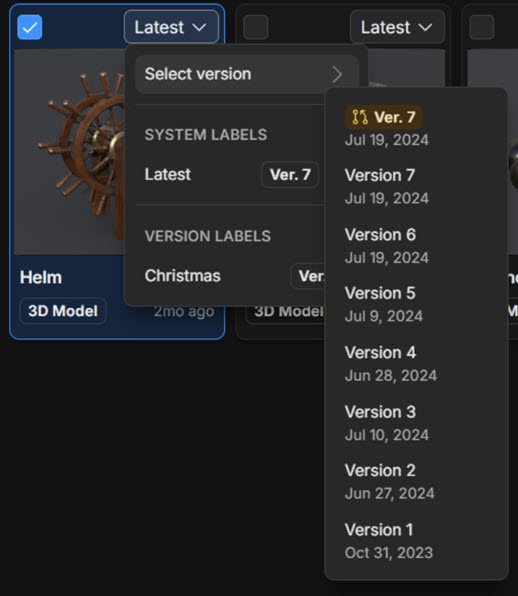
To add a downstream dependency through the Dependency modal, select the assets you want. An asset dependency has to point at a version of the asset. There are two ways to point an asset dependency to a version:
Version Label | Specific Version |
|---|---|
| You can point your dependency to a version label, for example, Latest. | You can point your dependency to specific versions, for example, Version 7. |
| The dependency pointing at the version label will automatically update as that label changes from version to version. | The dependency pointing at a specific version of a target asset will only point to that specific version. |
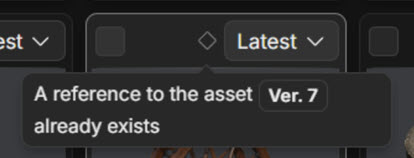
You can check if the asset you're adding as a dependency already has an existing dependency with another asset by viewing the tooltip at the top of the asset tile.
Asset dependencies with Unity Editor
The Asset Manager integration for Unity displays the dependencies of a selected asset on the right side at the bottom of the Details tab in the Asset Manager Inspector.
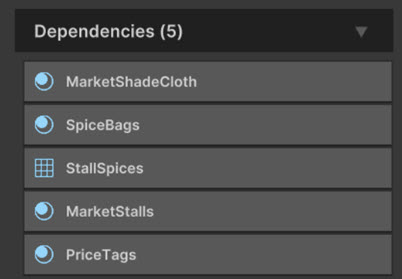
Below are some key functions for Asset Depenencies:
-
Import: Importing an asset automatically downloads and imports the full dependency tree, including the dependencies of the dependencies.
-
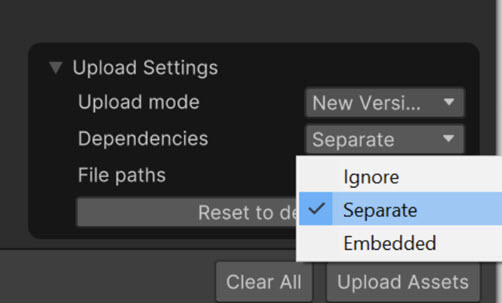
Upload: When uploading an asset from the Unity Editor via the Asset Manager integration, to have every Unity dependency, like the texture used in a Material, uploaded as a separate cloud asset, you can:
- Go to Upload Settings > Dependencies.
- Select Separate.
If Dependencies is set to Ignore or Embedded that cloud asset will not have any asset to asset references.
- Re-upload: When re-uploading a new version of a previously uploaded asset, previous dependencies are replaced with new ones. If a dependency has changed, then a new version of that dependency will be uploaded too.