기술 자료

​
​

Development

User Acquisition

Monetization

산업 분야

Unity Cloud

Get Started

Asset Manager SDKs and services

Open Unity Dashboard

Unity Cloud

이 페이지는 선택한 언어로 제공되지 않습니다.
​
​
Unity Dashboard
  • Accounts
  • Organizations
  • Projects
  • Products
  • Billing
Developer Data
  • Introduction to the Developer Data Framework
  • Get started
  • View Diagnostics for your project
  • Privacy and consent
Unity Asset Manager
  • What's new
  • Asset Manager web
  • Asset Store
  • Manage Assets in the Editor
  • Unity Version Control
  • Developer documentation
Unity Pipeline Automation
  • About
  • Get started
    • Basic concepts
  • Pipelines
  • Automations
  • Monitor jobs
  1. Unity Cloud Documentation
  2. Unity Pipeline Automation (beta)

Get started

How to access the Unity Pipeline Automation product on the Unity Dashboard.
읽는 시간 1분
최근 업데이트: 일 년 전

중요
Unity Pipeline Automation is currently in a beta release. The features and documentation might change between now and the next release.
To get started with Pipeline Automation:

1. Add the Pipeline Automation shortcut

You can add a Unity Pipeline Automation shortcut to your dashboard.
Go to the Unity Dashboard and follow the steps below:
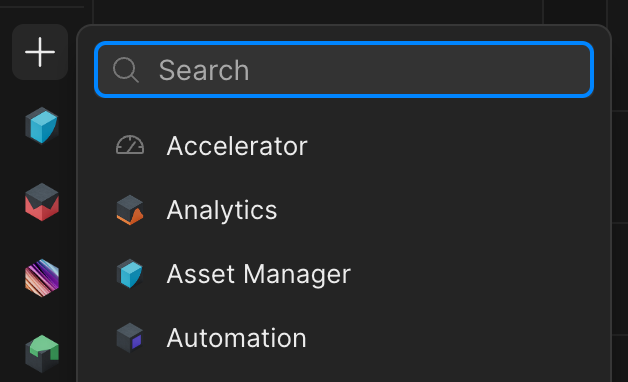
Add Pipeline Automation product shortcut
  1. Select the + shortcut button in the left navigation bar.
  2. Select Pipeline Automation from the list.
The Pipeline Automation logo now appears on your dashboard.

2. Assign Automation roles

The two roles in the Pipeline Automation service that you can assign to service accounts to grant different levels of access are:
  • Automation Developer
  • Automation User
You can assign the Automation Developer role to members of your organization to enable them to create pipelines and automations. To assign organization-level roles, follow these steps.
The following roles are listed under
Automation
:

Permission

Automation Developer, Organization Owner/Manager

Automation User (service accounts), Organization User

Organization Guest

Create, edit, delete pipelines and automationsYesNoNo
Run pipelinesYesYesNo
View pipelines and jobsYesYesNo

Copyright © 2026 Unity Technologies
법률 정보개인정보 처리방침쿠키Documentation Terms of Use개인 정보 판매 또는 공유 금지개인정보 보호 선택(쿠키 설정)

'Unity', Unity 로고 및 기타 Unity 상표는 미국 및 기타 지역 내 Unity Technologies 또는 그 계열사의 상표 또는 등록상표입니다(자세한 내용은 여기에서 확인하세요). 기타 명칭 또는 브랜드는 해당 소유자의 상표입니다.

일부 페이지는 편의를 위해 기계 번역되었으며 부정확한 내용이 있을 수 있습니다. 정보가 상충되는 경우, 영어 버전을 우선으로 참조하세요.

  • 보고 있는 페이지
    • 1. Add the Pipeline Automation shortcut

    • 2. Assign Automation roles


이 페이지의 문제 보고