OpenID Connect
Set up custom sign-in with OpenID Connect providers to enable players to authenticate with external identity systems.
읽는 시간 4분최근 업데이트: 10달 전
커스텀 로그인은 플레이어로부터 입력(예: 이메일 주소와 비밀번호 등의 로그인 자격 증명)을 받아 게임 세션에 새 플레이어를 생성하며, 플레이어를 커스텀 ID 제공업체 계정에 연결합니다. 커스텀 ID 제공업체를 사용해 게임에 PlayFab, Firebase, Epic Online Services를 비롯한 기존 인증 시스템 계정 로그인을 활성화할 수 있습니다.
플레이어가 커스텀 ID 제공업체 계정으로 로그인하면 API를 호출해 플레이어를 인증하거나 새 플레이어를 생성합니다.
SignInWith최소 SDK 버전: 2.2.0
SDK 버전을 확인합니다. OIDC는 2.2.0 이상부터 지원됩니다.
이 문서에서는 게임에서 OpenID Connect를 사용하는 커스텀 ID 제공업체를 통해 플레이어의 인증을 설정하는 다음 시나리오에 대해 설명합니다.
- 커스텀 OpenID Connect ID 로그인 설정
- 기존 사용자 로그인 또는 새 사용자 생성
- 사용자를 익명 로그인에서 커스텀 ID 제공업체를 통한 플랫폼 로그인으로 업데이트
중요: 게임에서 플레이어에게 커스텀 ID 제공업체 로그인 옵션을 제공하려면 커스텀 ID 제공업체가 제공하는 지침에 따라 Unity 게임에서 ID 토큰을 가져오십시오.
참고: Unity Gaming Services는 연동 기능을 제공하지 않으므로 직접 OIDC/OAuth2 서버에 연동해야 합니다.
참고: 아래 코드 예시에서는 Unity Dashboard에서 커스텀 ID 제공업체를 이미 설정하고 유효한 ID 제공업체 이름과 플레이어의 ID 토큰을 이미 가지고 있다고 가정합니다. 연동하면 UGS Player ID에 타사 IdP 자격 증명이 연결될 뿐이며, IdP 연동은 직접 구현해야 합니다.
아래 UML 시퀀스 다이어그램에서 일반적인 타사 IdP, Unity Gaming Services, Unity 앱/게임 연동 예시를 볼 수 있습니다.
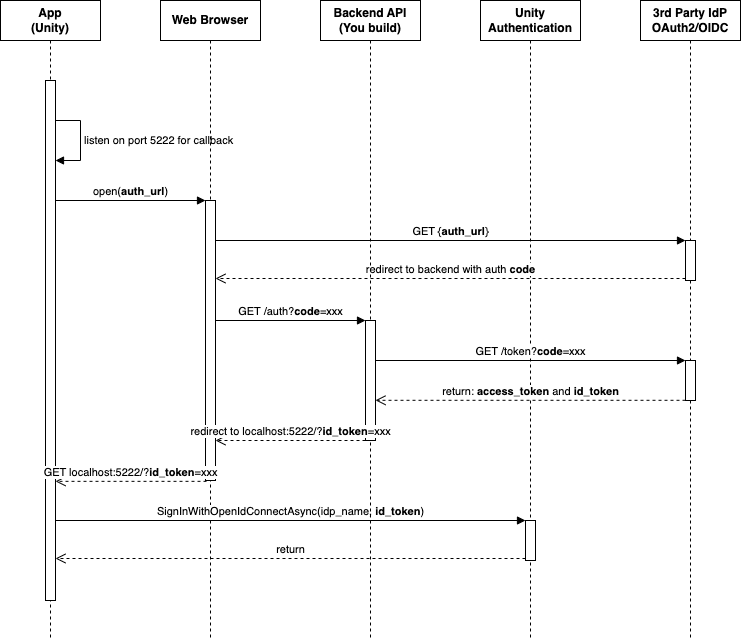
커스텀 OpenID Connect ID 로그인 설정
OpenID는 OAuth2.0 프로토콜의 ID 레이어입니다. 인증 서버가 수행하는 인증을 통해 플레이어 ID를 확인할 수 있습니다. OpenID를 사용해 웹 기반 클라이언트, JavaScript 클라이언트, 모바일 클라이언트 등에 연결해 최종 사용자의 정보와 인증 세션을 가져올 수 있습니다.
-
Unity Authentication의 OpenID Connect ID 제공업체를 설정합니다.
- Unity 에디터 메뉴에서 Edit > Project Settings… 로 이동한 후, 내비게이션 메뉴에서 Services > Authentication을 선택합니다.
- ID Providers를 OpenID Connect로 설정한 후, Add를 선택합니다.
- Oidc Name 텍스트 필드에 ID 제공업체 이름을 입력합니다('oidc-' 포함해 6~20자 사이의 임의의 텍스트).
- Issuer(URL) 텍스트 필드에 발행자 URL(https://)로 시작)을 입력합니다. 일부 ID 제공업체의 경우에는 다음 형식을 참고하십시오. AWS Cognito: Keycloak:
https://cognito-idp.<Region>.amazonaws.com/<userPoolId>Firebase:https://<keycloak-domain>/realms/<realm>https://securetoken.google.com/<projectId> - Save를 선택합니다.
기존 사용자 로그인 또는 새 사용자 생성
SignInWithOpenIdConnectAsync- Open ID Connect 자격 증명을 사용해 새 Unity Authentication 플레이어 생성
- Open ID Connect 자격 증명을 사용해 기존 플레이어 로그인
프로젝트에서 자격 증명과 연결된 Unity Authentication 플레이어가 존재하지 않는 경우, 가 새 플레이어를 생성합니다. 프로젝트에서 자격 증명과 연결된 Unity Authentication 플레이어가 존재하는 경우, 가 해당 플레이어의 계정으로 로그인합니다. 이 함수는 캐시된 플레이어를 고려하지 않으며, 는 캐시된 플레이를 대체합니다.
SignInWithOpenIdConnectAsyncSignInWithOpenIdConnectAsyncSignInWithOpenIdConnectAsyncasync Task SignInWithOpenIdConnectAsync(string idProviderName, string idToken){ try { await AuthenticationService.Instance.SignInWithOpenIdConnectAsync(idProviderName, idToken); Debug.Log("SignIn is successful."); } catch (AuthenticationException ex) { // Compare error code to AuthenticationErrorCodes // Notify the player with the proper error message Debug.LogException(ex); } catch (RequestFailedException ex) { // Compare error code to CommonErrorCodes // Notify the player with the proper error message Debug.LogException(ex); }}
플레이어를 익명 로그인에서 커스텀 ID 제공업체 계정 로그인으로 업데이트
익명 인증을 설정한 후, 플레이어가 익명 로그인에서 업그레이드하여 커스텀 ID 제공업체 계정을 생성하고 이를 통해 로그인해 ID 토큰을 가져올 수 있습니다. 그런 다음 API를 호출해 플레이어를 플레이어의 계정에 연결합니다.
LinkWithOpenIdConnectAsyncSDK에 캐시된 플레이어가 존재하는 경우, 캐시된 플레이어를 Open ID Connect 계정에 연결할 수도 있습니다.
- 를 사용해 캐시된 플레이어의 계정에 로그인합니다.
SignInAnonymouslyAsync - 를 사용해 캐시된 플레이어의 계정을 Open ID Connect 계정에 연결합니다.
LinkWithOpenIdConnectAsync
async Task LinkWithOpenIdConnectAsync(string idProviderName, string idToken){ try { await AuthenticationService.Instance.LinkWithOpenIdConnectAsync(idProviderName, idToken); Debug.Log("Link is successful."); } catch (AuthenticationException ex) when (ex.ErrorCode == AuthenticationErrorCodes.AccountAlreadyLinked) { // Prompt the player with an error message. Debug.LogError("This player is already linked with another account. Log in instead."); } catch (AuthenticationException ex) { // Compare error code to AuthenticationErrorCodes // Notify the player with the proper error message Debug.LogException(ex); } catch (RequestFailedException ex) { // Compare error code to CommonErrorCodes // Notify the player with the proper error message Debug.LogException(ex); }}
플레이어가 커스텀 ID 제공업체 계정을 통해 로그인하려고 하면 다음 API를 호출합니다.
async Task SignInWithOpenIdConnectAsync(string idProviderName, string idToken){ try { await AuthenticationService.Instance.SignInWithOpenIdConnectAsync(idProviderName, idToken); Debug.Log("SignIn is successful."); } catch (AuthenticationException ex) { // Compare error code to AuthenticationErrorCodes // Notify the player with the proper error message Debug.LogException(ex); } catch (RequestFailedException ex) { // Compare error code to CommonErrorCodes // Notify the player with the proper error message Debug.LogException(ex); }}
OpenID 계정 연결 해제
플레이어가 OpenID 계정 연결을 해제할 수 있도록 API를 사용합니다. 연결이 해제되면 계정이 다른 ID에 연결되지 않은 경우 익명 계정으로 전환됩니다.
UnlinkOpenIdConnectAsyncasync Task UnlinkOpenIdConnectAsync(string idToken){ try { await AuthenticationService.Instance.UnlinkOpenIdConnectAsync(idToken); Debug.Log("Unlink is successful."); } catch (AuthenticationException ex) { // Compare error code to AuthenticationErrorCodes // Notify the player with the proper error message Debug.LogException(ex); } catch (RequestFailedException ex) { // Compare error code to CommonErrorCodes // Notify the player with the proper error message Debug.LogException(ex); }}