Documentation

​
​

Development

User Acquisition

Monetization

Industry

LevelPlay SDK - Android

Unity SDK

Android SDK

iOS SDK

Adobe AIR SDK

Flutter SDK

React Native SDK

LevelPlay SDK - Android

Unity LevelPlay
​
​
Android SDK
  • Get started
  • Regulations and settings
  • Ad formats
  • Mediated networks
  • Test your integration
    • LevelPlay integration test suite
    • Integration Helper for Android
    • Test your integration
    • Integration checklists
    • Troubleshoot no ads displaying
    • Troubleshoot the TCF consent log
    • Troubleshoot Android build failures caused by Kotlin 2
    • Test Ad Quality SDK integration
  1. Grow your game
  2. Unity LevelPlay
  3. LevelPlay SDK
  4. LevelPlay SDK for Android developers

Integration Helper for Android

Employ the Integration Helper to validate that all necessary dependencies, configurations, and ad network integrations are correctly implemented in your Android app.
Read time 1 minute
Last updated 2 months ago

Use the Integration Helper to verify successful integration of the LevelPlay SDK and any additional adapters.
  • Dependency Verification: It ensures all required dependencies and frameworks are added for various mediated ad networks.
  • Version Compatibility Check: It portrays the compatibility between the SDK and adapter versions.
  • Configuration Validation: Verifies necessary configurations, such as required permissions in the Android manifest.

Integration Helper Method

When you have finished your integration, call the following static method and confirm that all networks you have implemented are marked as VERIFIED:
Note
For SDK versions earlier than 7.3.0, it is required to pass the activity as a parameter in the
validateIntegration
method.
LevelPlay.validateIntegration(context);
LevelPlay.validateIntegration(context)
Important
After you've successfully verified your integration, ensure that you remove the integration helper from your code.

Device Advertising ID

You can retrieve your GAID at the bottom of the log after you call the method, as detailed in the following example.
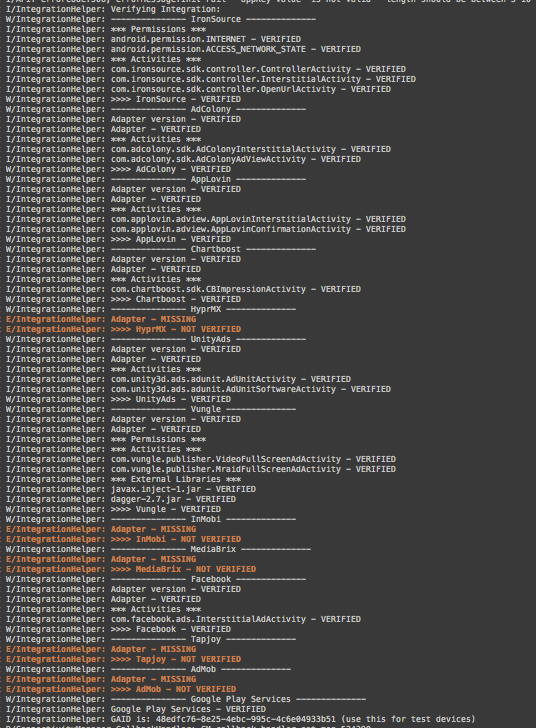
An example of the integration helper logfile results.
The Integration Helper tool reviews everything, including ad networks you may have intentionally chosen not to include in your application. These will appear as MISSING and there is no reason for concern. In case the ad network’s integration has not been completed successfully, it will be marked as NOT VERIFIED.

Copyright © 2026 Unity Technologies
LegalPrivacy PolicyCookiesDocumentation Terms of UseDo Not Sell or Share My Personal InformationYour Privacy Choices (Cookie Settings)

"Unity", Unity logos, and other Unity trademarks are trademarks or registered trademarks of Unity Technologies or its affiliates in the U.S and elsewhere (more info here). Other names or brands are trademarks of their respective owners.

Some pages are machine-translated for convenience, and may contain inaccuracies. In the event of conflicting information, the English version is authoritative.

  • On this page
    • Integration Helper Method

    • Device Advertising ID


Report a problem with this page