Introduction to Creative Testing campaigns
Learn about Creative Testing campaigns with Unity Ads User Acquisition.
Read time 3 minutesLast updated 4 months ago
Creative Testing campaigns let you experiment with different creative packs. Unlike other User Acquisition campaigns, Creative Testing campaigns are designed to test creative performance rather than optimize for installs.
Unlike other User Acquisition campaigns, Creative Testing campaigns are designed to give each creative pack a fair opportunity to serve impressions. This approach creates a testing environment where you can compare how creative packs perform using the metrics that matter to you. Because delivery can vary during a live campaign, creative packs might not receive exactly the same number of impressions.
Testing your creatives helps you make informed decisions about which creative packs to use and where to run them as part of your user acquisition strategy. To learn more about creatives and creative packs, refer to the Creative packs documentation.
When to test creative packs
Creative testing is available at any point in your user acquisition process. As soon as you have prepared creatives for a user acquisition campaign, you can begin testing those creatives in a Creative Testing campaign.
After establishing a user acquisition campaign, you can improve its performance by using data supplied by test campaigns. Creative testing can give insight into which creative packs will more likely result in better start-to-install conversion when used in a Unity User Acquisition campaign.
While you can run a test campaign at any time, the data yielded from a test campaign is most exact when you include one creative pack that has already accrued campaign data.
Creative testing considerations
Creative Testing campaigns are similar to other user acquisition campaign goals, but they have some unique characteristics to consider before starting a test.
Reduced exploration time
All creatives used in a User Acquisition campaign go through an exploration period. During this time, Unity's models evaluate how the creative pack performs across different audiences. Creative Testing campaigns provide a fair opportunity for impressions, which can significantly decrease the time needed for exploration. Adding a control pack to your test campaign can l further reduce the exploration time, so your creative packs will be ready for regular user acquisition campaigns sooner.
tCPI bids
Although User Acquisition campaigns typically use cost per install (CPI) billing, a Creative Testing campaign isn't designed to maximize installs. Instead, it focuses on providing a fair opportunity for impression delivery for all creative packs so their performance can be compared. Because test campaigns are impression-driven, they use cost per mille (CPM) billing, which is based on impressions. Unity supports a CPM-based approach called targeted cost per install (tCPI) bidding. To learn more about billing types, refer to the Billing types reference.
Creative testing reports
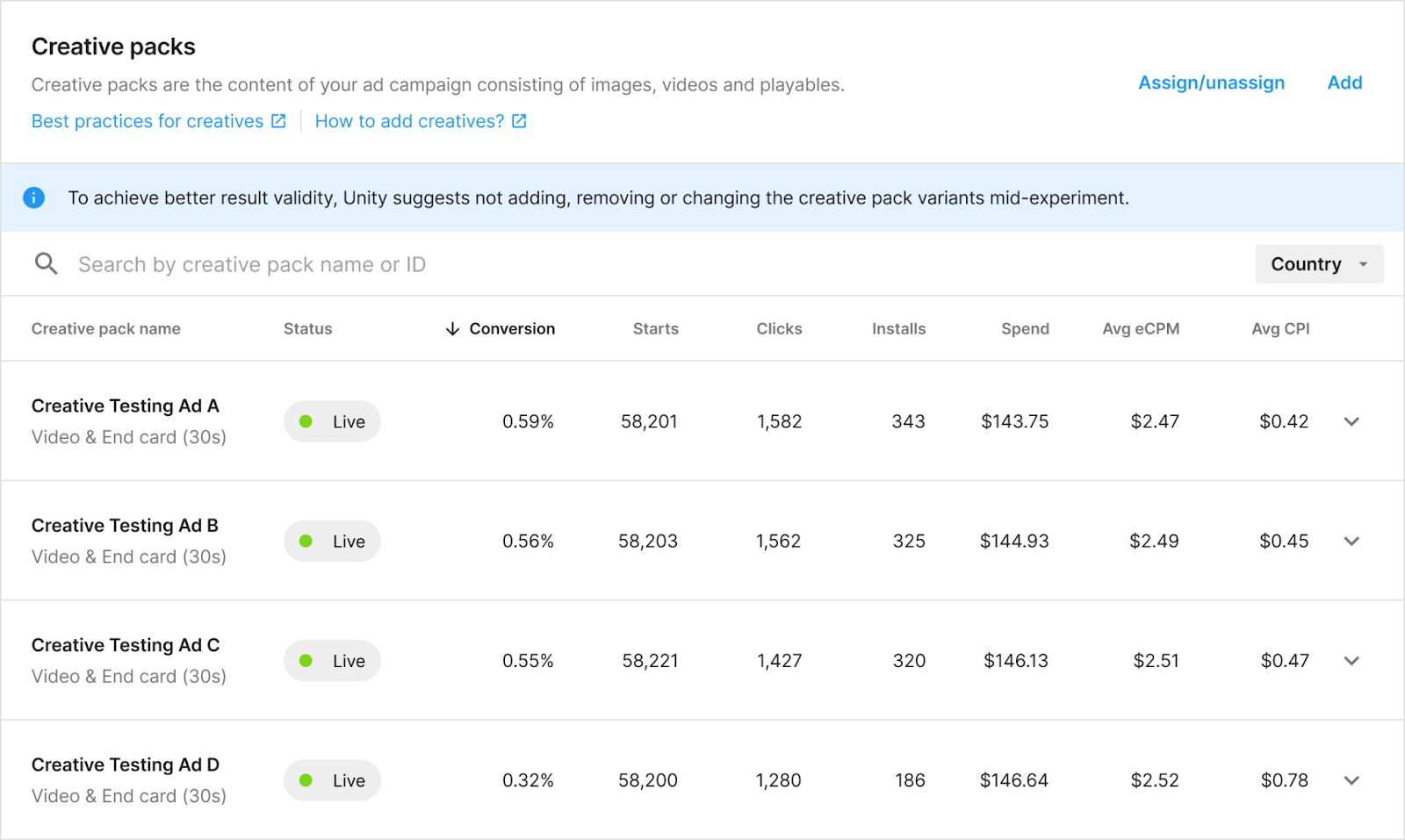
You can review an overview of how your creative packs are performing in the Creative packs section of your campaign setup. This overview shows a summary table of your creative packs' status and conversion rate. It also contains other testing metrics, such as starts, clicks, installs, and spend.
To access this overview, go to the Creative packs section of any Creative Testing campaign.