ドキュメント

​
​

Development

User Acquisition

Monetization

産業

Asset Transformer SDK

2026.4

サポート対象
​

User Manual

Python API

C# API

Changelog

Discussions

Asset Transformer SDK

2026.4

サポート対象
​

このページは選択した言語では使用できません。
​
​
Get started
  • System requirements
  • Licensing
  • Setup
  • Migrate from Scenario Processor
Framework
  • Framework
  • Preferences
Input/output files
  • Supported formats
  • Import files
  • Export files
  • Export textures
  • CAD vs Mesh
Scene
  • Product structure
  • Occurrence
  • Component
  • Material
  • Image
Algorithms
  • CAD
  • Healing
  • Optimization
  • Combine and bake
  • Reconstruction
    • Proxy mesh
    • Dual contouring
    • Retopologize
    • Decompose into convex meshes
    • Explode into connected subsets
    • Create occlusion meshes
  • UVs
Viewer
  • Viewer
Pixyz UI
  • Setup
  • Overview
  • Create a custom UI
Guidelines
  • Data preparation
  • Process point clouds
Debug and diagnose
  • Log files
  • Debug best practices
Other
  • Samples
  • Glossary
  1. Asset Transformer SDK (ex Pixyz)

Retopologize meshes

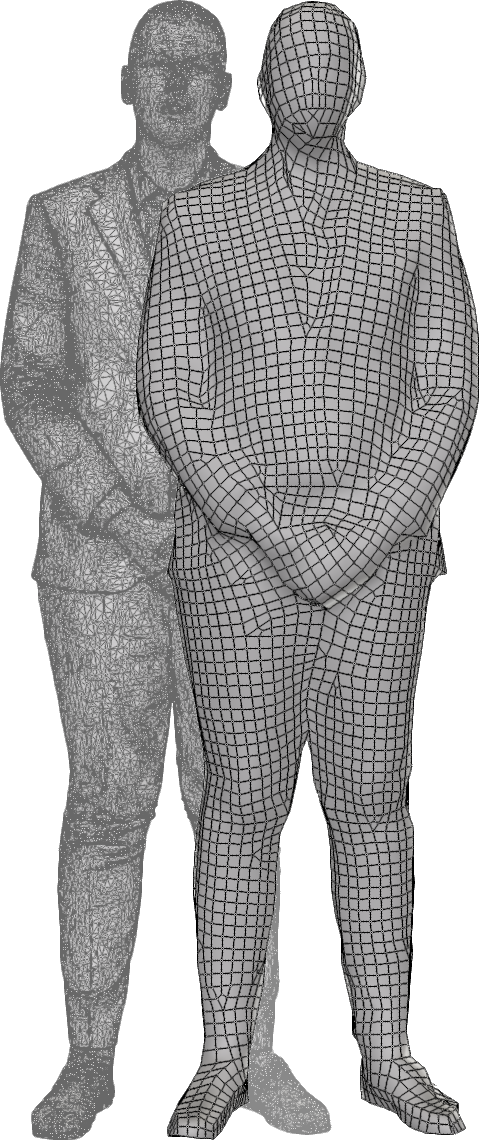
Generates a simplified mesh from selected occurrences. Commonly used in retopology workflows to create clean, optimized geometry for further processing such as baking materials or generating LODs.
読み終わるまでの所要時間 1 分
最終更新 3ヶ月前

API function: algo.retopologize
Use this feature to create a lightweight representation of a complex mesh by reducing the polygon count.
This feature is suitable for colliders, levels of detail (LODs), and devices with limited graphics power.
The algorithm

This algorithm is based on Instant Field-Aligned Meshes. It will produce a new mesh, containing either only quadrangles (if pureQuad is checked) or triangles and quadrangles. The target triangle count is indicative and will not create exactly the input number.
ヒント
If the resulting mesh has lots of holes or missing parts, try running the algorithm again with a higher target triangle count. It can be reduced afterwards using the decimation.
One major advantage of this approach is that the final mesh will automatically align to the structure of the 3D model.

Precision

The precision parameter will increase the fidelity of the output mesh, at the expense of some more polygons and more processing time.
ヒント
Decreasing the precision will require more RAM to process, so keep track of your RAM usage when using this parameter.

Limitation

This algorithm does not handle surfacic meshes correctly. For surfacic meshes, consider using the proxy mesh with the surfacic parameter checked, or the dual contouring that will automatically handle the surfacic parts.

Copyright © 2026 Unity Technologies
法規事項プライバシーポリシークッキーDocumentation Terms of Use私の個人情報を販売または共有しないプライバシーに関する選択 (クッキー設定)

"Unity" の名称、Unity のロゴ、およびその他の Unity の商標は、米国およびその他の国における Unity Technologies またはその関係会社の商標または登録商標です (詳しくはこちら)。その他の名称またはブランドは該当する所有者の商標です。

一部のページは利便性向上のため機械翻訳を使用しており、内容に不正確な表現が含まれる場合があります。内容に齟齬または不一致が生じた場合は、英語版を正本とします。

  • このページ
    • The algorithm

    • Precision

    • Limitation

  • 追加リソース
  • Bake materials
  • Proxy from meshes

このページの問題を報告する