Code integration
Implement Remote Config in your game code using the RemoteConfig API.
Read time 8 minutesLast updated 8 months ago
The API is included in the namespace, which you must include in your game script. For more information on its classes and methods, see the Remote Config Scripting API and the Remote Config Runtime Scripting API documentation.
RemoteConfigUnity.ServicesImplementing custom attributes
To provide custom attributes for Game Overrides conditions, implement the following variables in your game script:
struct- Use the structure to provide a custom player ID attribute by using the
Deliverymethod if your application uses its own tracking method. Remote Config will auto-generate an ID if no developer-defined attribute is available.SetCustomUserID - Use the structure to provide custom user-category attributes.
userAttributes - Use the structure to provide custom app-category attributes.
appAttributes - Use the structure to provide custom filter-category attributes in order to reduce the payload.
filterAttributes
Start by creating a framework for your script that implements your custom attributes and blocks out your functions:
using UnityEngine;using Unity.Services.RemoteConfig;using Unity.Services.Authentication;using Unity.Services.Core;using System.Threading.Tasks;public class RemoteConfigExample : MonoBehaviour { public struct userAttributes { // Optionally declare variables for any custom user attributes: public bool expansionFlag; } public struct appAttributes { // Optionally declare variables for any custom app attributes: public int level; public int score; public string appVersion; } public struct filterAttributes { // Optionally declare variables for attributes to filter on any of following parameters: public string[] key; public string[] type; public string[] schemaId; } // Optionally declare a unique assignmentId if you need it for tracking: public string assignmentId; // Declare any Settings variables you’ll want to configure remotely: public int enemyVolume; public float enemyHealth; public float enemyDamage; // The Remote Config package depends on Unity's authentication and core services. // These dependencies require a small amount of user code for proper configuration. async Task InitializeRemoteConfigAsync() { // initialize handlers for unity game services await UnityServices.InitializeAsync(); // options can be passed in the initializer, e.g if you want to set AnalyticsUserId or an EnvironmentName use the lines from below: // var options = new InitializationOptions() // .SetEnvironmentName("testing") // .SetAnalyticsUserId("test-user-id-12345"); // await UnityServices.InitializeAsync(options); // remote config requires authentication for managing environment information if (!AuthenticationService.Instance.IsSignedIn) { await AuthenticationService.Instance.SignInAnonymouslyAsync(); } } async Task Awake () { // In this example, you will fetch configuration settings on Awake. } // Create a function to set your variables to their keyed values: void ApplyRemoteConfig (ConfigResponse configResponse) { // You will implement this in the final step. }}
Fetching and applying settings at runtime
Next, implement your Remote Config support functions and call them at runtime to retrieve key-value pairs from the service then map them to the appropriate variables.
The Remote Config service returns a object to handle fetching and applying your configuration settings at runtime. In this example, you’ll use it to fetch the key-value pairs from the remote service, and invoke your function on retrieval. takes a struct, which represents the response to a fetch request, and uses the method to apply settings.
RemoteConfigService.InstanceApplyRemoteConfigApplyRemoteConfigConfigResponseRemoteConfigService.Instance.appConfig// Retrieve and apply the current key-value pairs from the service on Awake: async Task Awake () { // initialize Unity's authentication and core services await InitializeRemoteConfigAsync(); // Add a listener to apply settings when successfully retrieved: RemoteConfigService.Instance.FetchCompleted += ApplyRemoteConfig; // you can set the user’s unique ID: // RemoteConfigService.Instance.SetCustomUserID("some-user-id"); // you can set the environment ID: // RemoteConfigService.Instance.SetEnvironmentID("an-env-id"); // Fetch configuration settings from the remote service, they must be called with the attributes structs (empty or with custom attributes) to initiate the WebRequest. await RemoteConfigService.Instance.FetchConfigsAsync(new userAttributes(), new appAttributes()); // Example on how to fetch configuration settings using filter attributes: // var fAttributes = new filterAttributes(); // fAttributes.key = new string[] { "sword","cannon" }; // RemoteConfigService.Instance.FetchConfigs(new userAttributes(), new appAttributes(), fAttributes); // Example on how to fetch configuration settings if you have dedicated configType: // var configType = "specialConfigType"; // Fetch configs of that configType // RemoteConfigService.Instance.FetchConfigs(configType, new userAttributes(), new appAttributes()); // Configuration can be fetched with both configType and fAttributes passed // RemoteConfigService.Instance.FetchConfigs(configType, new userAttributes(), new appAttributes(), fAttributes); // All examples from above will also work asynchronously, returning Task<RuntimeConfig> // await RemoteConfigService.Instance.FetchConfigsAsync(new userAttributes(), new appAttributes()); // await RemoteConfigService.Instance.FetchConfigsAsync(new userAttributes(), new appAttributes(), fAttributes); // await RemoteConfigService.Instance.FetchConfigsAsync(configType, new userAttributes(), new appAttributes()); // await RemoteConfigService.Instance.FetchConfigsAsync(configType, new userAttributes(), new appAttributes(), fAttributes); } void ApplyRemoteConfig (ConfigResponse configResponse) { // Conditionally update settings, depending on the response's origin: switch (configResponse.requestOrigin) { case ConfigOrigin.Default: Debug.Log ("No settings loaded this session and no local cache file exists; using default values."); break; case ConfigOrigin.Cached: Debug.Log ("No settings loaded this session; using cached values from a previous session."); break; case ConfigOrigin.Remote: Debug.Log ("New settings loaded this session; update values accordingly."); break; } enemyVolume = RemoteConfigService.Instance.appConfig.GetInt("enemyVolume"); enemyHealth = RemoteConfigService.Instance.appConfig.GetInt("enemyHealth"); enemyDamage = RemoteConfigService.Instance.appConfig.GetFloat("enemyDamage"); assignmentId = RemoteConfigService.Instance.appConfig.assignmentId; // These calls could also be used with the 2nd optional arg to provide a default value, e.g: // enemyVolume = RemoteConfigService.Instance.appConfig.GetInt("enemyVolume", 100); }
Accessing configs with particular config types
All settings for corresponding config types will be correctly stored in the cache, and they could be accessed by passing the config type, such as:
RemoteConfigService.Instance.GetConfig("settings");RemoteConfigService.Instance.GetConfig("specialConfigType");
Metadata Parameters
Upon every request, we create an assignment event on the backend.
Within response to that request, together with block, a block is returned as a part of response with following parameters:
configsmetadata
- gets created on each assignment event and it is used to track events and eventual user segmentation
assignmentId - represents environment in which assignment happened
environmentId - is created upon assignment and presents a unique signature of that particular assignment
configAssignmentHash
configAssignmentHashappConfigRemoteConfigService.Instance.appConfig.configAssignmentHash
Once we know the we want to use, it can be passed to the backend within the payload by using the method:
configAssignmentHashSetConfigAssignmentHash()RemoteConfigService.Instance.SetConfigAssignmentHash("4d1064c5198a26f073fe8301da3fc5ead35d20d1");
If is passed to the backend, the backend will return the config present at the time of creation of that particular .
configAssignmentHashconfigAssignmentHashTTL for the lifetime of is 56 hours. After that time, can be requested again, and TTL will reset to 56 hrs again.
configAssignmentHashconfigAssignmentHashWorking With Templates
Most users utilize JSON-type settings to send complex data to their clients.
Remote Config now supports Template validation for JSON-type settings in the Editor.
After click on the button for JSON Setting, the JSON Setting editor modal will open:
Edit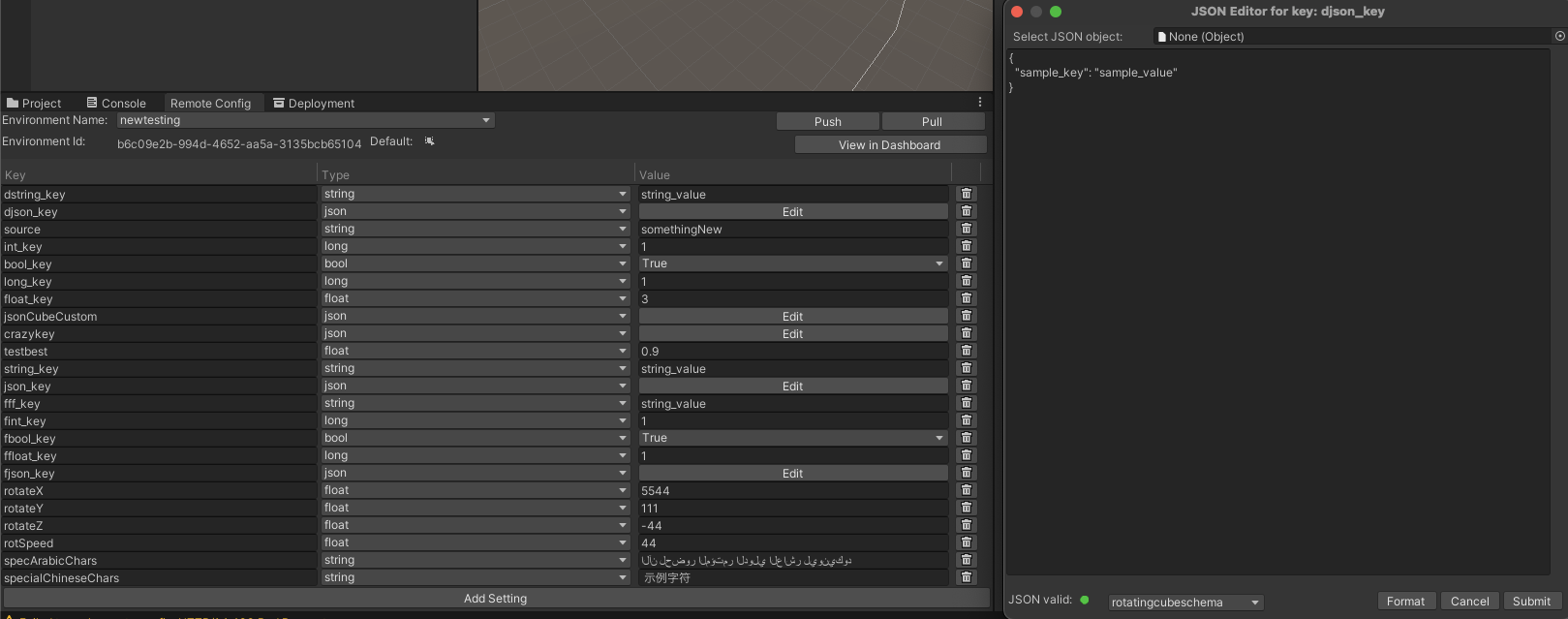
If templates for corresponding setting exist, you can chose your template from the drop down menu:
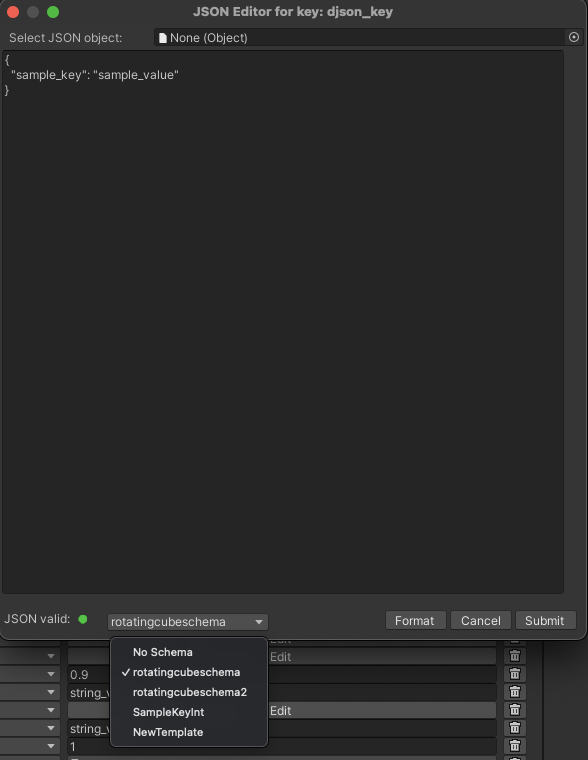
Each template has its own value, which represent the set of rules for validating the JSON Setting.
On mouseover in the dropdown, the tooltip will show the description of the template.
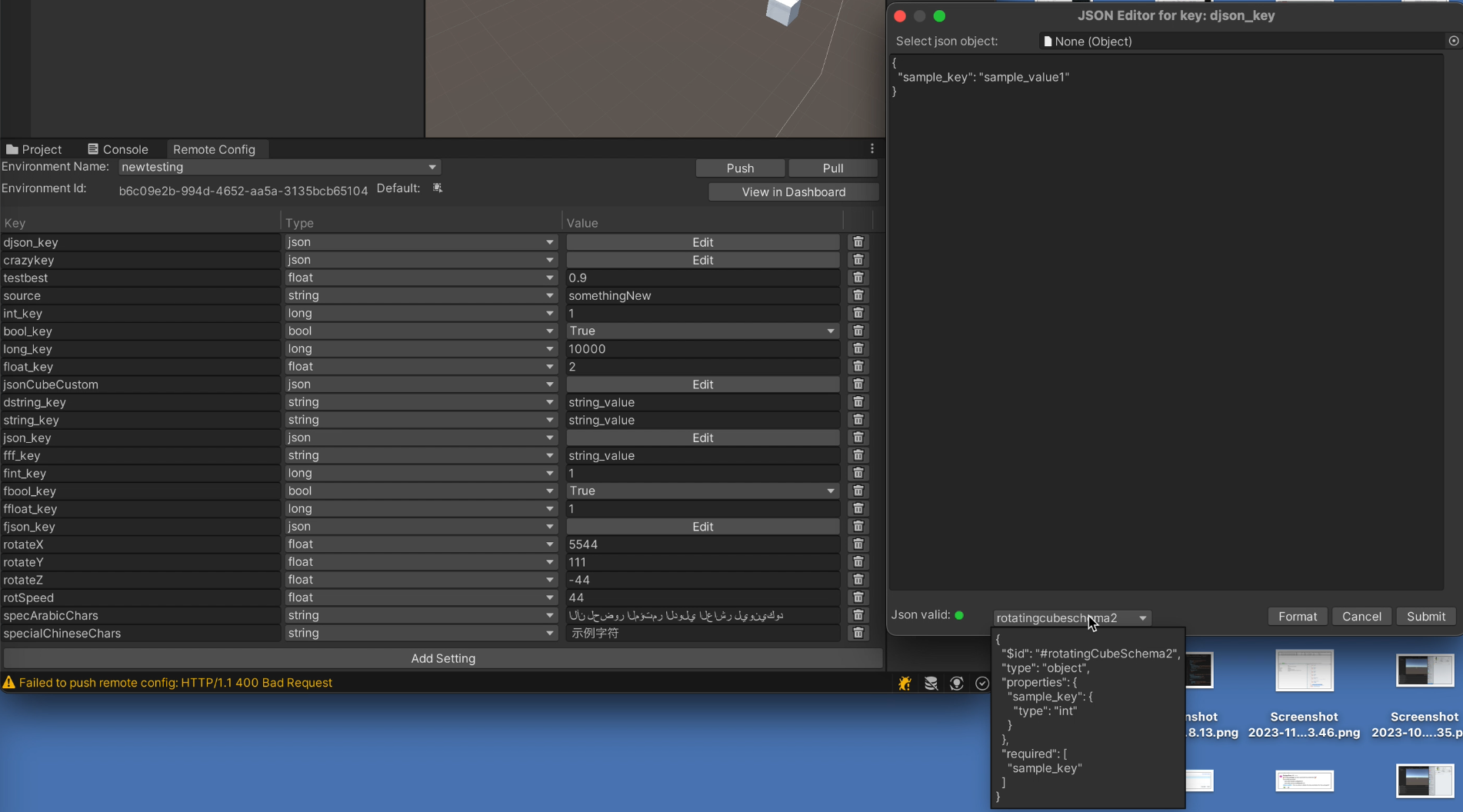
If you pick the template which value does not match the JSON setting content, after submitting and pushing, the error message will be shown in the console.
By observing the template value on the tooltip, you can easily identify the error in your JSON Setting.
More information regarding templates in general may be found .
hereOther considerations
Utilizing Setting of type JSON for overwriting objects
Let's say our code has a class as follows:
CubeInfo[System.Serializable]public class CubeInfo{ public float rotateX = 10f; public float rotateY = 10f; public float rotateZ = 10f; public float rotSpeed = 1.0f; public Color color = Color.white;}
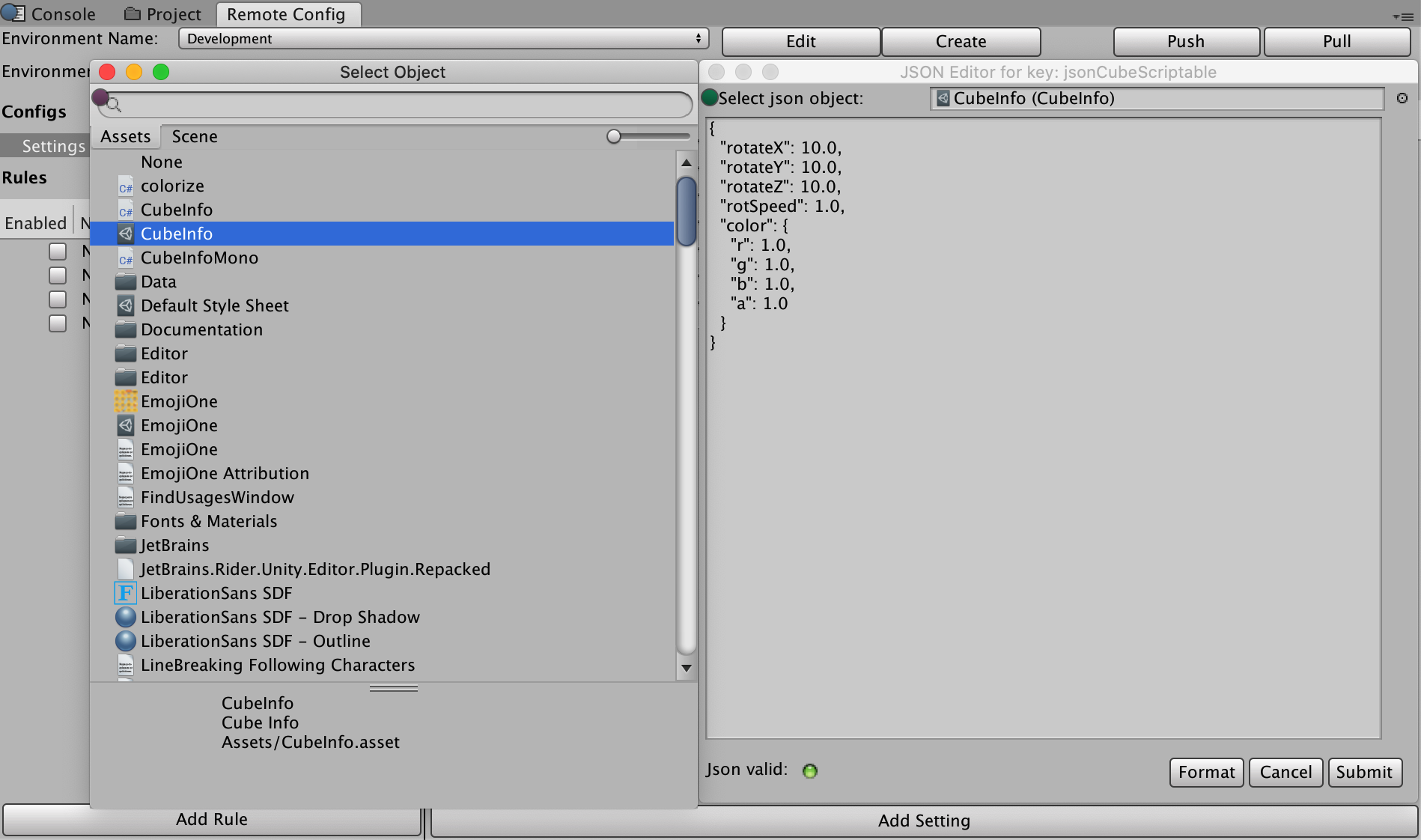
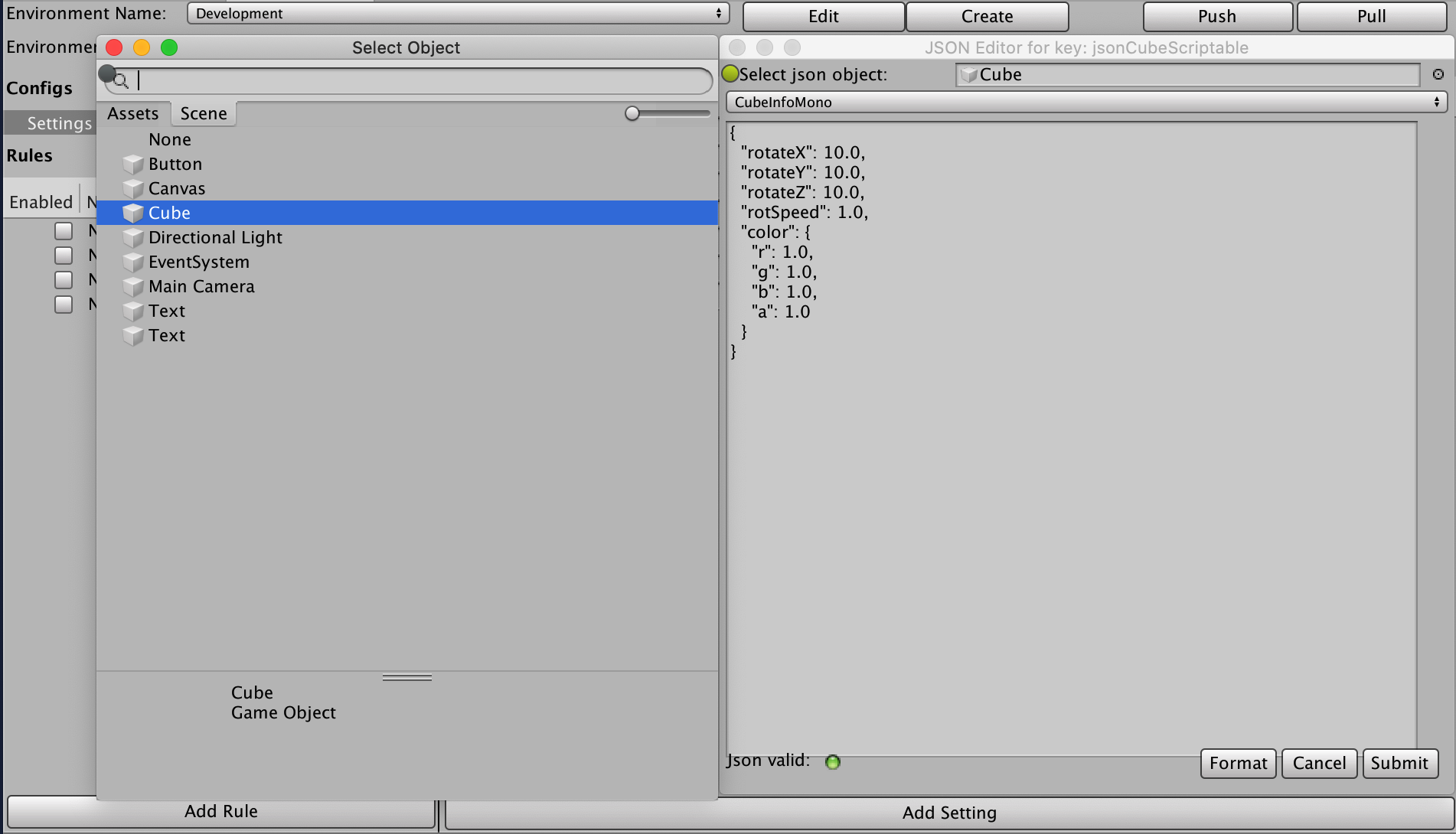
The JSON editor modal supports JSON conversion of following types:
- Text Assets
- Scriptable Objects
- Custom Scripts attached to Game Objects
If we want to use a Text Asset, we set up a Setting which structurally matches the class:
CubeInfo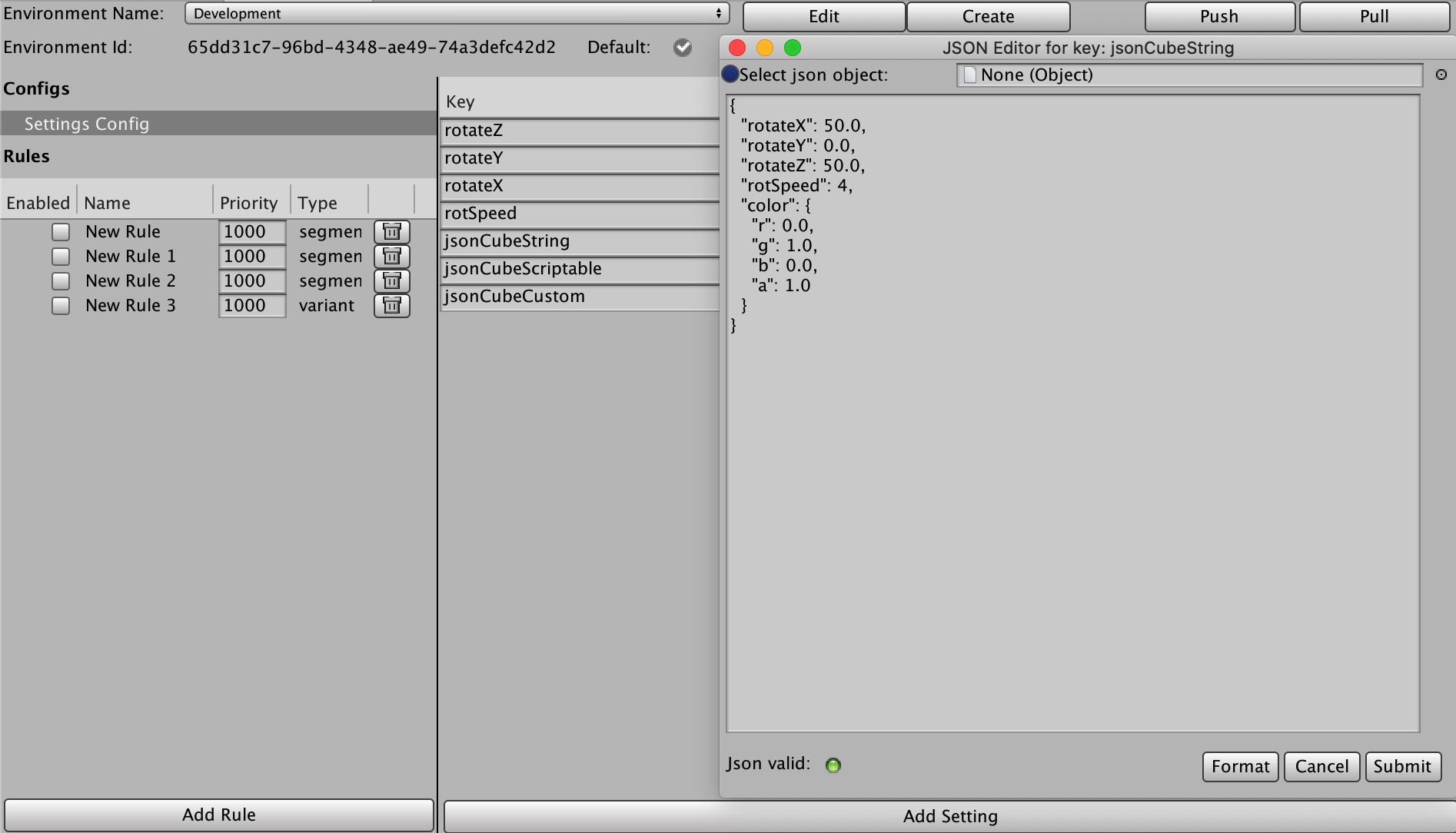
For Scriptable Objects, click on the upper right dot next to selection box, and if you pick a scriptable object, it should automatically convert to json:
If you select your Game Object from the scene, an additional dropdown will show for all Monobehaviour Custom Scripts attached to that Game Object.
The one you select should be converted to JSON:
To apply those settings to the CubeInfo object in runtime, use JsonUtility class for that matter:
case ConfigOrigin.Remote: var jsonCubeString = RemoteConfigService.Instance.appConfig.GetJson("jsonCubeString"); JsonUtility.FromJsonOverwrite(jsonCubeString, CubeInfo);
Security
The web service from which Unity downloads Remote Config data is read-only, but not secure. This means third parties could view your Remote Config data. Do not store sensitive or secret information in your configuration settings. Similarly, the saved settings file could be read and modified by end-users (although Remote Config would overwrite any modifications the next time a session starts with an available Internet connection).
Platform Support
Current version of Remote Config Runtime is tested successfully for following platforms:
Desktop:
- Windows (PC)
- Mac
- Linux Standalone
Mobile:
- iOS
- Android
For information on console support for Remote Config, contact our support team.