API Authentication
Authenticate your API requests with the Tapjoy Offerwall API to gain authorized access to manage user engagement and monetization data.
Read time 2 minutesLast updated 3 months ago
Requesting access
Requests are authenticated using a standard two-legged OAuth2 flow: an is requested using an encoded API Key, and the resulting is used to authenticate against future requests.
access_tokenaccess_tokenYou can find your API key in the LTV Dashboard by selecting an App > Settings > App Settings > Scroll down > API Keys.
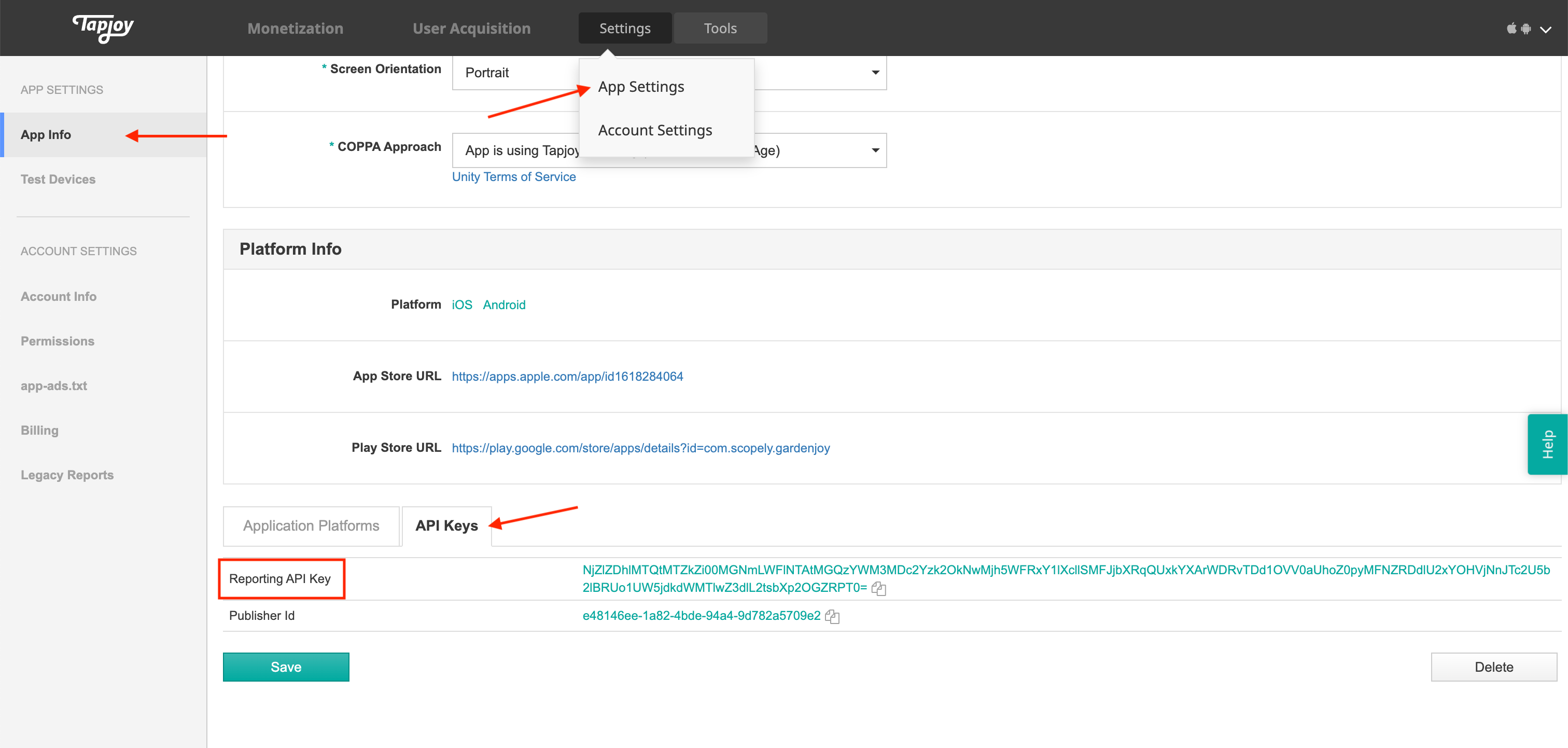
Access tokens have a 1-hour lifetime and cannot be refreshed. When a token expires, you must request a new one with your Reporting API Key/Marketing API Key.
To request an access token you must send a POST request with an Authorization header using your API Key. If the credentials are valid the response will include an access token and the number of seconds until the token expires.
Example request
The following examples show how to request an access token using raw HTTP, curl, and Ruby.
POST /v1/oauth2/token Host: api.tapjoy.com Authorization: Basic <API Key> Accept: application/json
Successful response
A successful request returns a 200 status with an access token and its expiry duration in seconds.
status 200 { "access_token": "token_string", "token_type": "bearer", "expires_in": 3600, "refresh_token": null }
Unsuccessful response
If the API Key is invalid or missing, the request returns a 401 status.
status 401{ "error": "Unauthorized" }
Using the access token
Once you have an , requests can be made to the API. The should be sent with every request in the Authorization header with a type of "Bearer". If the has expired or does not exist the response will have a status of 401 Unauthorized.
access_tokenaccess_tokenaccess_tokenExample request
The following example shows the required headers for an authenticated API request.
POST /v4/audiences Host: api.tapjoy.com Authorization: Bearer <token_string> Accept: application/json
Missing or invalid token response
If the access token is missing or has expired, the request returns a 401 status.
status 401 { "error": "Unauthorized" }