GetCorrespondingObjectFromSourceAtPath<TObject>(TObject, string)
Retrieves the corresponding object of the given object from a given Prefab Asset path.
Read time 2 minutesLast updated 2 months ago
Definition
- Type: Method
- Namespace: UnityEditor
- Assembly: UnityEditor.CoreModule
GetCorrespondingObjectFromSourceAtPath<T>(T, string)
public static TObject GetCorrespondingObjectFromSourceAtPath<TObject>(TObject componentOrGameObject, string assetPath) where TObject : Object
Parameters
The asset path of the Prefab Asset to get the corresponding object from.
Returns
Type | Description |
|---|---|
| T | The corresponding object or null. |
Remarks
Use this method to find the corresponding asset the was instantiated from, if but only if it is within the prefab asset at the specified path.
sourceIf you don't have the path to pass in, you can use PrefabUtility.GetCorrespondingObjectFromSource instead.
This method returns null if the given object does not have a corresponding object within the prefab asset at the specified path.
For example, in the following image prefab asset A contains a child nested prefab B, which contains a child nested prefab C.
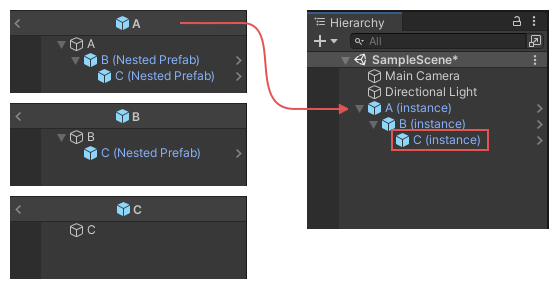
The image shows the nested prefab assets, with B and C nested under A, and C nested under B, and how this structure carries over to their nested instances in the Hierarchy window.
In this example scenario, if you call with the instance of GameObject C as the parameter and as the , this method returns the nested prefab object C from the prefab asset A.
GetCorrespondingObjectFromSourceAtPathcomponentOrGameObjectAssets/A.prefabassetPathThe following example adds a menu item to the Editor, which launches a simple wizard that allows you to test the results of this method.
using UnityEditor;using UnityEngine;public class AssetSourceTestWizard : ScriptableWizard{ public GameObject instance; public string path; [MenuItem("Test/Asset Source Test Wizard")] static void CreateWizard() { ScriptableWizard.DisplayWizard<AssetSourceTestWizard>("Asset Source Test Wizard", "Do Test"); } void OnWizardCreate() { var o1 = PrefabUtility.GetCorrespondingObjectFromSourceAtPath(instance, path); Debug.Log("Corresponding object from source: " + o1.name); }}