GetCorrespondingObjectFromSource<TObject>(TObject)
Retrieves the corresponding source prefab asset object of a given GameObject or component, or null if it can't be found.
Read time 1 minuteLast updated 2 months ago
Definition
- Type: Method
- Namespace: UnityEditor
- Assembly: UnityEditor.CoreModule
GetCorrespondingObjectFromSource<T>(T)
public static TObject GetCorrespondingObjectFromSource<TObject>(TObject componentOrGameObject) where TObject : Object
Parameters
Returns
Type | Description |
|---|---|
| T | The corresponding object or null. |
Remarks
Use this method to get the source prefab asset object the GameObject or component was instantiated from.
For example, in the diagram shown below, prefab asset A contains a child nested prefab B, which contains a child nested prefab C.
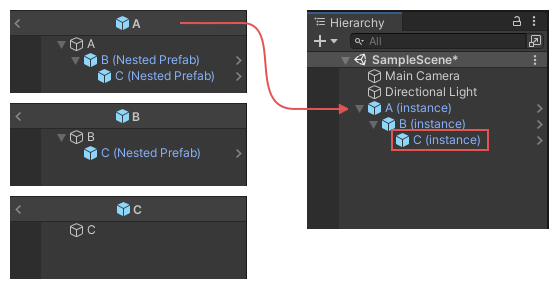
The image shows the nested prefab assets, with B and C nested under A, and C nested under B, and how this structure carries over to their nested instances in the Hierarchy window.
In this example scenario, if you supply the instance of GameObject C as the parameter to , then the method returns the object C from the asset Prefab A.
componentOrGameObjectGetCorrespondingObjectFromSourceFor more information about source objects, refer to Introduction to prefabs.
The following example adds a menu item to the Editor, which launches a simple wizard that allows you to test the results of this method.
using UnityEditor;using UnityEngine;public class AssetSourceTestWizard : ScriptableWizard{ public GameObject instance; [MenuItem("Test/Asset Source Test Wizard")] static void CreateWizard() { ScriptableWizard.DisplayWizard<AssetSourceTestWizard>("Asset Source Test Wizard", "Do Test"); } void OnWizardCreate() { var o1 = PrefabUtility.GetCorrespondingObjectFromSource(instance); Debug.Log("Corresponding object from source: " + o1.name + " from: " + AssetDatabase.GetAssetPath(o1)); }}