DrawPreviewTexture(Rect, Texture, Material, ScaleMode, float, float, ColorWriteMask, float)
Draws the texture within a rectangle.
Read time 2 minutesLast updated 5 days ago
Definition
- Type: Method
- Namespace: UnityEditor
- Assembly: UnityEditor.CoreModule
public static void DrawPreviewTexture(Rect position, Texture image, Material mat, ScaleMode scaleMode, float imageAspect, float mipLevel, ColorWriteMask colorWriteMask, float exposure)
Parameters
Rectangle on the screen to draw the texture within.
Material to be used when drawing the texture.
How to scale the image when the aspect ratio of it doesn't fit the aspect ratio to be drawn within.
Aspect ratio to use for the source image. If 0 (the default), the aspect ratio from the image is used.
The mip-level to sample. If negative, the texture is sampled normally. Sets material's _Mip property.
Specifies which color components of image will get written. Sets material's _ColorMask property.
Specifies the exposure for the texture. Sets material's _Exposure property.
Remarks
If mat is null (the default), an appropriate material will be chosen for a RGBM or doubleLDR lightmap or a normal map and the fallback blit material will be chosen otherwise.
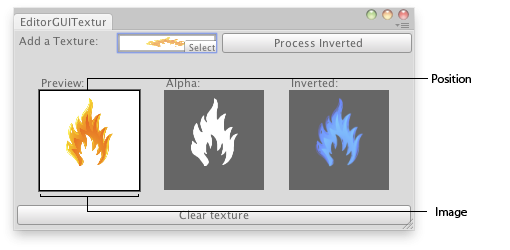
Preview Texture in an Editor Window.
Examples
// Load a texture, display the texture, display its alpha channel and// show a preview of the inverted textureusing UnityEditor;using UnityEngine;class EditorGUITextures : EditorWindow{ Texture2D texture; Texture2D invertedTexture; bool showInverted = false; [MenuItem("Examples/Texture Previewer")] static void Init() { var window = GetWindow<EditorGUITextures>("Texture Previewer"); window.position = new Rect(0, 0, 400, 200); window.Show(); } void OnGUI() { texture = (Texture2D)EditorGUI.ObjectField(new Rect(3, 3, 200, 20), "Add a Texture:", texture, typeof(Texture2D)); if (GUI.Button(new Rect(208, 3, position.width - 210, 20), "Process Inverted")) { if (invertedTexture) DestroyImmediate(invertedTexture); //Copy the new texture invertedTexture = new Texture2D(texture.width, texture.height, texture.format, (texture.mipmapCount != 0)); for (int m = 0; m < texture.mipmapCount; m++) invertedTexture.SetPixels(texture.GetPixels(m), m); InvertColors(); showInverted = true; } if (texture) { EditorGUI.PrefixLabel(new Rect(25, 45, 100, 15), 0, new GUIContent("Preview:")); EditorGUI.DrawPreviewTexture(new Rect(25, 60, 100, 100), texture); EditorGUI.PrefixLabel(new Rect(150, 45, 100, 15), 0, new GUIContent("Alpha:")); EditorGUI.DrawTextureAlpha(new Rect(150, 60, 100, 100), texture); EditorGUI.PrefixLabel(new Rect(275, 45, 100, 15), 0, new GUIContent("Inverted:")); if (showInverted) EditorGUI.DrawPreviewTexture(new Rect(275, 60, 100, 100), invertedTexture); if (GUI.Button(new Rect(3, position.height - 25, position.width - 6, 20), "Clear texture")) { texture = EditorGUIUtility.whiteTexture; showInverted = false; } } else { EditorGUI.PrefixLabel( new Rect(3, position.height - 25, position.width - 6, 20), 0, new GUIContent("No texture found")); } } void InvertColors() { for (int m = 0; m < invertedTexture.mipmapCount; m++) { Color[] c = invertedTexture.GetPixels(m); for (int i = 0; i < c.Length; i++) { c[i].r = 1 - c[i].r; c[i].g = 1 - c[i].g; c[i].b = 1 - c[i].b; } invertedTexture.SetPixels(c, m); } invertedTexture.Apply(); }}