DropShadowLabel
Draws a label with a drop shadow.
Read time 2 minutesLast updated 8 days ago
Definition
- Type: Method
- Namespace: UnityEditor
- Assembly: UnityEditor.CoreModule
DropShadowLabel(Rect, string)
Draws a label with a drop shadow.
public static void DropShadowLabel(Rect position, string text)
Parameters
Remarks
Not superfast, so use with caution.
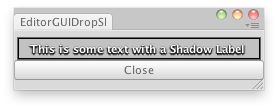
Shadow Label in and editor window.
Examples
using UnityEngine;using UnityEditor;public class EditorGUIDropShadowLabel : EditorWindow{ // Write some text using a Shadow Label. string text = "This is some text with a Shadow Label"; [MenuItem("Examples/Shadow Label")] static void Init() { var window = GetWindow<EditorGUIDropShadowLabel>(); window.position = new Rect(0, 0, 250, 60); window.Show(); } void OnGUI() { EditorGUI.DropShadowLabel(new Rect(0, 5, 245, 20), text); if (GUI.Button(new Rect(0, 30, 250, 20), "Close")) this.Close(); } void OnInspectorUpdate() { Repaint(); }}
DropShadowLabel(Rect, GUIContent)
Draws a label with a drop shadow.
public static void DropShadowLabel(Rect position, GUIContent content)
Parameters
Remarks
Not superfast, so use with caution.
Shadow Label in and editor window.
Examples
using UnityEngine;using UnityEditor;public class EditorGUIDropShadowLabel : EditorWindow{ // Write some text using a Shadow Label. string text = "This is some text with a Shadow Label"; [MenuItem("Examples/Shadow Label")] static void Init() { var window = GetWindow<EditorGUIDropShadowLabel>(); window.position = new Rect(0, 0, 250, 60); window.Show(); } void OnGUI() { EditorGUI.DropShadowLabel(new Rect(0, 5, 245, 20), text); if (GUI.Button(new Rect(0, 30, 250, 20), "Close")) this.Close(); } void OnInspectorUpdate() { Repaint(); }}
DropShadowLabel(Rect, string, GUIStyle)
Draws a label with a drop shadow.
public static void DropShadowLabel(Rect position, string text, GUIStyle style)
Parameters
Remarks
Not superfast, so use with caution.
Shadow Label in and editor window.
Examples
using UnityEngine;using UnityEditor;public class EditorGUIDropShadowLabel : EditorWindow{ // Write some text using a Shadow Label. string text = "This is some text with a Shadow Label"; [MenuItem("Examples/Shadow Label")] static void Init() { var window = GetWindow<EditorGUIDropShadowLabel>(); window.position = new Rect(0, 0, 250, 60); window.Show(); } void OnGUI() { EditorGUI.DropShadowLabel(new Rect(0, 5, 245, 20), text); if (GUI.Button(new Rect(0, 30, 250, 20), "Close")) this.Close(); } void OnInspectorUpdate() { Repaint(); }}
DropShadowLabel(Rect, GUIContent, GUIStyle)
Draws a label with a drop shadow.
public static void DropShadowLabel(Rect position, GUIContent content, GUIStyle style)
Parameters
Remarks
Not superfast, so use with caution.
Shadow Label in and editor window.
Examples
using UnityEngine;using UnityEditor;public class EditorGUIDropShadowLabel : EditorWindow{ // Write some text using a Shadow Label. string text = "This is some text with a Shadow Label"; [MenuItem("Examples/Shadow Label")] static void Init() { var window = GetWindow<EditorGUIDropShadowLabel>(); window.position = new Rect(0, 0, 250, 60); window.Show(); } void OnGUI() { EditorGUI.DropShadowLabel(new Rect(0, 5, 245, 20), text); if (GUI.Button(new Rect(0, 30, 250, 20), "Close")) this.Close(); } void OnInspectorUpdate() { Repaint(); }}