Code-Link
Provide a Code Link sign-in option to enable account linking by sharing unique codes between devices.
阅读时间5 分钟最后更新于 10 个月前
SDK 最低版本:3.0.0
请查看以下场景,为您游戏中使用 Code-Link 的玩家设置身份验证:
- 设置 Code-Link。
- 使用 Code-Link 登录。
设置 Code-Link
- 将 Unity Authentication 中的 ID 提供商设置为 Code-Link:
- 在 Unity 编辑器菜单中,转到 Edit(编辑)> Project Settings...(项目设置...),然后选择 Services(服务)> Authentication(身份验证)。
- 将 ID Providers(ID 提供商) 设置为 Code-Link,然后选择 Add(添加)。
- 选择 Save(保存)。
使用 Code-Link 登录
使用以下 Code-Link 功能来以玩家身份登录:
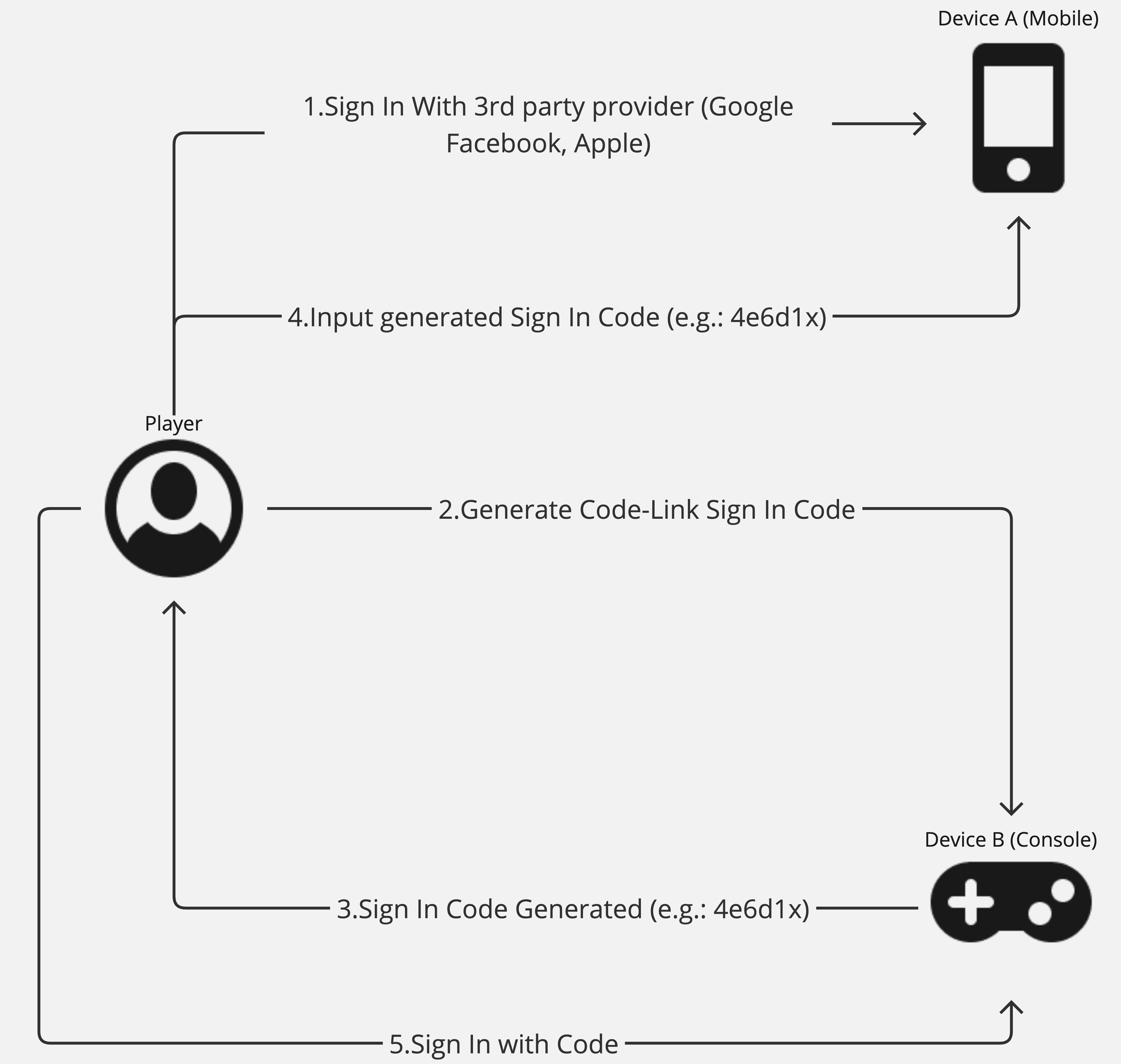
- 玩家以匿名方式或使用任意受支持的 ID 提供商登录设备 A。
- 玩家决定在设备 B(尚未登录)使用相同的帐户,并让设备 B 生成登录代码。
- 收到登录代码后,玩家在设备 A 上输入该代码来确认该代码已获授权。
- 玩家返回设备 B 并请求使用代码登录。
- 设备 B 使用与设备 A 上相同的帐户完成身份验证。
要使用 Code-Link 登录,请按照以下步骤操作:
-
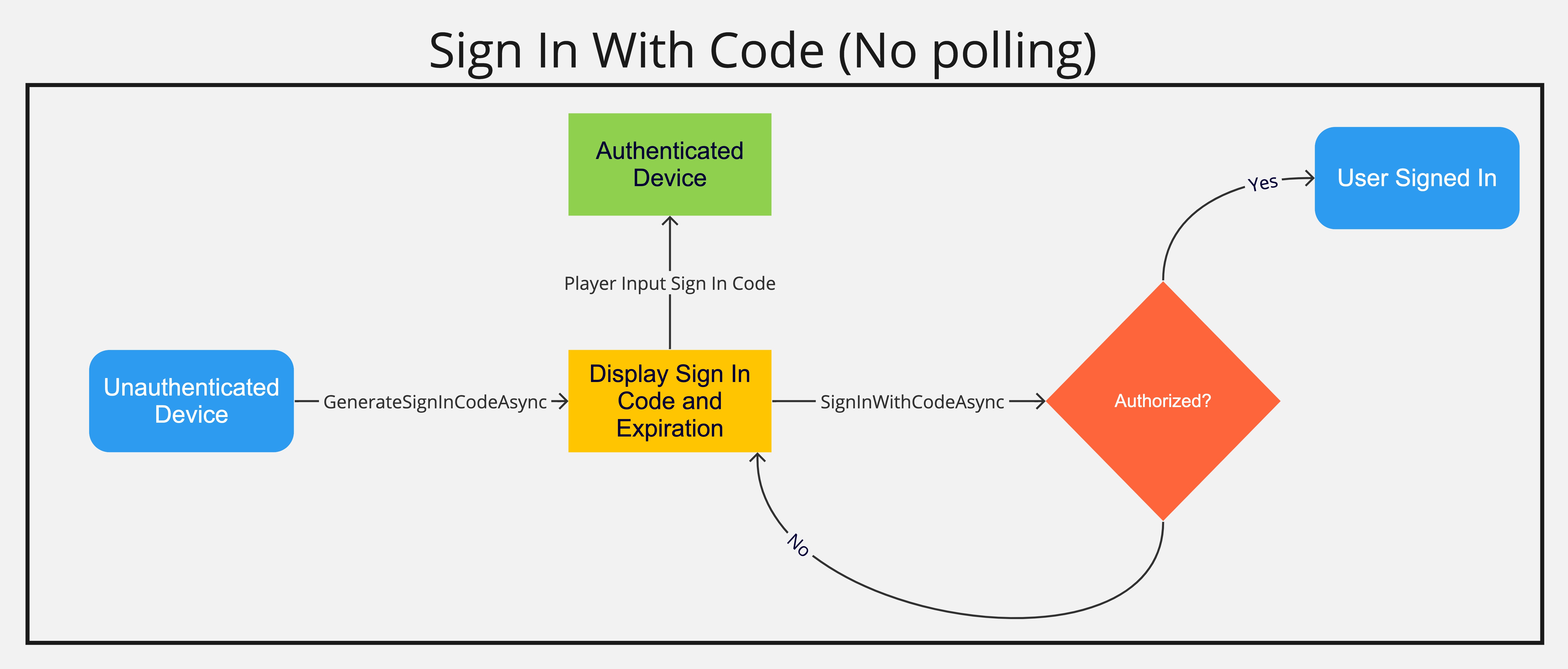
从要进行身份验证的未认证设备使用方法(回传标识符非必选项,但推荐使用该操作来识别生成登录代码的设备)生成登录代码。
GenerateSignInCodeAsync -
向玩家显示生成的 SignInCode 和过期时间。async Task GenerateCodeAsync(string identifier){ try { var codeInfo = await AuthenticationService.Instance.GenerateSignInCodeAsync(identifier); // Display code, and expiration and identifier to the player } catch (Exception e) { // Notify the client something went wrong generating the code }}
-
让玩家可以在另一台已经过身份验证的设备上输入该 SignInCode。
-
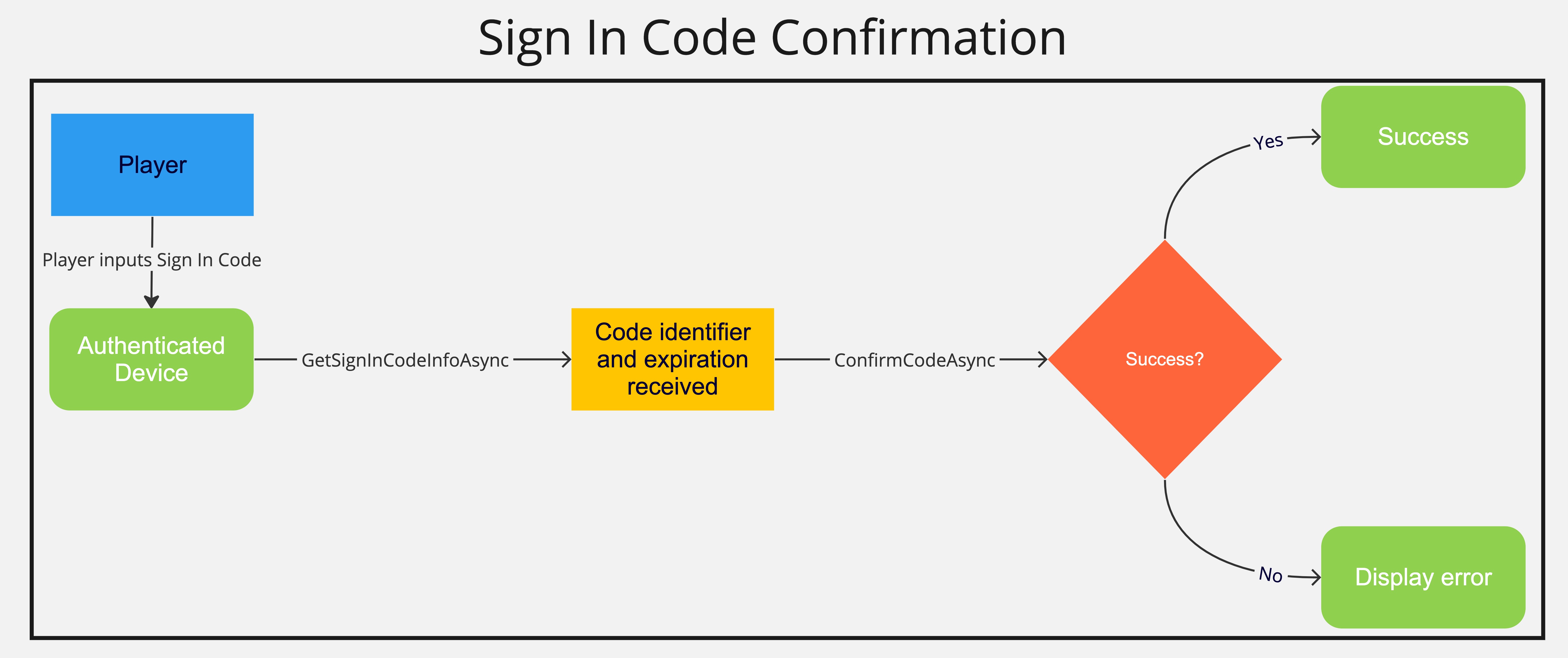
(可选)通过,使用玩家提供的 SignInCode 来获取 SignInCode 信息,并向玩家显示该信息,以便玩家比较两台设备上的标识符,以此确认是否在为正确的设备授权。
GetSignInCodeInfoAsync -
通过授权 Code-Link 登录。
ConfirmCodeAsyncasync Task GetCodeInfoAsync(string signInCode){ try { var codeInfo = await AuthenticationService.Instance.GetSignInCodeInfoAsync(signInCode); // Display code, and expiration and identifier to the player and ask them to authorize the code-link sign in } catch (Exception e) { // Notify the client something went wrong getting the code information }}async Task ConfirmCodeAsync(string signInCode){try{await AuthenticationService.Instance.ConfirmCodeAsync(signInCode);// Display a confirmation that the device should be authorized}catch (Exception e){// Notify the client something went wrong with the code confirmation}} -
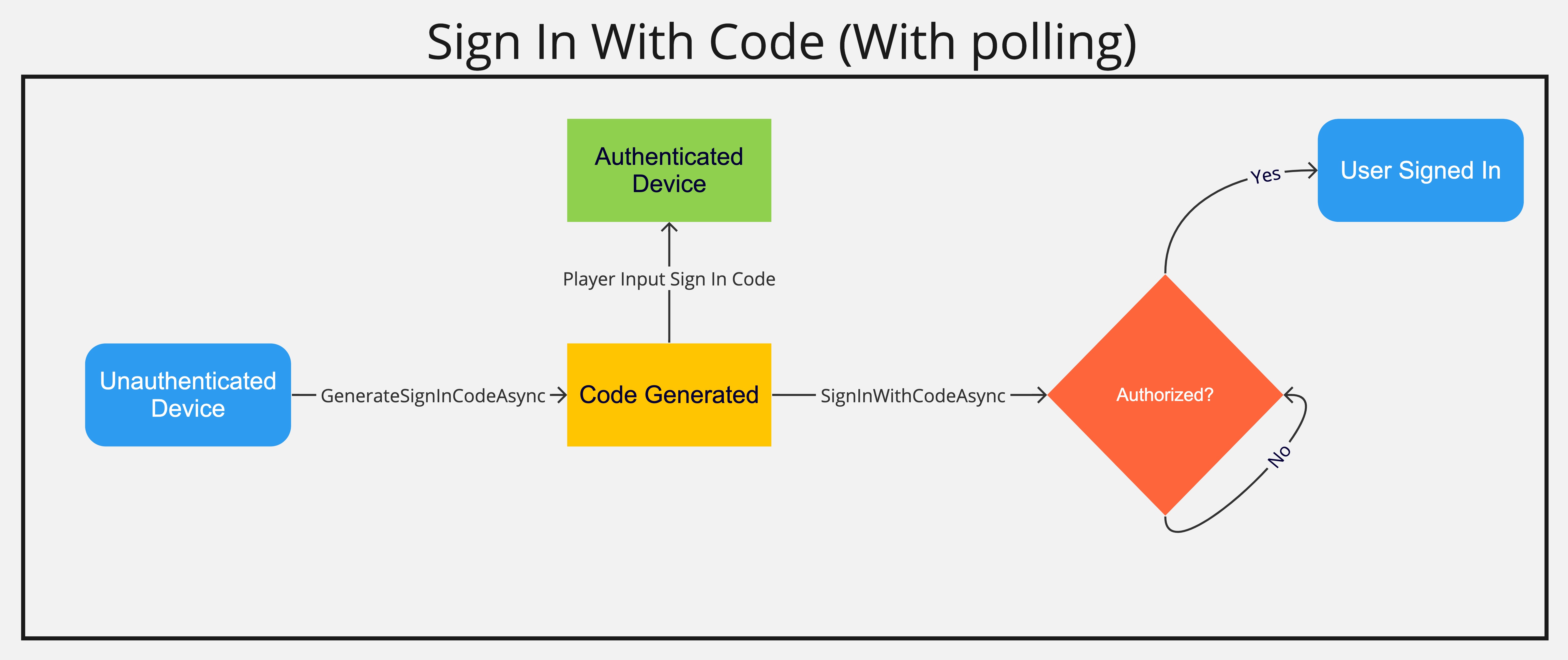
通过调用,在生成 SignInCode 的同一设备上登录玩家。(用于验证 Code-Link 登录的凭据储存在内存中,因此请确保先调用 GenerateSignInCodeAsync,然后再调用 SignInWithCodeAsync,否则会抛出异常。)如果代码尚未得到授权,则此方法成功,但用户不会登录;请检查是否出现 SignedIn 事件,以判断登录是否成功。
SignInWithCodeAsyncpublic async Task SignInWithCodeAsync(){ try { AuthenticationService.Instance.SignedIn += UserHasSignedIn await AuthenticationService.Instance.SignInWithCodeAsync(); } catch (Exception e) { // Notify the client something went wrong signing in the player } finally { AuthenticationService.Instance.SignedIn -= UserHasSignedIn }}public void UserHasSignedIn() { // Notify the client the user signed in successfully.}
<Note>**注意**:`SignInWithCodeAsync` 方法还支持自动轮询(每 5 秒钟轮询一次),因此设备会在该代码获得授权后自动使玩家登录,如果代码已过期,则会抛出异常。此方法还接受 `CancellationToken` 取消轮询。```csCancellationTokenSource CodeLinkCancellationTokenSource;</Note>public async Task PollSignInWithCodeAsync()\{ try \{ CodeLinkCancellationTokenSource = new CancellationTokenSource(); await AuthenticationService.SignInWithCodeAsync(true, CodeLinkCancellationTokenSource.Token); } catch (Exception e) \{ // Notify the client something went wrong with Polling for Code Confirmation }}public void CancelSignInWithCode()\{ CodeLinkCancellationTokenSource.Cancel();}