OpenID Connect
Set up custom sign-in with OpenID Connect providers to enable players to authenticate with external identity systems.
阅读时间7 分钟最后更新于 10 个月前
使用自定义登录时,系统会使用玩家输入的信息(比如,电子邮件和密码等登录凭据)在游戏中创建新玩家并将玩家与您的自定义 ID 提供商帐户建立关联。借助自定义 ID 提供商在您的游戏中启用现有身份验证系统帐户登录,如 PlayFab、Firebase、Epic Online Services 等。
如果玩家使用自定义身份提供商帐户登录,则会调用 API 对玩家进行身份验证,或创建新玩家。
SignInWithSDK 最低版本:2.2.0
请检查您的 SDK 版本;从 2.2.0+ 版本开始支持 OIDC。
本文将引导您完成以下场景,为您游戏中使用自定义 ID 提供商 OpenID Connect 的玩家设置身份验证:
- 设置自定义 OpenID Connect ID 登录。
- 回归用户登录或创建新用户。
- 将用户从匿名登录更新为通过自定义 ID 提供商进行平台登录。
重要:要在您的游戏中为玩家提供自定义 ID 提供商登录选项,请根据自定义 ID 提供商给出的指导说明来在您的 Unity 游戏中获取 ID 令牌。
注意:Unity Gaming Services(Unity 游戏服务)不提供集成功能,因此您需要集成到 OIDC/OAuth2 服务器。
注意:下方代码示例的前提为,您已经在 Unity Dashboard 中设置好自定义 ID 提供商,并且已经存在有效的 ID 提供商名称和玩家 ID 令牌。集成仅用于将 UGS Player ID 与第三方 IdP 凭据关联,并且您仍需要自行构建 IdP 集成。
以下 UML 序列图描述了如何在第三方 IdP、Unity Gaming Services(Unity 游戏服务)和 Unity 应用/游戏之间进行传统集成。
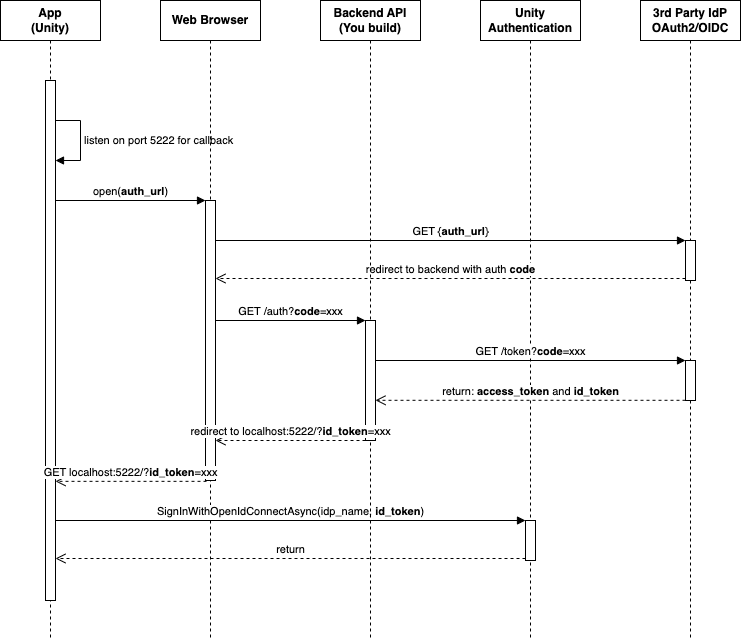
设置自定义 OpenID Connect ID 登录
OpenID 是建立在 OAuth2.0 协议基础上的身份层。您可以通过授权服务器执行的身份验证来验证玩家的身份。您可以使用 OpenID 连接客户端(比如基于 Web 的客户端、JavaScript 客户端和移动客户端),从而获取有关终端用户和身份验证会话的信息。
-
为 Unity Authentication 配置 OpenID Connect ID 提供商:
- 在 Unity 编辑器菜单中,访问 Edit(编辑)> Project Settings…(项目设置…),然后从导航菜单中选择 Services(服务)> Authentication(身份验证)。
- 将 ID Providers(ID 提供商) 设置为 OpenID Connect,然后选择 Add(添加)。
- 在 Oidc Name(Oidc 名称) 文本字段中输入 ID 提供商名称(ID 提供商名称是介于 6-20 个字符之间(包括“oidc-”在内)的任意文本)。
- 在 Issuer(URL)(颁发者 [URL]) 文本字段中输入颁发者 URL(必须以 https://) 开头)。请参考以下一些身份提供商的格式:AWS Cognito:Keycloak:
https://cognito-idp.<Region>.amazonaws.com/<userPoolId>Firebase:https://<keycloak-domain>/realms/<realm>https://securetoken.google.com/<projectId> - 选择 Save(保存)。
回归用户登录或创建新用户
您可以使用 方法执行以下操作之一:
SignInWithOpenIdConnectAsync- 通过 Open ID Connect 凭据创建新的 Unity Authentication 玩家帐户。
- 通过 Open ID Connect 凭据登录现有玩家帐户。
如果您的项目中没有与凭据关联的 Unity Authentication 玩家帐户,那么 将创建新的玩家帐户。如果您的项目中具有与凭据关联的 Unity Authentication 玩家帐户,那么 将登录该玩家帐户。该功能不考虑缓存的玩家帐户, 将替换缓存的玩家帐户。
SignInWithOpenIdConnectAsyncSignInWithOpenIdConnectAsyncSignInWithOpenIdConnectAsyncasync Task SignInWithOpenIdConnectAsync(string idProviderName, string idToken){ try { await AuthenticationService.Instance.SignInWithOpenIdConnectAsync(idProviderName, idToken); Debug.Log("SignIn is successful."); } catch (AuthenticationException ex) { // Compare error code to AuthenticationErrorCodes // Notify the player with the proper error message Debug.LogException(ex); } catch (RequestFailedException ex) { // Compare error code to CommonErrorCodes // Notify the player with the proper error message Debug.LogException(ex); }}
将玩家帐户从匿名更新为自定义 ID 提供商帐户
您设置匿名身份验证之后,玩家可以从匿名升级为自定义 ID 提供商帐户,并使用该帐户登录,以获得 ID 令牌。然后,调用 API,将玩家帐户与其提供商帐户关联。
LinkWithOpenIdConnectAsync如果 SDK 上有缓存的玩家帐户,那么您可以将缓存的玩家帐户与 Open ID Connect 帐户关联。
- 通过 登录缓存玩家的帐户。
SignInAnonymouslyAsync - 通过 将缓存的玩家帐户与 Open ID Connect 帐户关联。
LinkWithOpenIdConnectAsync
async Task LinkWithOpenIdConnectAsync(string idProviderName, string idToken){ try { await AuthenticationService.Instance.LinkWithOpenIdConnectAsync(idProviderName, idToken); Debug.Log("Link is successful."); } catch (AuthenticationException ex) when (ex.ErrorCode == AuthenticationErrorCodes.AccountAlreadyLinked) { // Prompt the player with an error message. Debug.LogError("This player is already linked with another account. Log in instead."); } catch (AuthenticationException ex) { // Compare error code to AuthenticationErrorCodes // Notify the player with the proper error message Debug.LogException(ex); } catch (RequestFailedException ex) { // Compare error code to CommonErrorCodes // Notify the player with the proper error message Debug.LogException(ex); }}
如果玩家希望在您自己的自定义 ID 提供商平台上使用他们的帐户登录,请调用以下 API:
async Task SignInWithOpenIdConnectAsync(string idProviderName, string idToken){ try { await AuthenticationService.Instance.SignInWithOpenIdConnectAsync(idProviderName, idToken); Debug.Log("SignIn is successful."); } catch (AuthenticationException ex) { // Compare error code to AuthenticationErrorCodes // Notify the player with the proper error message Debug.LogException(ex); } catch (RequestFailedException ex) { // Compare error code to CommonErrorCodes // Notify the player with the proper error message Debug.LogException(ex); }}
取消 OpenID 帐户关联
使用 API 可以取消玩家帐户与其 OpenID 帐户的关联。一旦取消关联,如果玩家帐户不再关联到任何其他身份,则会转换为匿名帐户。
UnlinkOpenIdConnectAsyncasync Task UnlinkOpenIdConnectAsync(string idToken){ try { await AuthenticationService.Instance.UnlinkOpenIdConnectAsync(idToken); Debug.Log("Unlink is successful."); } catch (AuthenticationException ex) { // Compare error code to AuthenticationErrorCodes // Notify the player with the proper error message Debug.LogException(ex); } catch (RequestFailedException ex) { // Compare error code to CommonErrorCodes // Notify the player with the proper error message Debug.LogException(ex); }}