Unity Version Control plugin for Intellij IDEs
Install the plugin to use version control in IntelliJ IDEs.
읽는 시간 1분최근 업데이트: 일 년 전
Requirements
- Unity Version Control installation version 11.0.16.X or above.
- JetBrains IDE version 2022.3 or above.
Install the plugin
The installation process below is a summary of the required steps to install a custom plugin in your IDE manually.
- Open your preferred JetBrains IDE.
- Go to the Plugins panel and uninstall any version of the plugin Plastic SCM Integration. Restart if asked.
- Select the gear icon and select Install Plugin from Disk. Then select the plugin zip file from the Unity Version Control installation folder .
${INSTALL_DIR}/client/plugins/intellij/plastic4intellij-X.Y.Z.zip - Open a .NET project under Unity Version Control.
- Make sure the PlasticSCM plugin is enabled under Settings > Version Control > PlasticSCM.
More info: JetBrains documentation
Use the plugin
To view the version control features, right-click the project hierarchy and select Plastic SCM:
- Checkin File
- Update File
- Compare with the Same Repository Version
- Compare with
- Edit
- Add
- Rollback
- Show History
- Annotate
- Work Offline
Version Control tab
There is a dedicated Version Control tab that covers version control related details, such as local changes pending to check in, history and revisions, and un-versioned and ignored files.
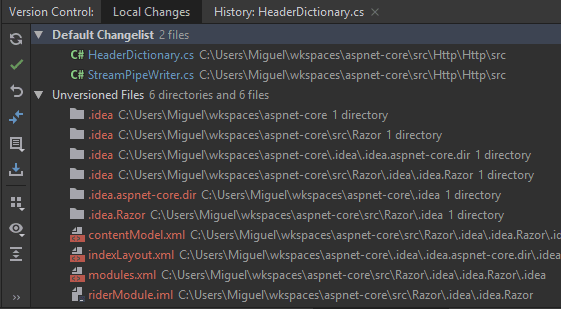
The Version Control tab with the Default Changelist and a list of unversioned files.
Diff files
One of Unity Version Control's main features, semantic diffing (understanding code structure to reduce integration conflicts), is embedded in the IDE interface.
Annotate files
Annotate lines and history of the local files to better understand the evolution of the project.