Services Core SDK API
Initialize all Unity Gaming Services with Services Core.
읽는 시간 3분최근 업데이트: 7달 전
Services Core 패키지는 단일 호출로 모든 Unity Gaming Services를 초기화하는 솔루션을 제공하며, 여러 패키지에서 사용되는 공통 컴포넌트를 정의합니다. 이러한 표준화된 컴포넌트는 Unity Gaming Services 패키지와 작업할 때 전체적인 경험을 통합하는 것을 목표로 합니다.
UnityServices
namespace Unity.Services.Core{ public static class UnityServices{}}
이 클래스를 사용하여 현재 프로젝트에 설치된 모든 Unity Gaming Services를 초기화합니다.
InitializeAsync
public static Task InitializeAsync(InitializationOptions options)
이 메서드는 현재 프로젝트에 설치된 모든 Unity Gaming Services를 초기화합니다. 이 메서드는 초기화 진행 상황을 모니터링할 수 있는 를 반환합니다.
Task파라미터 | 유형 | 설명 |
|---|---|---|
| | 이 선택적 파라미터는 고유한 SDK 초기화 사양을 용이하게 할 수 있는 키-값 스토리지 역할을 합니다. |
참고: 이 메서드는 런타임 시에만 지원됩니다.
State
public static ServicesInitializationState State
이 메서드는 런타임 시 게임의 현재 를 반환합니다.
ServicesInitializationState값 | 설명 |
|---|---|
| Unity 서비스가 초기화되지 않았습니다. |
| Unity 서비스가 초기화 중입니다. |
| Unity 서비스가 초기화되었습니다. |
InitializationOptions
namespace Unity.Services.Core { public class InitializationOptions{}}
초기화 옵션은 고유한 SDK 초기화 사양을 용이하게 할 수 있는 키-값 스토리지 역할을 합니다. Unity Gaming Services SDK를 초기화할 때 메서드를 통해 이러한 옵션을 전달합니다.
InitializeAsyncTryGetOption
public bool TryGetOption(string key, out bool option)public bool TryGetOption(string key, out int option)public bool TryGetOption(string key, out float option)public bool TryGetOption(string key, out string option)
이 메서드는 지정된 키가 존재하면 를 반환하고, 존재하지 않으면 를 반환합니다.
truefalse파라미터 | 유형 | 설명 |
|---|---|---|
| 문자열 | 검색할 옵션의 키입니다. |
| 다양 | 해당 키와 연결된 저장된 옵션입니다(존재하는 경우). |
SetOption
public InitializationOptions SetOption(string key, bool value)public InitializationOptions SetOption(string key, int value)public InitializationOptions SetOption(string key, float value)public InitializationOptions SetOption(string key, string value)
이러한 메서드는 지정된 키의 값을 저장합니다.
파라미터 | 유형 | 설명 |
|---|---|---|
| 문자열 | 저장할 옵션의 키입니다. |
| 다양 | 해당 키와 연결된 저장된 옵션입니다(존재하는 경우). |
초기화 예제
다음 예제는 개발 환경 초기화 확장 기능을 사용하여 모든 서비스를 한 번에 초기화합니다.
using System;using Unity.Services.Core;using Unity.Services.Core.Environments;using UnityEngine; public class InitializeUGS : MonoBehaviour { public string environment = "production"; async void Start() { try { var options = new InitializationOptions() .SetEnvironmentName(environment); await UnityServices.InitializeAsync(options); } catch (Exception exception) { // An error occurred during initialization. } }}
초기화 디버깅
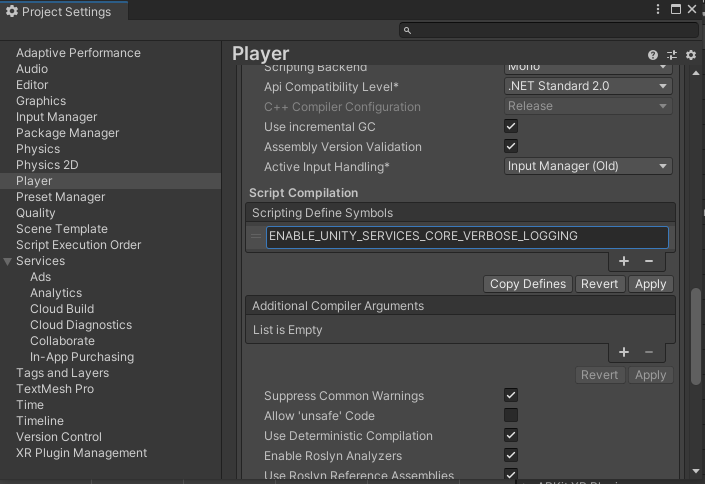
Services Core 버전 1.4.2 이상에서는 디버깅 목적으로 상세 모드를 활성화할 수 있습니다. 상세 모드를 활성화하면, Services Core SDK는 모든 서비스가 공유하는 공통 구성에 대한 정보를 에디터의 콘솔에 기록합니다. 상세 모드를 활성화하려면 다음을 수행합니다.
- Unity 에디터에서 Edit > Project Settings > Player를 선택합니다.
- 플레이어 설정 창에서 Other Settings를 클릭합니다.
- Script Compilation 아래에 다음 스크립팅 Define 기호를 추가합니다.
ENABLE_UNITY_SERVICES_CORE_VERBOSE_LOGGING - Apply를 클릭합니다.
예외 유형
ServicesInitializationException
서비스 초기화 중 발생하는 오류에 대한 기본 예외 유형입니다.
CircularDependencyException
등록된 두 개의 인스턴스가 서로 종속될 때 발생하는 예외입니다. 이 오류는 설계 문제를 나타내는 경우가 많으므로 반드시 수정해야 합니다.
IInitializablePackageRequestFailedException
요청이 실패할 때 발생하는 기본 예외 유형입니다. 각 예외는 실패 원인을 지정하는 를 반환합니다.
int ErrorCode이름 | 코드 | 설명 |
|---|---|---|
| | 오류를 확인할 수 없습니다. |
| | 유효한 HTTP 응답이 없는 DNS, TLS, 기타 전송 오류입니다. |
| | 할당된 시간 내에 응답을 받지 못해 요청 제한 시간을 초과했습니다. |
| | 서비스를 사용할 수 없습니다. 이는 일반적으로 서비스가 오버로드 상태임을 의미합니다. |
| | API가 존재하지 않습니다. |
| | 요청이 거부되었습니다. 일반적으로 API 엔드포인트에 도달하기 전에 거부됩니다. 자세한 내용은 제목/세부 정보를 참고하십시오. |
| | 요청 속도가 제한되었습니다. 클라이언트가 요청을 너무 자주 보내고 있습니다. |
| | 인증 토큰이 잘못되었거나 유효하지 않습니다. |
| | 인증 토큰이 만료되었습니다. |
| | 사용자가 요청된 작업을 수행할 권한이 없습니다. |
| | 요청된 리소스를 찾을 수 없습니다. |
| | 요청은 파악되었지만, 하나 이상의 컴포넌트가 유효하지 않기 때문에 API가 처리를 거부했습니다. |