Cloud Code による Economy Game Overrides
Learn how to use Game Overrides with Cloud Code to personalize your in-game Economy for specific player groups.
読み終わるまでの所要時間 6 分最終更新 8ヶ月前
Game Overrides を使用して、ゲーム内の Economy をパーソナライズすることができます。例えば、ごく短期間のシーズンセールを提供したり、熟練プレイヤーの購入のゲーム内報酬を増やしたりします。
Game Overrides と設定のキャッシュの Economy での機能
設定割り当てハッシュが Cloud Code と Economy SDK でどのように使用されるかについては、設定のキャッシュ を参照してください。
Economy が、プレイヤーにどの Override が適用されるかを認識するには、どの Override がクライアントデバイスにあるかを把握する必要があります。Economy は、設定の一部として を返します。 を Economy に渡すと、Economy がデバイスにあるのと同じ設定を使用し、そのプレイヤーに対して一貫したユーザー体験を提供できるようになります。
configAssignmentHashconfigAssignmentHashEconomy SDK 2.0.0 以降は、Economy API とやり取りする際に、 を自動的に Economy に渡します。Economy SDK で Game Overrides を使用する方法については、Economy SDK ガイドの Game Overrides を参照してください。
configAssignmentHashEconomy SDK 1.0.0 および Cloud Code 内の Economy SDK は、 を自動的に Economy に渡すことはありません。Economy が をパラメーターとして受け取らない場合でも、クライアントデバイス設定との一貫性を維持する方法があります。ただし、一部の珍しいケースでは、この設定がクライアントデバイス上の設定との一貫性を持たない場合があります。
configAssignmentHashconfigAssignmentHashCloud Code での Economy Game Overrides の使用
Cloud Code を使用してゲームロジックをクライアントデバイスから切り離すもう 1 つの方法は、Cloud Code を使用してゲーム内経済を操作することです。Cloud Code から Economy を操作するときは、 を Cloud Code スクリプトに渡してから、それを Economy に渡す必要があります。SDK には、クライアントデバイス上の を取得するメソッドがあります。すべてのステップは以下のとおりです。
configAssignmentHashconfigAssignmentHashCloud Code の設定
-
をパラメーターとして Cloud Code スクリプトを設定 します。
configAssignmentHash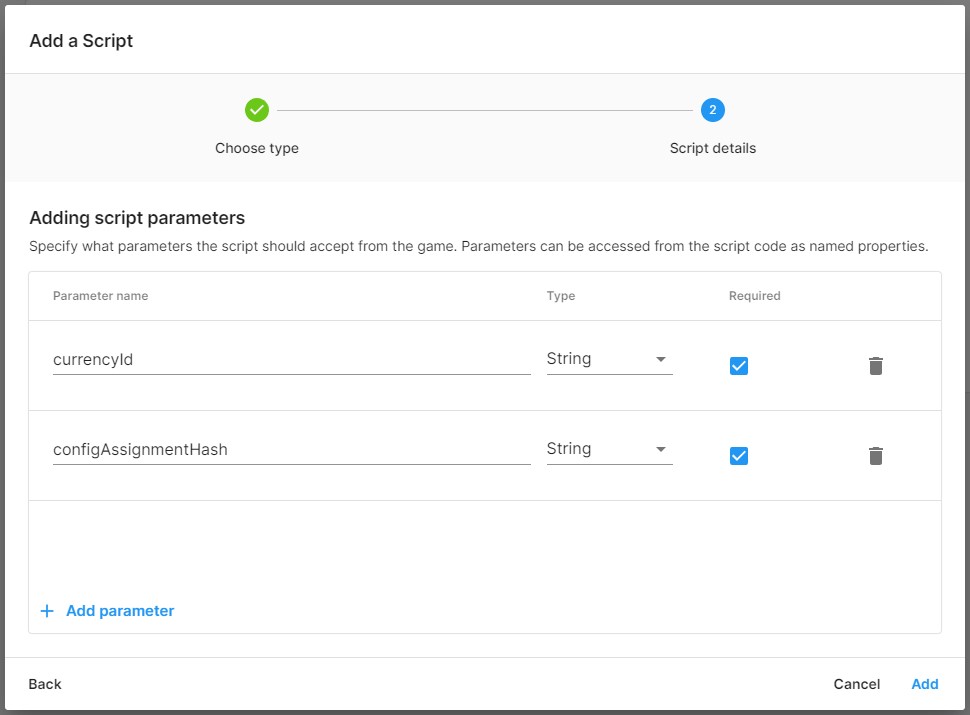
-
Economy SDK 2.2 以降を使用して、Economy を呼び出すスクリプトを Cloud Code に追加します。/* * -------- Example Cloud Code Script -------- * * Ensure consistency when using Game Overrides with Economy * * -------------------------------------------- */const { CurrenciesApi } = require("@unity-services/economy-2.2");/* * CommonJS wrapper for the script. It receives a single argument, which can be destructured into: * - params: Object containing the parameters provided to the script, accessible as object properties * - context: Object containing the projectId, environmentId, environmentName, playerId and accessToken properties. * - logger: Logging client for the script. Provides debug(), info(), warning() and error() log levels. */module.exports = async ({ params, context, logger }) => { // Log an info message with the parameters provided to the script and the invocation context logger.info("Script parameters: " + JSON.stringify(params)); logger.info("Authenticated within the following context: " + JSON.stringify(context)); const { projectId, playerId, accessToken } = context; const { currencyId, configAssignmentHash } = params; const currencies = new CurrenciesApi({ accessToken }); const increment = await currencies.incrementPlayerCurrencyBalance({ projectId, playerId, currencyId, configAssignmentHash, currencyModifyBalanceRequest: { currencyId, amount: 10 } }); logger.info("Increment data result: " + JSON.stringify(increment.data)); // Return the JSON result to the client return { newBalance: increment.data.balance, };};
エディターの設定
-
Economy SDK 2.0.0 以降から 設定を取得 します。string currencyID = "GOLD";CurrencyDefinition goldCurrencyDefinition = EconomyService.Instance.Configuration.GetCurrency(currencyID);
-
以下を呼び出します。EconomyService.Instance.Configuration.GetConfigAssignmentHash();(Economy SDK から)。
-
ステップ 2 のを Cloud Code に渡します。
configAssignmentHashawait CloudCode.CallEndpointAsync<NewBalance>("AddCurrency", new IncrementBalanceParam(currencyId, configAssignmentHash));
全体例
public async Task<int> IncrementCurrency(){ var goldCurrencyId = "GOLD"; EconomyService.Instance.Configuration.GetCurrency(goldCurrencyId); var configAssignemntHash = EconomyService.Instance.Configuration.GetConfigAssignmentHash(); var newBalance = await CallIncrementCurrencyEndpoint(goldCurrencyId, configAssignemntHash); return newBalance;}public async Task<int> CallIncrementCurrencyEndpoint(string currencyId, string configAssignmentHash){ var newBalanceResult = await CloudCode.CallEndpointAsync<NewBalance>( "AddCurrency", new IncrementBalanceParam(currencyId, configAssignmentHash)); return newBalanceResult.newBalance;}public class NewBalance{ public int newBalance;}[Serializable]public class IncrementBalanceParam{ public string currencyId; public string configAssignmentHash; public IncrementBalanceParam(string currencyId, string configAssignmentHash) { this.currencyId = currencyId; this.configAssignmentHash = configAssignmentHash; } public override string ToString() { return $"{{\"currencyId\": @currencyId, \"configAssignmentHash\": @configAssignmentHash }}"; }}
注意事項
設定のキャッシュの注意事項 を参照