ドキュメント

​
​

Development

User Acquisition

Monetization

産業

Asset Transformer SDK

2026.4

サポート対象
​

User Manual

Python API

C# API

Changelog

Discussions

Asset Transformer SDK

2026.4

サポート対象
​

このページは選択した言語では使用できません。
​
​
Get started
  • System requirements
  • Licensing
  • Setup
  • Migrate from Scenario Processor
Framework
  • Framework
  • Preferences
Input/output files
  • Supported formats
  • Import files
    • Import Autodesk Alias files
    • Import Autodesk VRED files
    • Import RVM files
    • Import Autodesk ReCap files
  • Export files
  • Export textures
  • CAD vs Mesh
Scene
  • Product structure
  • Occurrence
  • Component
  • Material
  • Image
Algorithms
  • CAD
  • Healing
  • Optimization
  • Combine and bake
  • Reconstruction
  • UVs
Viewer
  • Viewer
Pixyz UI
  • Setup
  • Overview
  • Create a custom UI
Guidelines
  • Data preparation
  • Process point clouds
Debug and diagnose
  • Log files
  • Debug best practices
Other
  • Samples
  • Glossary
  1. Asset Transformer SDK (ex Pixyz)

Importing ReCap Files

Learn how to import ReCap files (.rcp or .rcs) using the Pixyz SDK, including downloading the ReCap SDK and configuring the API.
読み終わるまでの所要時間 1 分
最終更新 3ヶ月前

Importing a ReCap file (.rcp or .rcs file) requires Autodesk ReCap to be installed (with a valid license) on the same computer the process is running.

Download ReCap SDK

Download the ReCapSDK v20.1.1, from Autodesk Developer Network website, with a valid Autodesk developer account.
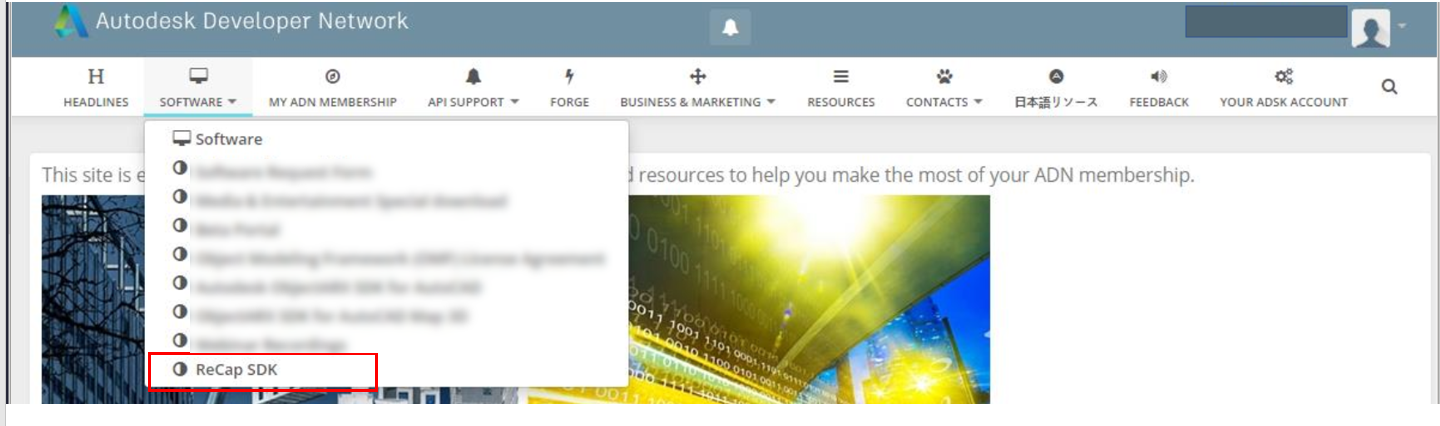
Image

Configuring API

To start importing .wire files the API needs to be configured at the beginning of your script:
pxz.core.setModuleProperty("IO", "RecapSDKPath", "*PATH_TO_RECAP_INSTALL*/bin/")

Copyright © 2026 Unity Technologies
法規事項プライバシーポリシークッキーDocumentation Terms of Use私の個人情報を販売または共有しないプライバシーに関する選択 (クッキー設定)

"Unity" の名称、Unity のロゴ、およびその他の Unity の商標は、米国およびその他の国における Unity Technologies またはその関係会社の商標または登録商標です (詳しくはこちら)。その他の名称またはブランドは該当する所有者の商標です。

一部のページは利便性向上のため機械翻訳を使用しており、内容に不正確な表現が含まれる場合があります。内容に齟齬または不一致が生じた場合は、英語版を正本とします。

  • このページ
    • Download ReCap SDK

    • Configuring API


このページの問題を報告する