In-app bidding
Integrate Unity LevelPlay to enable real-time in-app bidding, allowing multiple ad sources to compete for impressions and optimize monetization.
Read time 2 minutesLast updated 2 months ago
Use Unity LevelPlay in-app bidding to sell your ad inventory in an automated auction by allowing ad sources to simultaneously bid for each impression in real time.
You can set up an environment that includes only bidding sources, only non-bidding sources, or a combination of both (a hybrid model).
- Bidding sources place a real-time bid for each impression.
- Non-bidding sources bid by using eCPM, which is based on historical performance.
- In the hybrid model, both bidding and non-bidding sources are competing for all ad impressions.
Set up in-app bidding
Bidding is automatically enabled in every ironSource partner's account.
To set up LevelPlay bidding network partners, complete the following steps
- In the left navigation menu, go to Monetize > Setup > Ad Units & Placements.
- Activate the ironSource bidding network.
- In the left navigation menu, go to Monetize > Setup > SDK Networks.
- Activate SDK bidding networks from the Bidding section.
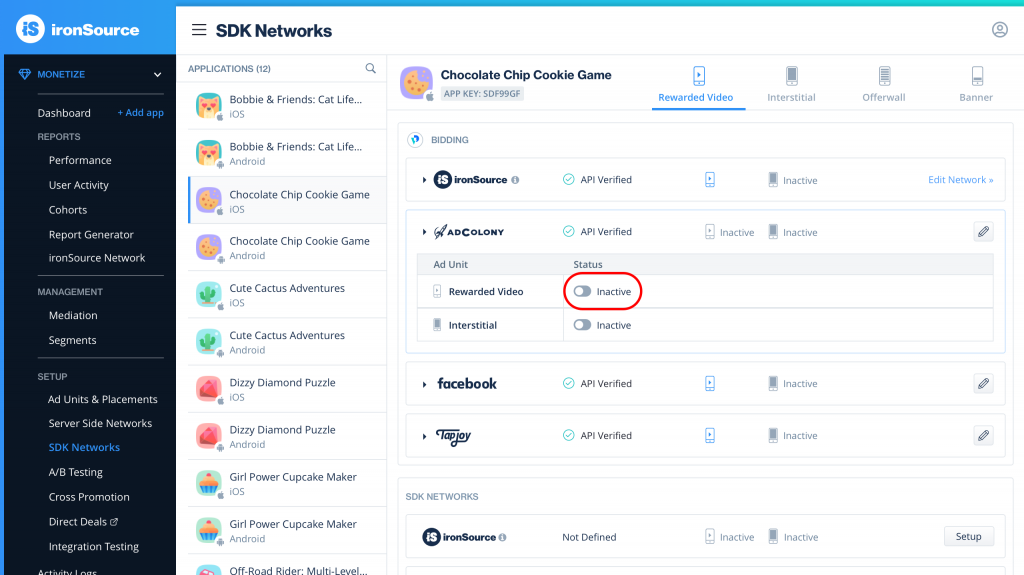
- AdColony: To activate AdColony as a bidder, you need LevelPlay SDK 6.10.0 or later. The bidding instance can be either an existing AdColony Zone ID or a new Zone ID. For assistance, contact your AdColony Account manager or contact support@adcolony.com.
- Meta: To activate Meta Audience Network bidding, you need LevelPlay SDK 6.11.0 or later.
- Tapjoy: To activate Tapjoy as a bidder, you need LevelPlay SDK 6.10.0 or later.
Monitoring and reporting
Active bidders are listed on the Mediation Management page in the Bidding section.
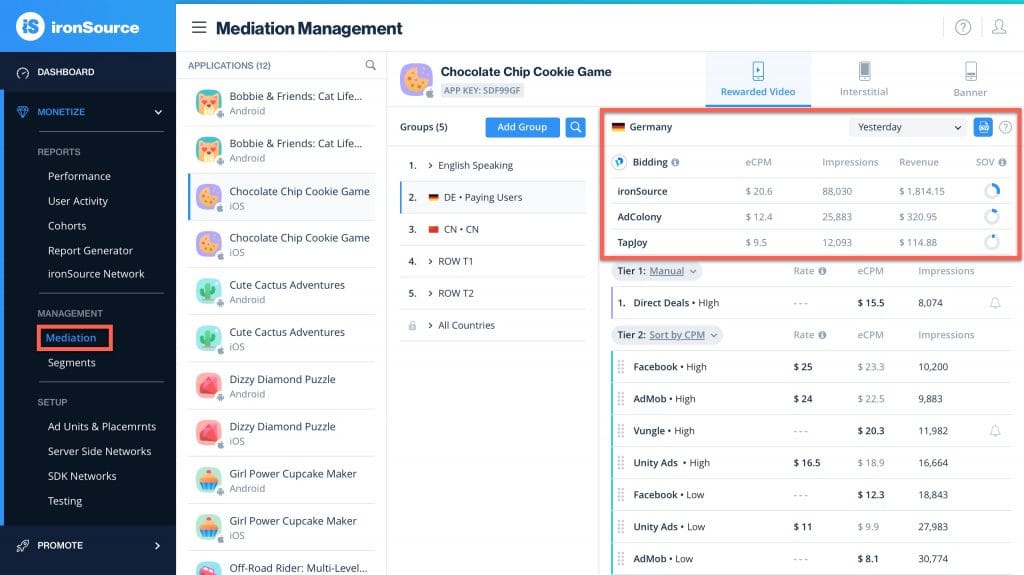
Each bidding source is accompanied by the following metrics, each of which detail the previous day's data:
- Impressions - Total impressions served
- eCPM - Average eCPM
- Revenue - Total revenue earned
- SOV - Share of voice of revenue compared to total revenue from both bidding and non-bidding sources
You can additionally monitor bidding performance from any of the platform reporting pages.