SaveScene
Save the open Scene.
Read time 5 minutesLast updated 8 days ago
Definition
- Type: Method
- Namespace: UnityEditor
- Assembly: UnityEditor.CoreModule
SaveScene()
Save the open Scene.
public static bool SaveScene()
Returns
Type | Description |
|---|---|
| bool | True if the save succeeded, otherwise false. |
Remarks
All paths are relative to the project folder, such as: "Assets/MyScenes/MyScene.unity". Folders specified in the path must already exist before calling the function. If no path is specified, the path of the current open Scene is used, except if it was never saved before, in which case a save dialog is shown.
The function returns if the save failed. This can happen if the specified path is invalid or if the user cancels in the case of a save dialog.
falseWhen calling the function, the unsaved changes marker is cleared, just as when saving using the file menu. (On Windows, the unsaved changes marker is an asterix after the file name in the window title. On macOS it's a dot inside the red close button of the window.) When a path is specified, the EditorApplication.currentScene is also changed to be the specified asset.
When is set to however, neither the EditorApplication.currentScene or the unsaved changes marker is changed.
saveAsCopytrueAdditional Resources: EditorApplication.currentScene.
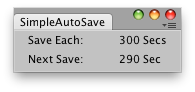
Simple Editor Window that saves each 300 seconds the current Scene.
Examples
using UnityEngine;using UnityEditor;public class SimpleAutoSave : EditorWindow{ float saveTime = 300f; float nextSave = 0f; [MenuItem("Example/Simple autoSave")] static void Init() { SimpleAutoSave window = EditorWindow.GetWindowWithRect<SimpleAutoSave>(new Rect(0, 0, 165, 40), true); window.Show(); } void OnGUI() { EditorGUILayout.LabelField("Save Each:", saveTime + " Secs"); int timeToSave = (int)(nextSave - EditorApplication.timeSinceStartup); EditorGUILayout.LabelField("Next Save:", timeToSave.ToString() + " Sec"); this.Repaint(); if (EditorApplication.timeSinceStartup > nextSave) { string[] path = EditorApplication.currentScene.Split(char.Parse("/")); path[path.Length - 1] = "AutoSave_" + path[path.Length - 1]; EditorApplication.SaveScene(string.Join("/", path), true); Debug.Log("Saved Scene"); nextSave = (int)(EditorApplication.timeSinceStartup + saveTime); } }}
SaveScene(string)
Save the open Scene.
public static bool SaveScene(string path)
Parameters
The file path to save at. If empty, the current open Scene will be overwritten, or if never saved before, a save dialog is shown.
Returns
Type | Description |
|---|---|
| bool | True if the save succeeded, otherwise false. |
Remarks
All paths are relative to the project folder, such as: "Assets/MyScenes/MyScene.unity". Folders specified in the path must already exist before calling the function. If no path is specified, the path of the current open Scene is used, except if it was never saved before, in which case a save dialog is shown.
The function returns if the save failed. This can happen if the specified path is invalid or if the user cancels in the case of a save dialog.
falseWhen calling the function, the unsaved changes marker is cleared, just as when saving using the file menu. (On Windows, the unsaved changes marker is an asterix after the file name in the window title. On macOS it's a dot inside the red close button of the window.) When a path is specified, the EditorApplication.currentScene is also changed to be the specified asset.
When is set to however, neither the EditorApplication.currentScene or the unsaved changes marker is changed.
saveAsCopytrueAdditional Resources: EditorApplication.currentScene.
Simple Editor Window that saves each 300 seconds the current Scene.
Examples
using UnityEngine;using UnityEditor;public class SimpleAutoSave : EditorWindow{ float saveTime = 300f; float nextSave = 0f; [MenuItem("Example/Simple autoSave")] static void Init() { SimpleAutoSave window = EditorWindow.GetWindowWithRect<SimpleAutoSave>(new Rect(0, 0, 165, 40), true); window.Show(); } void OnGUI() { EditorGUILayout.LabelField("Save Each:", saveTime + " Secs"); int timeToSave = (int)(nextSave - EditorApplication.timeSinceStartup); EditorGUILayout.LabelField("Next Save:", timeToSave.ToString() + " Sec"); this.Repaint(); if (EditorApplication.timeSinceStartup > nextSave) { string[] path = EditorApplication.currentScene.Split(char.Parse("/")); path[path.Length - 1] = "AutoSave_" + path[path.Length - 1]; EditorApplication.SaveScene(string.Join("/", path), true); Debug.Log("Saved Scene"); nextSave = (int)(EditorApplication.timeSinceStartup + saveTime); } }}
SaveScene(string, bool)
Save the open Scene.
public static bool SaveScene(string path, bool saveAsCopy)
Parameters
The file path to save at. If empty, the current open Scene will be overwritten, or if never saved before, a save dialog is shown.
If set to , the Scene will be saved without changing the EditorApplication.currentScene and without clearing the unsaved changes marker.
trueReturns
Type | Description |
|---|---|
| bool | True if the save succeeded, otherwise false. |
Remarks
All paths are relative to the project folder, such as: "Assets/MyScenes/MyScene.unity". Folders specified in the path must already exist before calling the function. If no path is specified, the path of the current open Scene is used, except if it was never saved before, in which case a save dialog is shown.
The function returns if the save failed. This can happen if the specified path is invalid or if the user cancels in the case of a save dialog.
falseWhen calling the function, the unsaved changes marker is cleared, just as when saving using the file menu. (On Windows, the unsaved changes marker is an asterix after the file name in the window title. On macOS it's a dot inside the red close button of the window.) When a path is specified, the EditorApplication.currentScene is also changed to be the specified asset.
When is set to however, neither the EditorApplication.currentScene or the unsaved changes marker is changed.
saveAsCopytrueAdditional Resources: EditorApplication.currentScene.
Simple Editor Window that saves each 300 seconds the current Scene.
Examples
using UnityEngine;using UnityEditor;public class SimpleAutoSave : EditorWindow{ float saveTime = 300f; float nextSave = 0f; [MenuItem("Example/Simple autoSave")] static void Init() { SimpleAutoSave window = EditorWindow.GetWindowWithRect<SimpleAutoSave>(new Rect(0, 0, 165, 40), true); window.Show(); } void OnGUI() { EditorGUILayout.LabelField("Save Each:", saveTime + " Secs"); int timeToSave = (int)(nextSave - EditorApplication.timeSinceStartup); EditorGUILayout.LabelField("Next Save:", timeToSave.ToString() + " Sec"); this.Repaint(); if (EditorApplication.timeSinceStartup > nextSave) { string[] path = EditorApplication.currentScene.Split(char.Parse("/")); path[path.Length - 1] = "AutoSave_" + path[path.Length - 1]; EditorApplication.SaveScene(string.Join("/", path), true); Debug.Log("Saved Scene"); nextSave = (int)(EditorApplication.timeSinceStartup + saveTime); } }}