DisplayDialog
This method displays a modal dialog.
Read time 6 minutesLast updated 5 days ago
Definition
- Type: Method
- Namespace: UnityEditor
- Assembly: UnityEditor
DisplayDialog(string, string, string, string)
This method displays a modal dialog.
public static bool DisplayDialog(string title, string message, string ok, string cancel)
Parameters
Returns
Type | Description |
|---|---|
| bool | Returns |
Remarks
Use it for displaying message boxes in the Editor. If is null or whitespace, an is thrown. If is longer than 512 characters, it is truncated and the full message is logged to the console in markdown format.
messageArgumentNullExceptionmessageTextok and are labels to be displayed on the dialog buttons. If is empty (the default), then only one button is displayed. DisplayDialog returns if button is pressed. If any button's text is longer than 64 characters, an is thrown.
cancelcanceltrueokArgumentExceptionFor dialog boxes that might be shown repeatedly, consider using an overload of this method that takes a DialogOptOutDecisionType as described in the below the code example.

Dialog box that has one button.
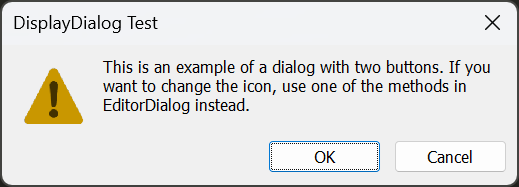
Dialog box that has two buttons.
Note: and are kept for backwards compatibilty. For new code, it is strongly recommended to use one of the new EditorDialog methods.
EditorUtility.DisplayDialogEditorUtility.DisplayDialogComplexAdditional Resources:
- EditorDialog.DisplayAlertDialog
- EditorDialog.DisplayAlertDialogWithOptOut
- EditorDialog.DisplayDecisionDialog
- EditorDialog.DisplayDecisionDialogWithOptOut
- EditorDialog.DisplayComplexDecisionDialog
- EditorDialog.DisplayComplexDecisionDialogWithOptOut.
DisplayDialog(string, string, string)
This method displays a modal dialog.
public static bool DisplayDialog(string title, string message, string ok)
Parameters
Returns
Type | Description |
|---|---|
| bool | Returns |
Remarks
Use it for displaying message boxes in the Editor. If is null or whitespace, an is thrown. If is longer than 512 characters, it is truncated and the full message is logged to the console in markdown format.
messageArgumentNullExceptionmessageTextok and are labels to be displayed on the dialog buttons. If is empty (the default), then only one button is displayed. DisplayDialog returns if button is pressed. If any button's text is longer than 64 characters, an is thrown.
cancelcanceltrueokArgumentExceptionFor dialog boxes that might be shown repeatedly, consider using an overload of this method that takes a DialogOptOutDecisionType as described in the below the code example.
Dialog box that has one button.
Dialog box that has two buttons.
Note: and are kept for backwards compatibilty. For new code, it is strongly recommended to use one of the new EditorDialog methods.
EditorUtility.DisplayDialogEditorUtility.DisplayDialogComplexAdditional Resources:
- EditorDialog.DisplayAlertDialog
- EditorDialog.DisplayAlertDialogWithOptOut
- EditorDialog.DisplayDecisionDialog
- EditorDialog.DisplayDecisionDialogWithOptOut
- EditorDialog.DisplayComplexDecisionDialog
- EditorDialog.DisplayComplexDecisionDialogWithOptOut.
DisplayDialog(string, string, string, DialogOptOutDecisionType, string)
This method displays a modal dialog that lets the user opt-out of being shown the current dialog box again.
public static bool DisplayDialog(string title, string message, string ok, DialogOptOutDecisionType dialogOptOutDecisionType, string dialogOptOutDecisionStorageKey)
Parameters
The title of the dialog box. If left null, defaults to "Unity".
The text of the message.
Label displayed on the OK dialog button.
Where the result is stored if the user opts out of the dialog by checking the box.
The key to use for storing the opt-out decision.
Returns
Type | Description |
|---|---|
| bool | true if the user clicks the |
Remarks
Use this method to display dialog boxes in the Editor that might be shown repeatedly. Choose which DialogOptOutDecisionType to use based on how often you think users encounter this message and how often you want to remind them of it.
If the user opts-out of seeing the dialog box associated with the provided , Unity doesn't show the dialog box and this method immediately returns .
dialogOptOutDecisionStorageKeytrueok and are labels to be displayed on the dialog buttons. If is empty (the default), then only one button is displayed. DisplayDialog returns if button is pressed. If any button's text is longer than 64 characters, an is thrown.
cancelcanceltrueokArgumentExceptionIf is not a valid XML tag, or more than 127 characters long, an ArgumentException is thrown. Care should be taken to ensure that the key is unique to the dialog box being displayed to prevent conflicts. The decision is only stored if the user checks the opt-out checkbox and clicks the Yes button. The user can reset the option in user preferences.
dialogOptOutDecisionStorageKey
Dialog box that can opt out for this session.
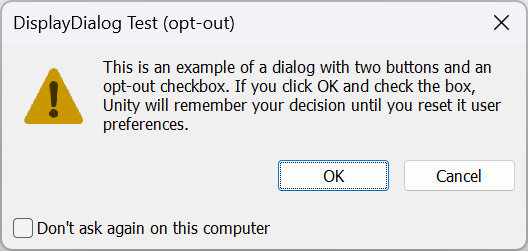
Dialog box that can be opted out more permanently.
Note: and are kept for backwards compatibilty. For new code, it is strongly recommended to use one of the new EditorDialog methods.
EditorUtility.DisplayDialogEditorUtility.DisplayDialogComplexAdditional Resources:
- EditorDialog.DisplayAlertDialog
- EditorDialog.DisplayAlertDialogWithOptOut
- EditorDialog.DisplayDecisionDialog
- EditorDialog.DisplayDecisionDialogWithOptOut
- EditorDialog.DisplayComplexDecisionDialog
- EditorDialog.DisplayComplexDecisionDialogWithOptOut.
DisplayDialog(string, string, string, string, DialogOptOutDecisionType, string)
This method displays a modal dialog that lets the user opt-out of being shown the current dialog box again.
public static bool DisplayDialog(string title, string message, string ok, string cancel, DialogOptOutDecisionType dialogOptOutDecisionType, string dialogOptOutDecisionStorageKey)
Parameters
The title of the dialog box. If left null, defaults to "Unity".
The text of the message.
Label displayed on the OK dialog button.
Label displayed on the Cancel dialog button.
Where the result is stored if the user opts out of the dialog by checking the box.
The key to use for storing the opt-out decision.
Returns
Type | Description |
|---|---|
| bool | true if the user clicks the |
Remarks
Use this method to display dialog boxes in the Editor that might be shown repeatedly. Choose which DialogOptOutDecisionType to use based on how often you think users encounter this message and how often you want to remind them of it.
If the user opts-out of seeing the dialog box associated with the provided , Unity doesn't show the dialog box and this method immediately returns .
dialogOptOutDecisionStorageKeytrueok and are labels to be displayed on the dialog buttons. If is empty (the default), then only one button is displayed. DisplayDialog returns if button is pressed. If any button's text is longer than 64 characters, an is thrown.
cancelcanceltrueokArgumentExceptionIf is not a valid XML tag, or more than 127 characters long, an ArgumentException is thrown. Care should be taken to ensure that the key is unique to the dialog box being displayed to prevent conflicts. The decision is only stored if the user checks the opt-out checkbox and clicks the Yes button. The user can reset the option in user preferences.
dialogOptOutDecisionStorageKeyDialog box that can opt out for this session.
Dialog box that can be opted out more permanently.
Note: and are kept for backwards compatibilty. For new code, it is strongly recommended to use one of the new EditorDialog methods.
EditorUtility.DisplayDialogEditorUtility.DisplayDialogComplexAdditional Resources: